
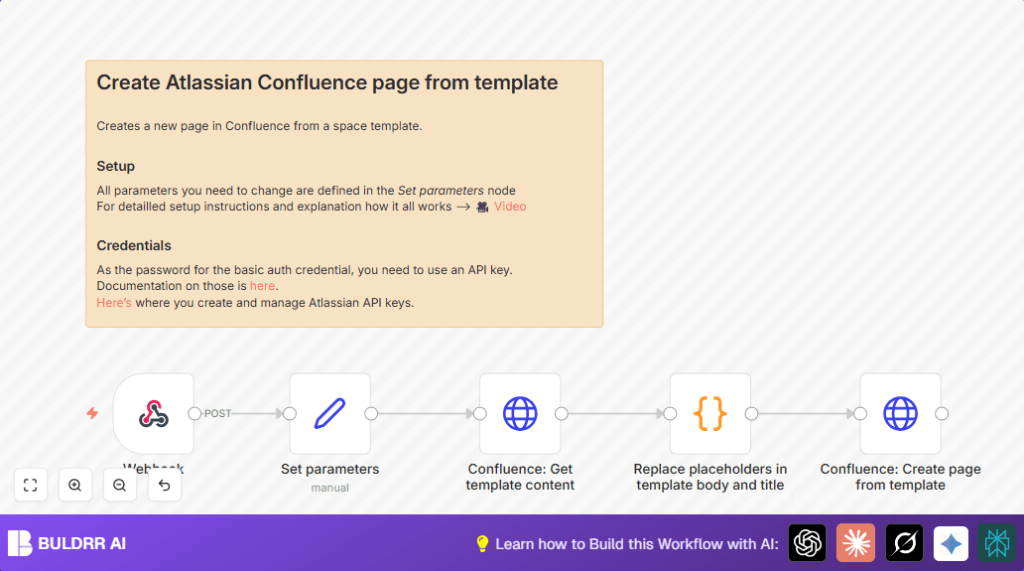

What this workflow does
This workflow creates Confluence pages automatically from a template using data sent by a webhook.
It solves the problem of copying templates and replacing placeholders by hand every time.
When it runs, it makes a new page with the correct info filled in right away.
Who should use this workflow
This workflow fits people who work in teams needing fast, consistent Confluence pages.
If manual page creation wastes time or causes mistakes, this is helpful.
Users with access to an Atlassian Confluence account and webhook-capable systems can use it easily.
Tools and services used
- n8n: automation platform for workflows.
- Atlassian Confluence API: to get templates and create pages.
- HTTP Basic Auth: with Atlassian email and API key for secure access.
- Webhook: receives incoming data in JSON format.
Inputs, processing, and output
Inputs
- JSON data sent by an external system via a webhook POST request.
- The data includes values like names, dates, or custom info to use in the page.
- Confluence template ID and base URL set in parameters.
- Credentials for authentication.
Processing steps
- Receive webhook JSON payload at the Webhook node.
- Fetch the template content (title and body) via Confluence API using Confluence: Get template content node.
- Replace placeholders marked by $placeholder$ within the template using JavaScript code in the Replace placeholders in template body and title code node.
- Generate a new page title with timestamp and replaced content.
- Create a new Confluence page with the replaced content using the Confluence: Create page from template node.
Output
A new Confluence page is created under the chosen space and parent page.
The page has a unique title with time and correct info filled in.
This removes manual copying and editing, saving time and lowering mistakes.
Beginner step-by-step: How to use this workflow in n8n
Importing the workflow
- Download the workflow file using the Download button on this page.
- Open the n8n editor.
- Click “Import from File” in the n8n menu and select the downloaded file.
Configuring after import
- Go to Credentials in n8n.
- Add new credentials with HTTP Basic Auth.
- Enter the Atlassian email as username and API key as password.
- In the Set parameters node, update the Confluence base URL, template ID, space key, and parent page ID.
- Double-check the webhook path and ensure your external system will POST JSON matching your template placeholders.
- If there is any code (like JavaScript to replace placeholders), copy it exactly as found here and paste into the code node.
Testing and activating
- Send a test POST request with sample JSON to the webhook URL using Postman or curl.
- Check the workflow runs without errors in the execution log.
- If all works, activate the workflow by toggling it on.
If using self-host n8n, make sure your server is accessible externally so webhooks work. self-host n8n setup can help.
JavaScript code for placeholder replacement explained
The code uses a pattern to find placeholders like $name$ in templates.
It replaces each placeholder with matching values from the webhook JSON object.
If a placeholder has dots like $user.name$, the code looks into nested JSON keys.
This ensures every placeholder is replaced by the correct dynamic data before creating the page.
function replacePlaceholders(template, values) {
    const placeholderPattern = /\$(.*?)\$/g;
    return template.replace(placeholderPattern, (match, p1) => {
        const keys = p1.split('.');
        let value = values;
        for (const key of keys) {
            if (value && key in value) {
                value = value[key];
            } else {
                return match;
            }
        }
        return value;
    });
}

const templateTitle = $('Confluence: Get template content').item.json.name;
const templateBody = $('Confluence: Get template content').item.json.body.storage.value;
const values = $('Webhook').item.json;

const pageTitle = replacePlaceholders(templateTitle, values);
const pageBody = replacePlaceholders(templateBody, values);

return { "page_title": pageTitle, "page_body" :  pageBody};
Customization ideas
- You can change the page title format inside the creation node, adding different timestamp styles or labels.
- Update the JavaScript code to add support for new or nested placeholder keys in the webhook JSON.
- Make the workflow choose different templates based on webhook data by adding conditions before parameters are set.
- Add nodes to notify team members using Slack or Email after page creation.
Troubleshooting common issues
- 401 Unauthorized: Usually means wrong API key or Basic Auth details. Fix by checking credentials in n8n and regenerating API keys in Atlassian if needed.
- Placeholders not replaced: Happens when webhook JSON keys don’t match placeholders exactly. Make sure names and nesting are correct.
- Workflow not triggering: Check webhook URL and HTTP POST method. Use Postman to verify the webhook receives data properly.
Pre-production checklist
- Check Atlassian API keys and make sure Basic Auth credentials are valid.
- Manually test template retrieval using Confluence API with your credentials.
- Send test webhook data to confirm placeholders get replaced correctly.
- Review workflow logs in n8n to verify data flow.
- Backup important Confluence pages before running many automated creations.
Deployment guide
Turn on the workflow in n8n after test runs pass.
Check recent executions in n8n to confirm pages create fine.
Schedule webhook calls from your external system as needed.
Keep credentials current and rotate API keys on schedule for security.
Summary of benefits and outcomes
✓ Save several hours every week by avoiding manual page creation.
✓ Reduce errors from missed placeholder replacements.
✓ Get up-to-date, consistent Confluence pages fast.
→ After setting up, pages create themselves with correct info each time.
→ Workflow fits teams needing documentation automation from external data.
