
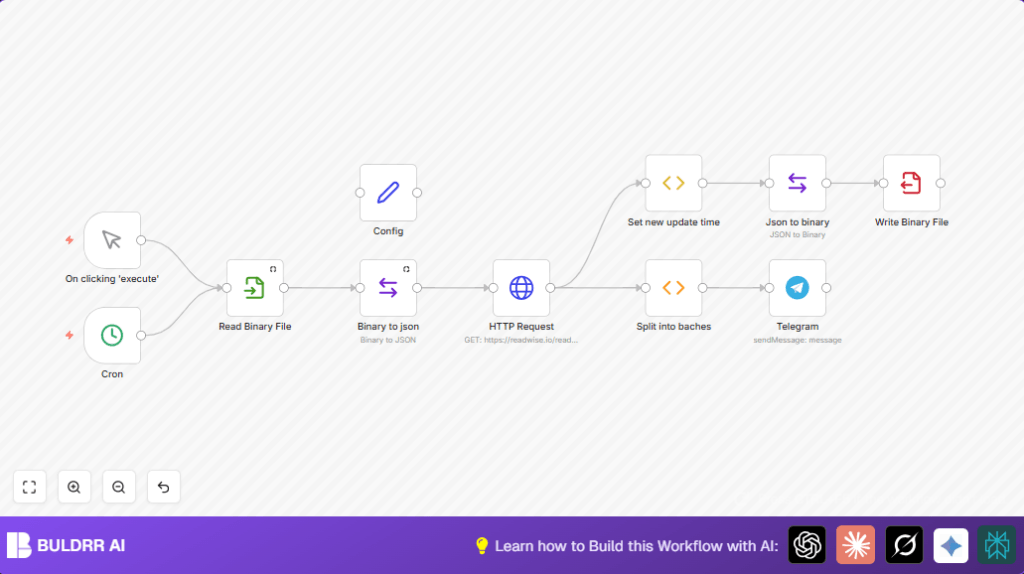

What This Automation Does 🛠️
This workflow checks Readwise every 10 minutes for new saved articles since the last time it ran.
It skips non-article items to only keep real articles with no child notes.
After fetching data, it sends a neat summary message for each article into a Telegram chat.
The workflow then updates a local JSON file with the new sync time for the next run.
This saves time by removing the need to manually share new article summaries every day.
Inputs:
– Last sync timestamp from JSON file
– New article entries from Readwise API
– Config values like file path and Telegram chat ID
Processing Steps:
– Read last synced time from file or start fresh
– Call Readwise API to get articles updated after last sync
– Filter articles to exclude bundles and only keep individual items
– Format article details (title, author, summary, URL) for messaging
– Send each article summary as a message to a Telegram chat
– Save current time as new last sync timestamp into JSON file
Output:
– Telegram messages with fresh article summaries
– Updated JSON file storing last sync time
Beginner Step-by-Step: How to Use This Workflow in n8n
Import the Workflow
- Click the Download button on this page to get the workflow file.
- In the n8n editor, choose “Import from File” and select the downloaded file.
Configure Credentials and IDs
- Add your Readwise API Key in the HTTP Request node’s authentication section.
- Enter your Telegram Bot API token and set the chat ID in the Config node.
- If needed, update the JSON file path in the Config node to match your environment.
Test the Workflow
- Run the workflow manually with the Manual Trigger node to make sure it fetches and sends data correctly.
Activate for Production Runs
- Disable the manual trigger node.
- Enable the Cron node set to run every 10 minutes or desired interval.
- Save and activate the workflow.
For stable operation on your own server, consider self-host n8n.
Prerequisites ⚙️
- n8n account or self-hosted setup 🔌 (for running the workflow)
- Readwise account with API access 🔑 (to fetch saved highlights and articles)
- Telegram Bot API token and chat ID 📲 (to send messages to the desired chat)
- File system access where n8n runs 📁 (to read/write JSON file tracking last sync time)
- Optional: Self-host with Hostinger for reliable uptime https://buldrr.com/hostinger
Step-by-Step Guide to Build the Workflow ✏️
Step 1: Set Up the Manual or Cron Trigger
Use a Manual Trigger for testing by clicking execute.
For automation, use a Cron node to run every 10 minutes.
Remember to enable the Cron node after saving.
Step 2: Configure the File Path Settings
Use a Set node called Config.
Add a string field for the file path (e.g. /whatever/readwiseLastSynced.json).
Add a number field for the Telegram chat ID (like 19999).
Step 3: Read Last Sync from JSON File
Use a Read Binary File node.
Set file path using expression from Config node.
Enable “Continue On Fail” to work on first run without file.
Step 4: Convert File Data to JSON
Add a Move Binary Data node named Binary to json.
Convert binary data from previous node to JSON.
Ensure “Always Output Data” is set.
Step 5: Fetch New Data from Readwise API
Add HTTP Request node.
Use method GET, URL https://readwise.io/reader/api/state/.
Query parameters include schemaVersion=5 and filter[updated_at][gt] with last synced time.
Authenticate with API Key in Header Auth.
Step 6: Process and Filter Data for Articles Only
Add Function node Split into baches.
Run code to keep only article category items without children.
const newValue = Object.values(items[0].json.documents)
  .filter(it => it.category === 'article')
  .filter(it => it.children.length === 0)
  .map(it => ({
    json: {
      url: it.url,
      title: it.title,
      author: it.author,
      summary: it.summary,
      saved_at: new Date(it.saved_at),
    }
  }));

return newValue;
Step 7: Send Summaries to Telegram Chat
Use Telegram node.
Set chat ID from Config node.
Message text template includes title, author, summary, and URL.
Step 8: Update Last Sync Timestamp
Add FunctionItem node Set new update time with code:
return {
  last_synced: new Date().getTime()
};
Step 9: Convert JSON Timestamp to Binary
Use Move Binary Data node Json to binary to convert JSON to binary for writing.
Step 10: Write Updated Timestamp to JSON File
Use Write Binary File node.
Write new last sync time back to the file path specified.
Troubleshooting 🔧
Problem: HTTP Request node returns 401 Unauthorized.
Cause: API Key missing or wrong.
Solution: Check API Key and Header Auth in HTTP Request node.
Problem: Telegram messages not sent.
Cause: Invalid chat ID or bot token.
Solution: Verify Telegram node credentials and chat ID.
Problem: Last sync JSON file not found.
Cause: Wrong file path or no permissions.
Solution: Confirm file path and permissions match Config node.
Customizations ✏️
- Change Cron node interval for sync frequency.
- Add filters in Function node to select different Readwise categories or authors.
- Add more Telegram nodes to send messages to multiple chats.
- Expand article info with tags, images, or notes from Readwise in messages.
Summary
✓ Saves 30+ minutes daily by automating data fetching and sharing.
✓ Sends only new article summaries to Telegram chat automatically.
✓ Keeps a clean, updated JSON file to track last sync time.
✓ Easy to import, configure, and run inside n8n.
✓ Customizable to different sync times, filters, and multiple chats.