

What This Workflow Does
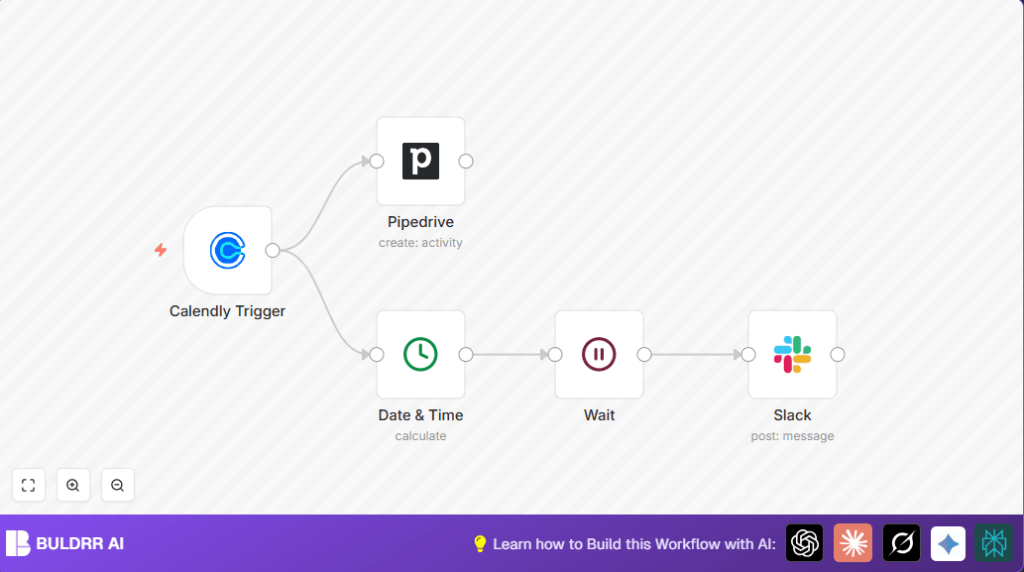
This workflow helps automate sales follow-ups by linking Calendly, Pipedrive, and Slack.
It starts when a new meeting is created in Calendly.
Then it logs a call activity in Pipedrive with meeting details.
Next, it waits 15 minutes after the meeting ends before sending a reminder in Slack.
The reminder asks the sales rep to write notes and confirm completion.
This reduces lost details, missed follow-ups, and manual work.
Workflow Inputs, Processing, and Outputs
Inputs
- Calendly invitee.created webhook event: Triggers the workflow when a new meeting is booked.
- Meeting data from Calendly: Includes event type, invitee name, meeting start and end times.
Processing Steps
- Log call activity in Pipedrive: Using the API, create a call record with meeting subject and time.
- Calculate post-meeting feedback time: Add 15 minutes to meeting end time using Date & Time node.
- Wait for feedback time: Pause workflow with Wait node until 15 minutes after meeting ends.
- Send Slack reminder: Post a message tagging the assigned sales rep to write call notes and confirm.
Outputs
- New call activity recorded in Pipedrive pipeline.
- Slack message sent to sales member at right time.
Who Should Use This Workflow
This workflow suits sales teams who book meetings with Calendly.
It helps managers and reps keep updates accurate in Pipedrive.
Salespeople who use Slack for communication get timely reminders here.
Users wanting to save time and avoid missing follow-ups should use it.
Tools and Services Used
- Calendly API and webhook: Sends invitee.created event.
- Pipedrive API: Logs call activities.
- Slack API: Posts reminder messages.
- n8n automation platform: Runs the workflow.
Beginner Step-by-Step: How to Use This Workflow in Production
Import and Setup
- Download the workflow file from the Download button on this page.
- Open n8n editor and choose “Import from File”.
- Select the downloaded workflow file and load it.
- Add your API Keys and credentials for Calendly, Pipedrive, and Slack in the Credentials section.
- Check node settings to update sales team Slack channel or user IDs if needed.
Test Workflow
- Trigger a test event from Calendly or simulate webhook payload.
- Watch the execution in n8n editor for errors.
- Confirm that call activity appears in Pipedrive.
- Confirm Slack message delivery.
Activate Workflow
- Enable the workflow to run automatically.
- Monitor workflow executions regularly.
- Consider setting up alerts for failure detection.
For stable use, try running this on a self-host n8n instance.
Common Edge Cases and Troubleshooting
Input Problem: No trigger from Calendly
Check Calendly webhook URL is correct and webhook event subscription is enabled.
Pipedrive API errors on call creation
Make sure API Key is valid and subject field expression syntax is correct.
Slack messages not posting
Verify Slack bot token permissions and channel name accuracy.
Customization Ideas
- Change reminder delay by editing Date & Time node’s added minutes.
- Add more fields in Pipedrive call activity for deeper logging.
- Personalize Slack message content including meeting links.
- Add extra notification channels, like email or Microsoft Teams.
- Handle multiple assigned reps by looping Slack messages.
Summary of Benefits and Outcome
✓ Saves time by automating call logging and reminders.
✓ Avoids losing meeting details or missing feedback requests.
✓ Ensures sales reps get reminders exactly when needed.
✓ Improves data accuracy in Pipedrive CRM.
✓ Keeps team communication clear with Slack prompts.
