
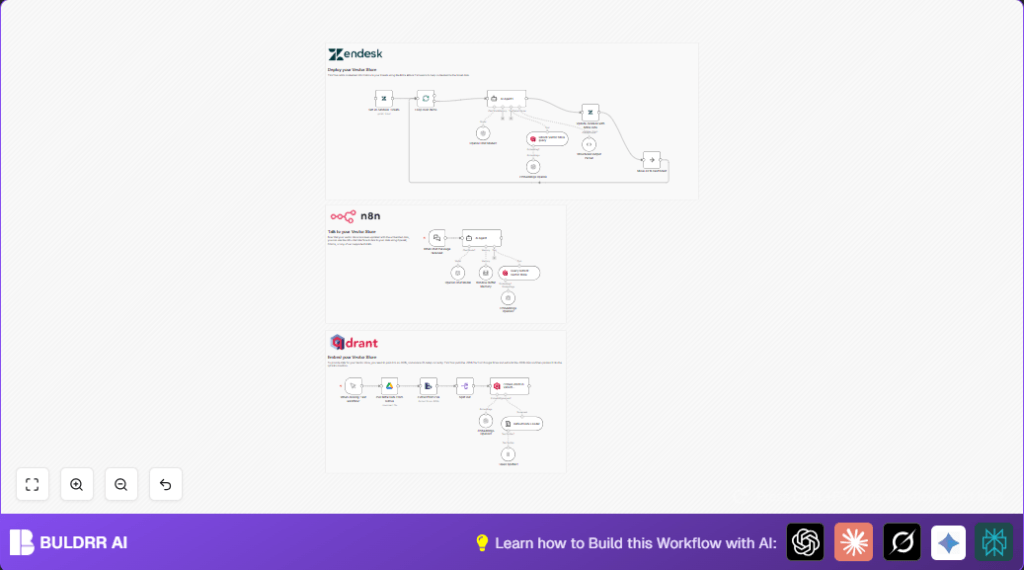

What this workflow does
This n8n workflow helps security teams process a lot of SIEM alerts fast.
It uses AI to find attack details from alerts and adds helpful fix instructions.
It also looks through past alerts for extra context and adds info to Zendesk tickets.
This cuts the time to check alerts and makes responses quicker and clearer.
Who should use this workflow
Security analysts who get many SIEM alerts each day.
Teams wanting to save time on manual alert review.
Anyone using Zendesk for incident ticket handling.
Users needing links to trusted cybersecurity resources.
Tools and services used
- n8n: Automates the flow of data and actions.
- OpenAI API (GPT-4o): Reads alert text and finds attack techniques.
- Google Drive: Stores the MITRE ATT&CK JSON dataset.
- Qdrant vector database: Stores MITRE data as vectors for quick searching.
- Zendesk API: Reads and updates security tickets with new info.
Inputs, Processing Steps & Outputs
Inputs
- New SIEM alerts or chat messages in n8n.
- MITRE ATT&CK dataset JSON file from Google Drive.
- Existing Zendesk tickets for updates.
Processing Steps
- Trigger on new chat messages with alert details (the When chat message received node).
- The AI Agent reads alert data and finds TTP info using custom instructions.
- OpenAI GPT-4o analyzes text for clear technique tags and remediation steps.
- Download MITRE ATT&CK JSON from Google Drive.
- Parse and split MITRE JSON into smaller entries.
- Prepare each MITRE entry as text documents for vector embedding.
- Split long text into small token chunks for embedding.
- Create embeddings with OpenAI’s embedding model.
- Store vectors in Qdrant collection ‘mitre’.
- Query Qdrant with current alert embeddings to find close MITRE matches.
- Convert AI Agent’s output from HTML to structured JSON.
- Get all Zendesk tickets and loop to process each ticket.
- Send each ticket’s text to AI Agent to extract technique tags.
- Update Zendesk tickets with findings and add remediation info.
- Continue looping until all tickets are updated.
Outputs
- Zendesk tickets enriched with MITRE technique ID, tactic, and remediation notes.
- Qdrant vector store filled with MITRE data for future alerts.
- Contextual insights on each alert for faster investigation.
Beginner step-by-step: How to use this workflow in n8n
Step 1: Import the workflow
- Download the workflow file using the Download button on this page.
- Open n8n editor and click “Import from File.”
- Select the downloaded workflow file to load it into n8n.
Step 2: Add your credentials
- Configure OpenAI API Key in n8n credentials (used for GPT-4o and embeddings).
- Set Google Drive credentials with access to the MITRE JSON file.
- Enter Zendesk API credentials for ticket reading and updating.
- Verify Qdrant database connection details are correct for vector storage.
Step 3: Update IDs and fields if necessary
- Check Google Drive file ID matches your MITRE ATT&CK JSON file.
- Update any emails, folder IDs, or collection names if your setup differs.
- Ensure Zendesk ticket field mappings correspond to your account fields.
Step 4: Test the workflow
- Trigger the workflow manually with a sample SIEM alert or chat message.
- Watch the execution log to confirm AI Agent outputs TTP data correctly.
- Confirm Zendesk tickets update with new remediation info.
Step 5: Activate for production
- Set workflow to active in n8n to receive real alerts.
- Monitor for any errors or failed updates in the n8n dashboard.
- Adjust node settings or prompts if the output needs tuning.
For those using self hosting n8n, consider self-host n8n to run this workflow reliably on your own infrastructure.
Edge cases and failures to watch
- OpenAI API key errors – check for expired or wrong keys.
- Google Drive file access issues – move or share MITRE JSON correctly.
- Zendesk API limits – add retry logic if many tickets update at once.
- Qdrant connection failures – verify network access and database health.
- AI output not structured – adjust AI Agent’s system message for clarity.
Customization ideas
- Change AI Agent instructions to fit other security frameworks.
- Use a different MITRE JSON file by updating Google Drive file ID.
- Add more custom fields in Zendesk updates for wider context.
- Switch to other OpenAI models if GPT-4o is unavailable.
- Enable longer memory buffers to keep alert history for better AI insights.
Summary of results
✓ Speed up SIEM alert handling by automating analysis.
✓ Get clear tags linking alerts to MITRE ATT&CK techniques.
✓ Add step-by-step remediation instructions inside Zendesk tickets.
✓ Build a rich vector database of MITRE knowledge for quick searches.
✓ Save hundreds of hours monthly on alert triage.
✓ Improve incident accuracy and response speed.
