

What This Automation Does
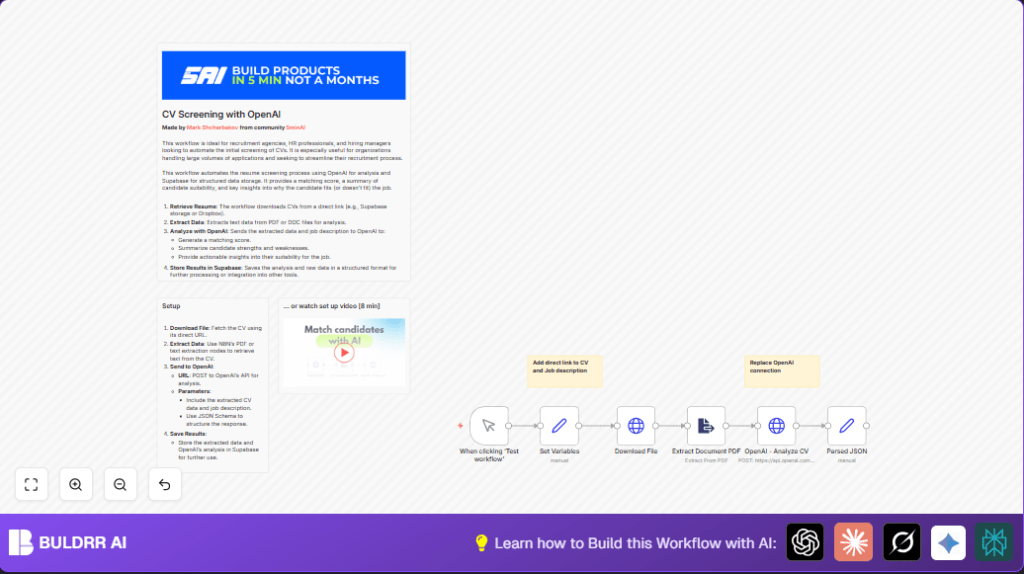
This workflow gets a candidate’s CV from a link, reads the text from the PDF, sends that text and the job description to OpenAI for a detailed check, and gets back a clear match score plus reasons why the candidate fits or not.
It saves time by doing resume screening automatically. It helps hiring teams find the best candidates faster and with fewer mistakes.
Who Should Use This Workflow
This workflow works well for recruiters and HR managers who get many CVs every week.
You should use it when you need faster, consistent, and unbiased candidate screening, especially for tech roles requiring skill matching.
Tools and Services Used
- n8n Automation Platform: Runs the workflow tasks.
- OpenAI API: Analyzes the CV text versus job description.
- HTTP Request Node in n8n: Downloads CV files and talks to OpenAI.
- PDF Extractor Node in n8n: Pulls text from PDF resumes.
- Optional Database (like Supabase): Stores results for later use.
Inputs, Processing Steps, and Output
Inputs:
- Candidate CV link (a public URL to the PDF).
- Job description text describing the role’s needs.
- Custom prompt and JSON schema to guide OpenAI’s analysis.
Processing Steps:
- The workflow downloads the CV using the link.
- PDF text is extracted to plain text.
- OpenAI gets the CV text and job description together, and it returns a structured JSON with matching details.
- The JSON response is parsed into usable data.
- Processed info can be saved or used to inform hiring decisions.
Output:
The workflow produces a clear JSON object showing match percentage, summary, and reasons for the candidate’s suitability.
Beginner Step-by-Step: How to Use this Workflow in n8n
1. Download and Import
- Find and click the Download button on this page to save the workflow file.
- Open n8n editor currently in use (Cloud or self-host n8n).
- Use the menu option “Import from File” to load the saved workflow.
2. Configure Credentials and Variables
- Add your OpenAI API Key in the n8n Credentials section.
- Check any node that needs IDs, URLs, emails, channels, or tables and update those as per your use case.
- Verify the prompt and JSON schema in the Set node with your exact text or copy-paste provided values.
3. Test the Workflow
- Manually run the workflow via the Manual Trigger.
- Watch the execution logs to confirm the CV downloads, text extracts, and OpenAI responds correctly.
4. Activate for Production
- Once testing is complete, activate the workflow with your chosen trigger (webhook, scheduler, etc.).
- Monitor regular runs inside n8n to catch any issues early.
Customizations
- Change Candidate Scoring Threshold: You can easily set how strict the passing score is in the prompt text in the Set node.
- Switch Resume Source: Use different URLs with authentication headers if CVs are on Dropbox, Google Drive, or private storage.
- Support More File Types: Add nodes to handle DOCX or plain text resumes if needed.
- Save Results to a Database: Add a Supabase or SQL node to keep candidate evaluation records.
Troubleshooting
Download Fails or File is Empty
Check if the CV URL is correct, public, and not expired.
If private, get a public link or add necessary authentication headers to the request.
OpenAI API Errors
Make sure the JSON body matches the schema, and the API Key is valid.
Check that text data sent to OpenAI is properly encoded.
Pre-Production Checklist
- Confirm that CV URLs open publicly without login.
- Test PDF extraction node across different CV formats.
- Validate OpenAI JSON schema and prompt works as expected.
- Run full workflow manually and check parsed data.
- Verify database connections and table structures if saving results.
Deployment
Activate the workflow after testing inside n8n.
Connect the workflow to your preferred trigger for automation.
Keep monitoring logs within n8n to catch errors quickly.
For periodic batch runs, use the scheduler node.
Summary
→ Automates CV download, text extract, and AI evaluation steps
→ Produces simple match scores and detailed candidate feedback
✓ Saves hours of manual resume screening work
✓ Improves hiring decisions with consistent, structured AI analysis
✓ Easy to customize and integrate with storage or databases
✓ Works with public URLs and OpenAI API for versatile use
