
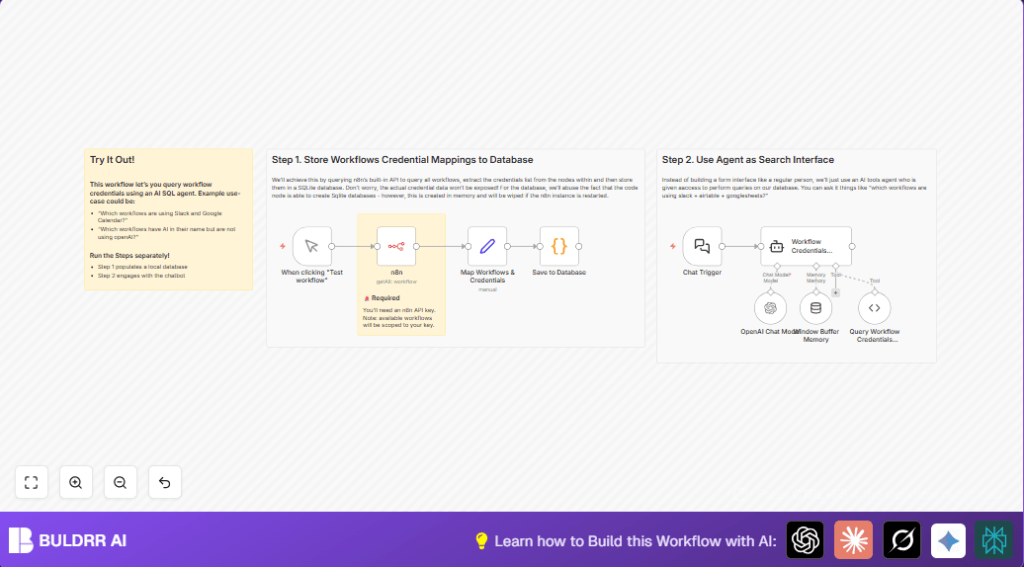

What This Workflow Does
This workflow finds which credentials are used in all your n8n workflows. It saves time by stopping you from searching manually. The workflow collects workflow metadata through n8n API, stores credentials in a SQLite database, and answers questions using AI chat.
You get a fast way to see which workflows use which credentials like Slack or OpenAI APIs. This helps in troubleshooting and managing workflows better.
Who Should Use This Workflow
This workflow is for people who manage many n8n workflows and need to track credential use. It is helpful for automation specialists and team leads who want faster audits and fewer mistakes.
If you spend hours checking workflows manually, this tool can save you time and reduce errors.
Tools and Services Used
- n8n API: Fetches workflow information including credentials.
- SQLite: Stores workflow and credential data locally.
- OpenAI Chat API: Powers natural language queries on stored data.
Beginner Step-by-Step: How to Use This Workflow in n8n
Step 1: Download and Import Workflow
- Click the Download button on this page to get the workflow file.
- Open your n8n editor.
- Select Import from File and upload the downloaded workflow.
Step 2: Add Your Credentials
- Go to each node that requires API access, like the n8n API node and the OpenAI Chat Model node.
- Enter your valid API Keys or other credentials.
Step 3: Update IDs or Names If Needed
- Check if any IDs, folder names, or channel names in the workflow need to be changed to match your setup.
- Adjust these fields using the expression or text editors inside the nodes.
Step 4: Test the Workflow
- Run the manual trigger in the workflow by clicking Execute Workflow.
- Watch the nodes run and check for errors.
Step 5: Activate for Production
- When testing works, activate the workflow by enabling the trigger node.
- Set schedule triggers if you want this to run regularly.
- Secure chat webhooks by adding authentication if exposing them.
Inputs, Processing Steps, and Outputs
Inputs:
- Trigger to start workflow manually or on schedule.
- API credentials for n8n and OpenAI.
- User chat messages sent to the chat webhook to query data.
Processing Steps:
- Use the n8n API node to fetch all workflows metadata including credentials.
- Map workflows with the Set node to extract workflow ID, name, and credentials.
- Use a Python Code node to save workflows and credentials into an SQLite database.
- On receiving chat input through the Chat Trigger webhook, process the message using OpenAI chat model.
- Maintain conversation context with the Window Buffer Memory node.
- Run SQL queries on the SQLite database via the ToolCode node based on AI-generated instructions.
- The Workflow Credentials Helper Agent node combines AI chat, memory, and SQL query execution to give results.
Outputs:
- List of workflows with their used credentials that match the query.
- User-friendly AI chat answers including workflow links and credential details.
Customization Ideas
- Save the SQLite database on disk to keep data after restarts. This is good for self-host n8n setups.
- Add more data fields like node types or metadata for better reporting in the Set node.
- Change AI system prompts in the Workflow Credentials Helper Agent to better suit your company’s language.
- Add security to the Chat Trigger webhook by using API keys or OAuth.
- Support multiple users with different permissions to see different workflows.
Edge Cases and Troubleshooting
Problem: API calls fail with 401 Unauthorized
This means the API key for the n8n API node is missing or wrong.
Fix by updating the API key in the node settings and re-run the workflow.
Problem: SQLite database lost after restarting n8n
In-memory database resets with workflow restarts.
Fix by changing the Python Code node to save the database file on disk in a persistent folder. This needs self-host n8n or similar.
Problem: AI shows errors or no results
Check that the database was filled by previous workflow runs. Also confirm the AI generates correct SQL SELECT queries only.
Adjust AI prompt messages or review database content if errors persist.
Summary Results
✓ Easily find which workflows use specific credentials without manual checking.
✓ Save hours weekly by automating credential mapping and queries.
✓ Get AI-powered natural language answers for complex queries.
→ Improves audit and troubleshooting speed for large n8n environments.
→ Supports better security and operational management of workflow credentials.
Code Snippets for Reference
Save to Database Python Code
This code creates, inserts, and updates the workflows and credentials in SQLite.
import json
import sqlite3
con = sqlite3.connect("n8n_workflow_credentials.db")

cur = con.cursor()
cur.execute("CREATE TABLE IF NOT EXISTS n8n_workflow_credentials (workflow_id TEXT PRIMARY KEY, workflow_name TEXT, credentials TEXT);")

for item in _input.all():
    cur.execute('INSERT OR REPLACE INTO n8n_workflow_credentials VALUES(?,?,?)', (
        item.json.workflow_id,
        item.json.workflow_name,
        json.dumps(item.json.credentials.to_py())
    ))

con.commit()
con.close()

return [{ "affected_rows": len(_input.all()) }]
Query Database Python Code for SQL SELECT
This code runs SQL queries sent by AI and returns JSON results.
import json
import sqlite3
con = sqlite3.connect("n8n_workflow_credentials.db")

cur = con.cursor()
res = cur.execute(query);

output = json.dumps(res.fetchall())

con.close()
return output;
