
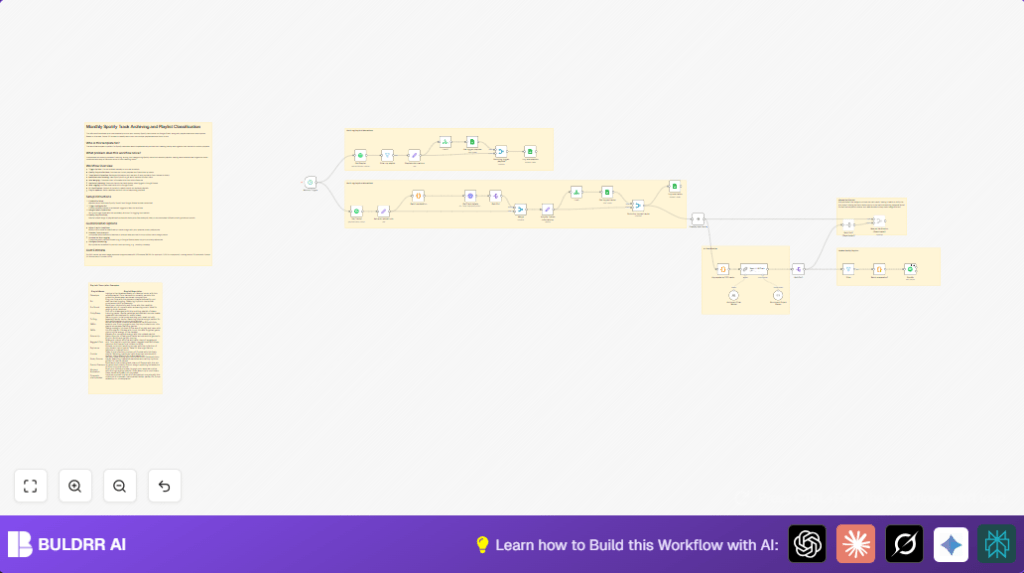

What This Workflow Does
This workflow automatically fetches all your personal Spotify playlists and liked tracks.
It checks your Google Sheets archives to avoid duplicates.
Then it logs new playlists and tracks with detailed info and audio features into Google Sheets.
It uses an AI model to classify new tracks into matching playlists based on descriptions and track traits.
Finally, it updates Spotify playlists with these classified tracks.
This saves hours of manual work and stops errors in playlist organization.
Who Should Use This Workflow
This is for Spotify users who add many liked tracks monthly.
It fits people who want an easy archive in Google Sheets to track music history.
Users wanting smart playlist sorting by AI, without manual effort, can benefit.
It needs basic n8n knowledge and accounts with Spotify, Google Sheets, and Anthropic AI.
Tools and Services Used
- Spotify API: Get playlists, liked tracks, and audio features.
- Google Sheets API: Read and write playlists and track archives.
- Anthropic Claude 3.5 AI model: Classify tracks into playlists using AI.
- n8n Platform: Automate the workflow with scheduling and API calls.
- Langchain nodes: Work with prompts and parse AI structured outputs.
Inputs, Processing Steps, and Outputs
Inputs
- Your Spotify account OAuth2 credentials.
- Google Sheets with two sheets for playlist and track logs.
- Anthropic AI API key for track classification.
Processing Steps
- Fetch all Spotify playlists and filter only those owned by you.
- Check Google Sheets to exclude already logged playlists.
- Append new playlists to Google Sheets archive.
- Retrieve all liked tracks from Spotify.
- Extract and clean track details like name, artist, album, popularity, and release year.
- Batch track IDs and request audio features for each batch from Spotify.
- Join track metadata and audio features into enriched records.
- Add archive date and prepare records for logging.
- Exclude tracks already logged in Google Sheets archives.
- Append new tracks with detailed info into Google Sheets.
- Group new tracks into chunks for AI processing.
- Send track chunks and playlist info to Anthropic Claude 3.5 AI model with a prompt to classify tracks into playlists.
- Parse the AI JSON output to extract playlist classifications.
- Split results to separate playlist batches.
- Batch track URIs per playlist in groups of 100 due to Spotify API limits.
- Filter empty track batches before calling Spotify API.
- Add new tracks to Spotify playlists in bulk.
Outputs
- Updated Google Sheets archives of playlists and tracks with metadata.
- Spotify playlists refreshed by AI-classified new tracks automatically.
Beginner Step-by-Step: How to Use This Workflow in n8n
1. Import Workflow
- Download the workflow file from this page.
- Open n8n editor and select Import from File.
- Choose the downloaded workflow file to load it into n8n.
2. Configure Credentials
- Add your Spotify OAuth2 credentials in n8n Credentials settings.
- Add Google Sheets OAuth2 credentials and connect to your Google account.
- Add Anthropic AI API key in the appropriate credential section.
3. Adjust Settings
- Update Google Sheets nodes with your sheet IDs, names, or GIDs if needed.
- If any static values like Spotify username or playlist owner are used in filters, update to match your account.
- Check prompt text in the Langchain LLM chain node if you want to customize classification.
4. Test and Activate
- Run the workflow manually to test the connection and data flows.
- Review logs and Google Sheets to confirm new tracks and playlists get appended properly.
- Activate the schedule trigger node for monthly runs or customize trigger timing as needed.
- If self-hosting n8n, follow best practices for scheduling and security. See self-host n8n for resources.
Workflow Edge Cases and Possible Failures
- Spotify API errors may occur if OAuth2 token expires; reauthenticating credentials is needed.
- Google Sheets append may fail if permissions are incomplete or sheet ranges are incorrect.
- Anthropic AI can return malformed JSON if prompt or schema is wrong; verify prompt instructions carefully.
- Spotify API batch limits require splitting track lists; missing batching causes request errors.
- Empty playlists or no new tracks will result in no changes but are handled gracefully.
Customization Ideas
- Change the AI prompt inside the Langchain node to add mood or genre-based classification rules.
- Adjust the Schedule Trigger node to run weekly or at any preferred interval.
- Add fields or audio features to track logging in Google Sheets by editing the “Simplify Tracks informations” set node.
- Enable manual verification steps by activating review nodes before updating Spotify playlists.
Summary
✓ Automatically archives playlists and liked tracks with detailed data.
✓ Avoids duplicates by checking Google Sheets archives.
✓ Uses AI to classify new tracks into the right playlists based on track and playlist info.
✓ Updates Spotify playlists in bulk with new, well-organized tracks.
✓ Saves user hours each month and reduces manual errors.
