
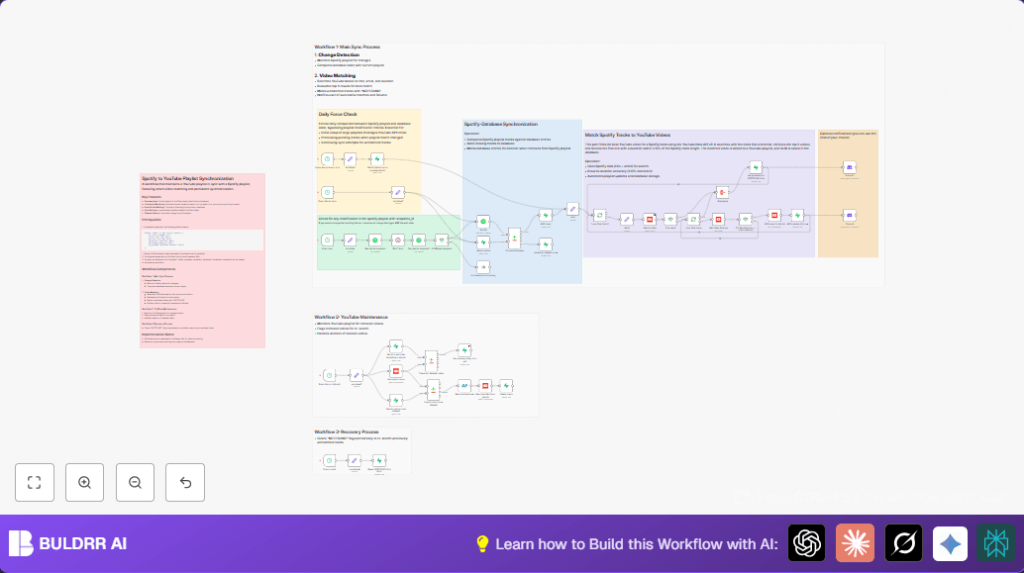

What This Automation Does
This workflow copies a Spotify playlist to a YouTube playlist automatically.
It finds songs on Spotify, checks for exact matching YouTube videos by title, artist, and almost the same length.
It adds matching videos to the YouTube playlist and removes videos that are no longer in Spotify.
Notifications about matches or misses are sent to Discord.
This saves time and keeps playlists always matched without manual work.
Who Should Use This Workflow
This is for users with Spotify playlists who want the same music on YouTube.
If manual copying takes too long or causes errors, this workflow helps a lot.
It works best for people with stable API keys and basic knowledge of n8n usage.
Tools and Services Used
- Spotify API: To get playlist data and track details.
- YouTube Data API: To search videos and manage YouTube playlists.
- Supabase Database: To store playlist tracks with fields like id, title, artist, duration, YouTube video id, and deletion flag.
- Discord Webhook: For sending notifications about new or missing videos.
- n8n Automation Platform: Runs the workflow with triggers and nodes.
Inputs, Processing, and Outputs
Inputs
- Spotify playlist ID and API credentials.
- YouTube playlist ID and API credentials.
- Supabase table storing current playlist track data.
- Discord webhook URL.
Processing Steps
- Detect Spotify playlist changes by comparing snapshot IDs.
- Get all Spotify tracks and current database entries.
- Compare both datasets to find new or removed tracks.
- Add new tracks to the database and mark tracks to delete.
- Search YouTube for videos matching new tracks within ±10% duration.
- Add matched videos to the YouTube playlist and update database.
- Remove old YouTube videos no longer on Spotify.
- Send Discord notifications for added and NOTFOUND tracks.
- Clear NOTFOUND flags daily/monthly to retry matches.
Outputs
- Updated YouTube playlist with matching videos.
- Database synced with Spotify and YouTube data.
- Notifications for user about sync status.
Beginner Step-by-Step: How to Use This Workflow in n8n
1. Import Workflow
- Download the workflow JSON file by clicking the Download button on this page.
- In the n8n editor, use “Import from File” option to load the workflow.
2. Configure Credentials and IDs
- Add Spotify API credentials in n8n’s credentials manager.
- Add YouTube Data API credentials similarly.
- Set up Supabase credentials and connection details.
- Update variables node with your Spotify playlist ID, YouTube playlist ID, and Supabase table name if different.
- Add your Discord webhook URL if notifications are needed.
3. Test Workflow
- Run the workflow manually once inside n8n editor.
- Check node outputs for errors and ensure data flows as expected.
4. Activate Workflow
- Turn on the workflow by toggling it Active in n8n.
- The workflow will run on schedule automatically, syncing playlists.
For advanced users running self-host n8n, this workflow can run reliably on private cloud or VPS.
Edge Cases and Failures
1. No Matching YouTube Video Found
If no YouTube video matches 90%-110% of the Spotify track duration, the database marks track as NOTFOUND.
Workflow retries matching daily and monthly by resetting these flags.
2. API Limits Are Reached
YouTube or Spotify API limits may block further requests temporarily.
Batching using SplitInBatches node and adjusting schedule frequency avoids hitting limits.
3. Playlist Snapshot Never Updates
If Spotify snapshot ID never changes, the workflow skips updates.
You can run workflow manually or check that playlist is updated on Spotify side.
4. Removal of Wrong YouTube Videos
Removing playlist videos uses database flags carefully with exact ID matching to avoid accidents.
Check field mappings in removal nodes to prevent deleting unrelated videos.
Customization Ideas
- Change YouTube search query to include album names or genres for better matches.
- Replace Discord notifications with Slack or email by updating webhook URLs.
- Adjust schedule trigger frequency to match playlist update rates or API quota.
- Add extra columns in Supabase to track metadata like track popularity.
- Insert a Code node for error logging and custom metrics between key steps.
Summary
✓ This workflow syncs Spotify playlists to YouTube playlists automatically.
✓ It matches videos using song title, artist, and duration checks within ±10%.
✓ Tracks are added or removed in YouTube, and data stays updated in Supabase.
✓ Notifications alert about new additions or unmatched tracks.
→ Saves hours every week by removing manual syncing tasks.
→ Keeps playlists accurate and up-to-date without errors.
