

What This Automation Does
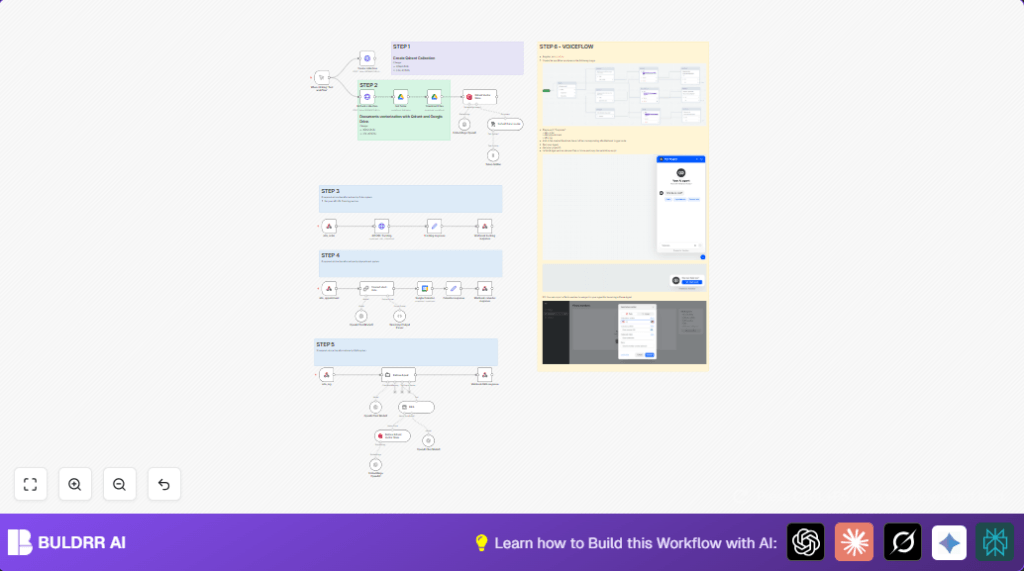
This workflow helps automate answering questions, tracking orders, and booking appointments for an electronics store using n8n and connected services.
It fixes slow replies and errors caused by manual handling.
Users get faster, clear answers, and smooth appointment management.
The system listens for user requests from chat, voice, or phone.
It then processes those requests by searching a company knowledge database, calling order tracking APIs, or writing appointments into Google Calendar.
This means customers ask once and get the right info or booking instantly.
That saves the support team many hours and avoids mistakes.
Who Should Use This Workflow
If you have customers who ask about products, orders, or need appointments, but your team spends too much time answering.
This workflow suits small to medium businesses wanting automation without coding.
Users who want a combined chat, voice, and phone assistant inside their n8n automation will benefit.
You should have accounts for Google Calendar, Google Drive, OpenAI, Qdrant, and optionally Voiceflow and Twilio.
Tools and Services Used
- n8n: Runs the workflow and connects all services.
- Google Calendar API: Manages appointment events.
- Google Drive API: Stores and provides company knowledge documents.
- OpenAI GPT-4o Mini: Understands user intents and generates replies.
- Qdrant Vector Database: Stores vectorized knowledge for fast search.
- Voiceflow: Handles multi-channel chat, voice, and phone inputs.
- External Order Tracking API: Fetches real-time order status.
- Twilio (Optional): Enables phone call integration.
Beginner Step-by-Step: How to Use This Workflow in n8n
1. Download and Import Workflow
- Use the Download button on this page to get the workflow file.
- Open your n8n editor.
- Click “Import from File” and select the downloaded workflow.
2. Configure Credentials and IDs
- Add your OpenAI API key in all OpenAI nodes.
- Connect your Google Calendar OAuth2 credentials to the Google Calendar node.
- Set Google Drive OAuth2 in the Google Drive nodes.
- Insert Qdrant URL and API key in the HTTP Request nodes where you create or query the collection.
- Update folder IDs or collection names if you store documents in a different folder.
- Enter the External Order Tracking API URL and required parameters in the API URL Tracking node.
- If using Voiceflow or Twilio, set webhook URLs and credentials accordingly.
3. Test Workflow
- Trigger test requests on each webhook to confirm responses.
- Check logs in n8n executions for errors.
4. Activate for Production
- Enable the workflow by switching it live in n8n.
- Make sure the webhook endpoints are publicly reachable (consider self-host n8n if needed).
- Connect your Voiceflow project to the webhook URLs.
Workflow Overview: Inputs, Process, and Outputs
Inputs
- User queries and commands via chat, voice, or phone triggered through Voiceflow and webhooks.
- Documents stored in Google Drive folders for company knowledge.
- Order numbers and emails from customers for tracking.
- Appointment requests with date and time details.
Processing Steps
- The workflow splits into three main paths based on the type of request: order tracking, appointment, or question answering.
- Intent and entities are extracted by GPT-4o Mini models.
- Order status is obtained by calling the external order tracking API.
- Appointment details are normalized and passed to Google Calendar to create events.
- For questions, the workflow uses OpenAI embeddings to search Qdrant vectors and applies RAG for relevant answers.
Output
- The workflow sends back formatted responses for order updates.
- Returns confirmation messages on successful calendar bookings.
- Delivers clear and accurate answers from company knowledge for customer questions.
Common Errors and How to Fix Them
- Webhook errors or empty replies: Check webhook URLs in Voiceflow match exactly the n8n links.
- Calendar event creation fails: Verify date format from OpenAI parsing and Google Calendar permissions.
- Qdrant API insertion issues: Confirm API keys and endpoint URLs in the HTTP nodes.
- OpenAI token limit problems: Reduce prompt size, split documents, and use output parsing.
- Order tracking data missing: Make sure API parameters like order number and email match service requirements.
Customization Ideas
- Change calendar event details in Google Calendar node summary and description fields.
- Add more document folders in Get folder and Download Files to widen company knowledge.
- Expand order tracking API calls with extra data fields if backend allows.
- Switch OpenAI models across nodes for cost or accuracy balance.
- Update Retrieval Agent prompts to change assistant tone.
Production Use Tips
Keep the workflow running on a reliable server or use self-host n8n for control.
Monitor execution logs regularly for failures.
Back up vector data in Qdrant safely before updating collections.
Test the full user scenario including Voiceflow interactions.
Use retry or alert systems on the order tracking API to improve uptime.
Summary and Results
✓ Automation for order tracking, appointment booking, and Q&A in one place.
✓ Instant, clear answers for customers across chat, voice, and phone.
✓ Saves support time and reduces errors in manual handling.
✓ Uses AI models and vector databases for smart knowledge search.
✓ Fully customizable and scalable workflow inside n8n.
