
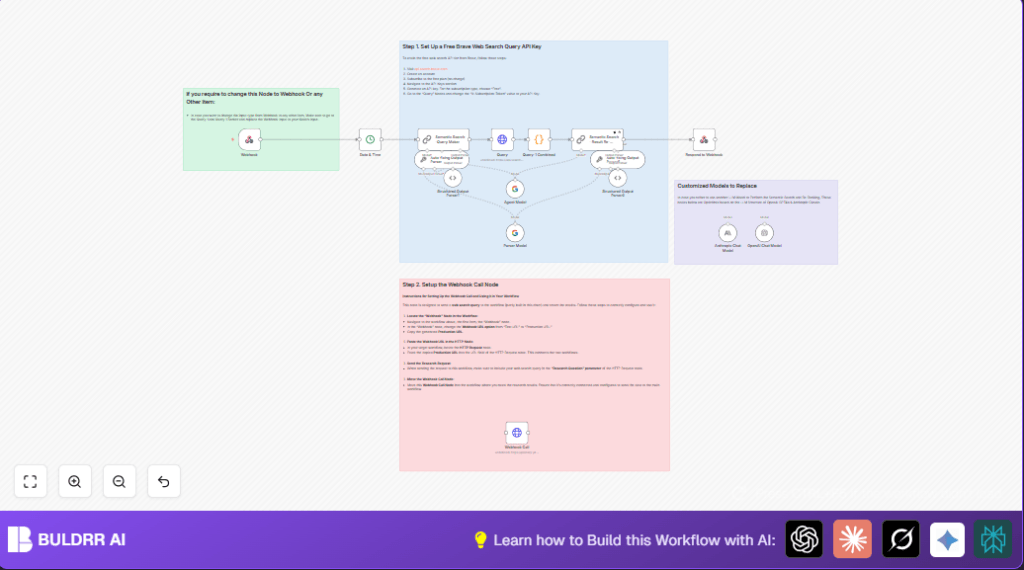

What This Workflow Does
This workflow takes a detailed research question and turns it into clear web search results. It fixes the problem of slow manual searching by finding the most important and latest information online fast. You get a neat list of the best web pages with main points so you can make decisions quicker and with less hassle.
The system works by using AI to make sharper search queries, getting web results from the Brave Search API, mixing all the results together, sorting them by how close they match the question, and pulling out key facts. The summary given shows the best links with descriptions so users don’t have to spend time looking themselves.
Who Should Use This Workflow
Anyone who does deep, daily research on global political or economic news will find this workflow handy.
It helps people save hours they usually spend looking through many websites and news sources.
It is perfect for analysts, researchers, or team members who need quick updates with clear priorities on important topics.
Tools and Services Used
- n8n Automation Platform: Runs the workflow and connects nodes.
- Brave Web Search API: Provides raw web search results.
- OpenAI / Anthropic / Google Gemini APIs: Make AI queries to generate better search questions and rank results.
- Webhook Endpoint: Starts the workflow when new questions arrive.
Beginner Step-by-Step: How to Build This Workflow in n8n
Step 1: Import the Workflow
- Download the ready workflow file using the Download button on this page.
- Go to the n8n editor where you want to add this automation.
- Click on “Import from File” and select the downloaded workflow.
Step 2: Set Up Credentials and Configuration
- Add your Brave Web Search API Key in the Query node under headers, naming the key exactly “X-Subscription-Token”.
- Insert your AI API credentials (OpenAI, Anthropic, or Google Gemini) into the semantic search nodes.
- If any IDs, emails, or URLs are placeholders in the nodes, update them with your real values.
Step 3: Test the Workflow
- Use the Webhook node production URL and send a sample JSON payload like {“Research Question”: “What are the latest trends in renewable energy investments?”}.
- Check the output and logs to make sure the workflow runs correctly.
Step 4: Activate for Production
- Set the Webhook node to production mode so external apps can trigger it anytime.
- Monitor the workflow executions and errors inside the n8n dashboard regularly.
For users running n8n on their own servers, consider self-host n8n to keep full control.
Workflow Inputs, Processing, and Outputs
Input
The workflow starts with a webhook receiving a JSON input that has a field called “Research Question”.
This input question should be clear and specific to get good search results.
Processing Steps
- Date & Time Node: Adds the current date to give context for fresher results.
- Semantic Search – Query Maker Node: AI transforms the question to a better search phrase.
- Query Node: Sends the refined query to Brave Web Search API with the API key.
- Query-1 Combined JavaScript Node: Joins all the returned titles, URLs, and descriptions into one text blob.
- Semantic Search – Result Re-Ranker Node: AI ranks the top 10 results by how relevant they are and grabs important info snippets.
- Respond to Webhook Node: Sends back a clean, structured JSON with sorted titles, links, and summaries.
Output
The final result is a JSON object listing the best web results, clearly ranked and easy to read.
This output helps users focus on top resources quickly without reading many irrelevant links and descriptions.
Customization Ideas
- Switch the AI model inside Semantic Search nodes to Claude, GPT-4o, or Google Gemini as preferred.
- Adjust how many top-ranked results the system returns to fit user needs.
- Replace Brave Search API with another search API like Google, changing headers and query URLs accordingly.
- Change the input trigger node from the Webhook node to something else like an HTTP Trigger or scheduled Cron in n8n.
- Modify the final JSON formatting to add extra details or reorganize data for specific app consumption.
Troubleshooting Common Issues
No Results or Empty Search Output
Cause could be a wrongly built search query or bad API key.
Check API key is active. Test simpler queries directly on Brave API. Verify Semantic Search – Query Maker outputs good queries.
Webhook Does Not Trigger
Often the Webhook node is still on test URL, not production.
Update to production URL and make sure external requests use this exact URL.
Re-Ranker AI Node Returns Bad Output
Possible cause is misconfigured AI API credentials or token limits.
Check AI model setup in n8n. Ensure models chosen support input size needed.
Pre-Production Checklist
- Make sure the Brave API Key is active and correct in the Query node.
- Test the webhook externally with sample JSON input.
- Confirm AI credentials are valid.
- Run example queries and check outputs step-by-step.
- Save backup copies before making major edits.
Deployment Guide
Activate the workflow inside n8n and set the Webhook node to production mode with a public URL.
Check regular logs and executions in the n8n dashboard to catch errors or failures early.
If running on private servers, use self-host n8n for better security and control.
Summary
✓ Saves time by automating detailed web research with AI.
✓ Produces clean and ranked search results in JSON format.
✓ Easy to trigger via webhook with simple JSON input.
→ Shows the best and most relevant web pages for any given research question.
→ Helps reduce manual searching and improve decision speed.
