
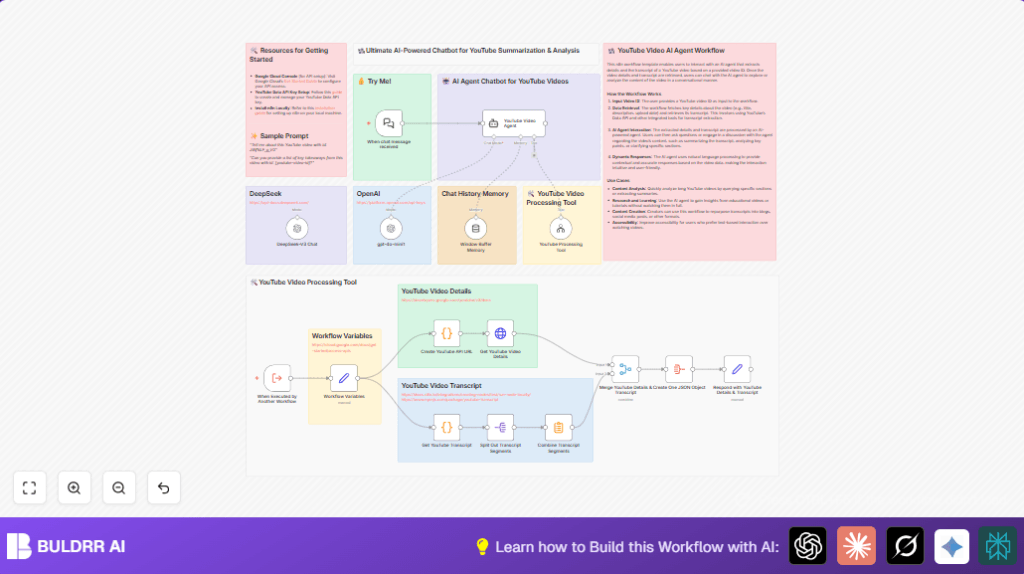

What This Workflow Does
This workflow gets information about a YouTube video using its video ID. Then it finds the video’s transcript and breaks it into smaller parts. It combines these parts and makes a short summary. It also puts the video information and summary together in one JSON. Finally, an AI chatbot can answer questions about the video using this combined data.
The main problem solved is saving time and effort by turning long videos into short summaries with key points. This helps people understand video content faster without watching the whole video or taking notes manually.
Who Should Use This Workflow
This workflow fits users who need to quickly extract main ideas from long YouTube videos. For example, content strategists, marketers, researchers, or anyone who reviews many videos often. It helps to avoid missing important detail and cuts down manual note-taking.
Tools and Services Used
- YouTube Data API: To get video title, description, date, and stats.
- youtube-transcript package: To extract full video transcripts inside code steps.
- n8n Summarize node: To combine and shorten transcript text.
- OpenAI GPT-4 (or equivalent model): For chatbot AI to answer questions and summarize.
- LangChain integration: To connect chatbot with YouTube video processing.
Inputs, Processing Steps, and Outputs
Inputs
The workflow starts by receiving a YouTube video ID in JSON format through the When Executed by Another Workflow node.
Processing Steps
- It sets variables for the video ID and the Google API Key.
- It builds the YouTube API URL to get video details.
- It calls the YouTube Data API to fetch video metadata such as title and views.
- It fetches the video transcript using the youtube-transcript package within a code node.
- It splits the transcript into smaller pieces for easier processing.
- It uses the Summarize node to combine the transcript pieces into a short summary.
- It merges the video details and the transcript summary into one JSON object.
- It formats a final response JSON for use in AI chatbot or other tools.
Outputs
The workflow outputs a clean JSON object that includes video metadata and a summarized transcript. This enables chatbots powered by AI models to answer questions and provide insights from the video content quickly and clearly.
Beginner Step-by-Step: How to Use This Workflow in n8n
1. Import the Workflow
- Download the workflow file using the Download button on this page.
- Open the n8n editor.
- Use the “Import from File” option to upload the workflow.
2. Configure Credentials and Variables
- Fill in your Google API Key in the Workflow Variables node under
GOOGLE_API_KEY. - Provide the YouTube video IDs as inputs to the When Executed by Another Workflow node or update default values.
- If the workflow has OpenAI nodes, enter your OpenAI API key in the credential settings.
3. Test the Workflow
- Run the workflow manually to confirm it fetches video details and transcripts.
- Check that the summary outputs appear as expected in the final response node.
4. Activate for Production
- Toggle the workflow status to ON to enable live triggers.
- Monitor the workflow runs through the n8n dashboard.
For users hosting their own instance, see self-host n8n for setup options.
Common Edge Cases and Failures
- Empty video ID input: The workflow stops and shows an error if the video ID is missing.
- Google API call fails: Usually caused by a wrong or missing API key.
- No transcript found: The video might lack captions or the youtube-transcript package might not be installed.
- AI chatbot gives wrong answers: May need prompt adjustment or improved chat history in Window Buffer Memory.
Customization Ideas
- Change how long or short the transcript summary is by adjusting the Summarize node settings.
- Switch to another AI model in the OpenAI node for different accuracy or cost.
- Add more YouTube API data parts, like comments or captions, by changing the API URL in the code node.
- Add support for different languages in the transcript fetch code if video captions are multilingual.
- Add extra AI steps for sentiment analysis or keyword extraction after the summary.
Summary of Results
✓ Saves many hours of watching and note-taking by making short summaries from long YouTube videos.
✓ Provides clear video metadata and summarized content in one structured JSON.
✓ Enables an AI-powered chatbot to talk about video contents with accurate answers.
→ Helps users understand video points faster and reduce errors from manual review.
