
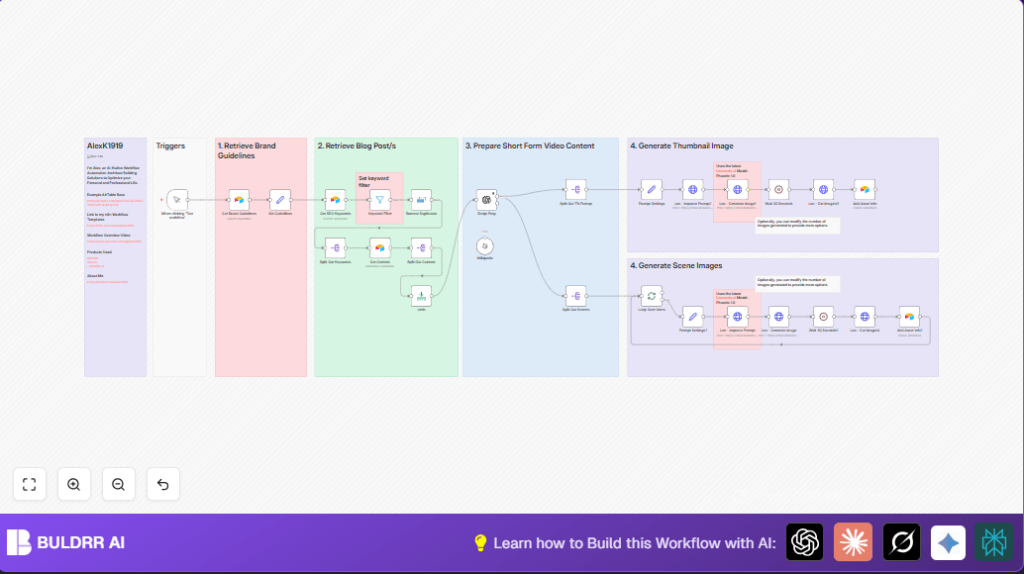

What This Workflow Does
This workflow takes blog posts as input and makes short videos automatically with images and thumbnails in vertical 9:16 format.
It stops users from spending many hours on scripting and making images manually, which can cause mistakes and delays.
The output is ready-to-use video scripts and picture assets that match your brand and style.
Who Should Use This Workflow
People who need to make short social videos from long blog content.
This is good for marketing teams, video creators, or anyone wanting fast and consistent video assets with AI help.
Tools and Services Used
- Airtable: Stores brand guidelines, SEO keywords, and blog content.
- OpenAI GPT-4o-mini model: Creates short video scripts and image descriptions.
- Leonardo.ai API: Improves image prompts and generates vertical 9:16 images and thumbnails.
- n8n automation platform: Runs and connects all these steps automatically.
Input, Processing, and Output Explained
Inputs
- Brand details from Airtable for style and voice.
- SEO keywords filtered for “ai automation” topics.
- Blog post content linked to filtered keywords from Airtable.
Processing Steps
- Filter and remove duplicate keywords matching “ai automation.”
- Generate a 4-scene short video script less than 30 seconds using OpenAI.
- Create original image prompts for each scene plus a thumbnail prompt.
- Send these prompts to Leonardo.ai for improvement and high-quality image creation.
- Wait for Leonardo.ai image jobs to finish, then retrieve final image URLs.
- Upload all image and asset details back to Airtable for tracking.
Outputs
- Clear, branded short video scripts in four scenes.
- High-resolution vertical (9:16) AI-generated images for scenes and a thumbnail.
- All asset information stored in Airtable for easy reuse.
Beginner Step-by-Step: How to Use This Workflow in n8n
Step 1: Import Workflow File
- Download the workflow using the Download button on this page.
- Open the n8n editor.
- Click “Import from File” and select the downloaded workflow file.
Step 2: Add Credentials
- Set up Airtable API Key credentials inside n8n.
- Add OpenAI API Key for GPT-4o-mini model access.
- Configure Leonardo.ai HTTP credentials for image generation and prompt improvement.
Step 3: Configure Node Settings
- Update Airtable base IDs, table names, and fields if different from defaults.
- Review and adjust OpenAI prompt text if needed for video length or style.
- Check Leonardo.ai model IDs and any additional prompt instructions.
Step 4: Test and Activate
- Run the workflow once using the Manual Trigger node inside n8n.
- Check the output images and script data in Airtable for correctness.
- Fix any errors and retry the test if needed.
- Once working, activate the workflow to run automatically or on a schedule.
For users hosting their own n8n instance, this workflow can run reliably with self-host n8n.
Customizations and Extensions
- Change OpenAI prompt to adjust number of scenes or total video length.
- Modify Leonardo.ai prompt settings to get different art styles or quality.
- Broaden SEO keyword filter to include more topics or keywords.
- Increase number of images generated by changing Leonardo.ai API parameters.
- Add social media nodes for auto-posting videos and thumbnails after creation.
Known Issues and Troubleshooting
- Airtable node returns no data.
Check Airtable base and table IDs match and that API Key has proper permissions. - OpenAI node errors or timeouts.
Verify OpenAI API Key is valid and network connectivity is stable. - Leonardo.ai image generation fails or hangs.
Confirm API credentials and review Leonardo.ai API changes if any. - Images mismatch brand style.
Ensure full and correct brand guidelines are stored in Airtable.
Summary of Results
✓ Save several hours of manual work on scripts and images.
✓ Get consistent, brand-aligned short video scripts and vertical images.
✓ Store all assets centrally in Airtable for easy reuse and tracking.
→ Run the workflow on-demand or schedule regular content creation.
