
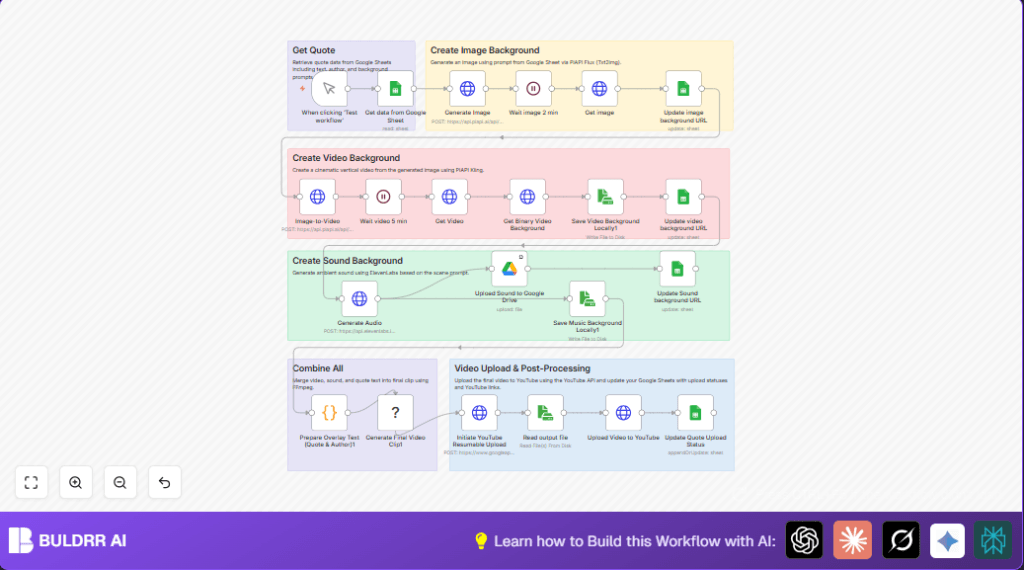

What This Workflow Does ⚙️
This workflow takes a quote from Google Sheets and turns it into a video automatically.
It solves the problem of making videos by hand that waste many hours.
The outcome is a polished video with image, sound, and text ready to post on YouTube.
The workflow first reads quote and background text from Google Sheets.
Then it uses the PiAPI Flux service to create a realistic nature image based on the prompts.
Next, it makes a short animated video from that image.
Using ElevenLabs AI, it generates matching ambient sound for the video mood.
It merges video, sound, and quote text into a final clip with FFmpeg.
Then it uploads the video to YouTube with metadata from the quote.
Finally, it updates the Google Sheet with the new media URLs and video links.
Tools and Services Used
- Google Sheets: Stores quotes and background prompt data.
- PiAPI Flux: AI model generating photorealistic images and animated videos.
- ElevenLabs: Creates ambient soundscape audio files.
- Google Drive: Stores the generated sound files.
- YouTube API: Uploads final videos.
- FFmpeg: Combines video, audio, and overlays text.
- n8n: Orchestrates the complete automation.
Inputs and Outputs
Inputs
- Quote text and author from Google Sheets row.
- Background description and prompt for image from Google Sheets.
- API Keys for PiAPI, ElevenLabs, Google, and YouTube.
Processing Steps
- Send prompt to PiAPI to create an image.
- Wait and download generated image URL.
- Update Google Sheets with image URL.
- Create a video from the image with animation.
- Wait and download video URL.
- Save video file locally.
- Generate ambient sound with ElevenLabs.
- Upload sound to Google Drive and get link.
- Update Google Sheets with sound URL.
- Save audio file locally.
- Create text overlay filters with JavaScript.
- Run FFmpeg command to merge video, sound, text overlay.
- Upload final video to YouTube.
- Update Google Sheets with YouTube link and status.
Outputs
- Generated image URL stored in sheet.
- Generated video URL stored in sheet.
- Uploaded sound file URL in Google Drive and sheet.
- Final published video link on YouTube.
Beginner Step-by-Step: How to Use this Workflow in n8n
1. Importing the Workflow
- In the n8n editor, click on the top-right menu and select “Import from File”.
- Download the workflow file from this page first using the Download button.
- Choose the downloaded file to import.
2. Configure Credentials
- Open the imported workflow and locate nodes using API calls like HTTP Request and Google Sheets.
- Add your API Key credentials for PiAPI Flux and ElevenLabs in node settings.
- Make sure Google Sheets OAuth2 credentials are added.
- Connect Google Drive with correct account.
- Set YouTube OAuth2 credentials in the upload nodes.
3. Update IDs and Parameters
- Change Google Sheets Sheet ID to match your sheet.
- If needed update folder IDs or email fields for Google Drive and YouTube upload.
- Double-check prompts or text inside HTTP Request nodes to match your content.
4. Run a Test
- Click the Manual Trigger node’s “Execute Node” button.
- Watch the workflow run through all steps.
- Check updated links and video upload in Google Sheets.
5. Activate Workflow
- Once testing works, enable the trigger node for scheduled or webhook execution.
- Use the self-host n8n link if you want to run this outside the cloud and manage better control.
Why This Workflow Exists
People spend a lot of time making inspirational quote videos by hand.
That takes many hours every week and can cause mistakes.
This workflow helps save about 8 to 10 hours per week by automating the whole process.
It stops manual copy-paste and syncing errors.
Users get quick polished videos with matching music and text automatically.
The workflow does many technical steps so users don’t have to.
Edge Cases and Troubleshooting
- Image generation stops or errors occur.
Check if PiAPI API Key is correct. - YouTube upload fails with 403 Forbidden error.
Refresh or reauthenticate YouTube OAuth2 credentials. - FFmpeg drawtext fails with font error.
Make sure the font file “Kanit-Italic.ttf” is present on the server running n8n.
Customization Ideas ✏️
- Change the image style by editing the “prompt” field in the Generate Image node JSON body.
- Adjust zoom or motion parameters in the Image-to-Video node for different video effects.
- Swap ElevenLabs voice or sound model ID to change the background audio tone.
- Edit local file names or paths in Read/Write File nodes to organize output.
Sample Prompt for Image Generation
This prompt is sent in the Generate Image HTTP Request body.
Replace content in {{ }} with Google Sheets fields.
{
  "prompt": "Ultra-realistic vertical nature landscape, {{ $json['Background (EN)'] }}, featuring {{ $json['Prompt (EN)'] }}, high detail, soft atmospheric lighting..."
}
Sample JavaScript Code For Text Overlay
This code runs inside the Prepare Overlay Text (Quote & Author)1 node.
It organizes Thai quote text to fit video width and generates complex FFmpeg drawtext filters.
const quoteFont = "Kanit-Italic.ttf";
const quoteFontSize = 70;
// ... [code truncated for brevity but includes all logic for line breaks and drawtext commands]
Summary
✓ Saves many hours by automating quote video making.
✓ Automatically generates images, video, sound, and text.
✓ Uploads finished videos directly to YouTube.
✓ Updates Google Sheets with all new media links.
✓ Easy to use after importing and configuring in n8n.
→ Users get quality, consistent inspirational quote videos faster.
→ Workflow handles complex tasks with simple inputs.
