
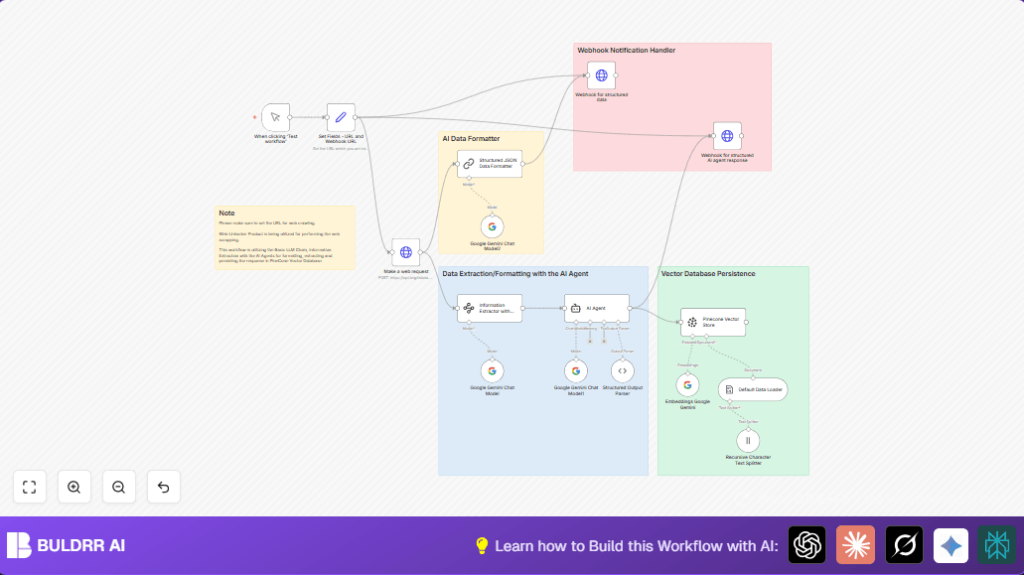

What this workflow does
This workflow helps you take messy web data and turn it into clean, easy-to-use AI data in n8n.
It fixes the hard part of scraping web pages, cleaning data, making vectors, and saving them.
At the end, you get data ready for AI searches and fast results.
Tools and services used
- Bright Data API: Gathers web content with a special unlocking feature.
- Google Gemini (PaLM) API: Converts raw data into clean, smart text and creates vector embeddings.
- Pinecone API: Stores vector data for quick AI matching.
- n8n platform: Automates all steps in one workflow.
- Webhook endpoint: Receives live notifications about the processed data.
Inputs, processing steps, and output
Inputs
- Manual trigger starts the workflow.
- URL of the web page to fetch.
- Webhook URL to send processed results.
- API Keys for Bright Data, Google Gemini, Pinecone.
Processing steps
- Fetch raw web data using Bright Data’s Web-Unlocker API.
- Use AI models to transform raw JSON into clear structured items with titles, ranks, points, and users.
- Extract and clean HTML content with Google Gemini chat AI agents for quality results.
- Split long text results into smaller parts for embeddings.
- Generate vector embeddings for each text chunk with Google Gemini embedding model.
- Store vectors inside Pinecone index for fast semantic search.
- Send real-time webhook messages containing both structured data and AI agent outputs.
Outputs
- Clean, structured JSON datasets ready for AI use.
- Embedded vectors stored in Pinecone for search.
- Webhook notifications streaming data results.
Who should use this workflow
This suits automation lovers who need clean AI data fast.
Anyone who handles unstructured web data and wants to avoid manual work.
Good for AI engineers, data collectors, or hobbyists wanting easy vector creation.
Beginner step-by-step: How to build this in n8n
Step 1: Import the workflow
- Click the Download button on this page to get the workflow file.
- Open your n8n editor.
- Choose “Import from File” and pick the downloaded workflow file.
Step 2: Set up credentials
- Add your Bright Data API Key in the credential section of the Make a web request node.
- Insert Google Gemini API credentials in the nodes using AI models.
- Fill in Pinecone API Key and index info in the Pinecone Vector Store node.
Step 3: Update workflow variables
- Go to the Set Fields – URL and Webhook URL node.
- Change the
urlfield to the website you want to scrape. - Update the
webhook_urlfield to your webhook address where data will be sent.
Step 4: Test the workflow
- Click Execute Workflow to run the flow manually.
- Watch nodes run and check logs for any errors.
Step 5: Activate for production
- Once tests work, activate the workflow in your n8n dashboard.
- You can run it on demand or add a schedule trigger for automatic runs.
If planning to run this on your own server, check out self-host n8n for useful options.
Customization ideas
- Change source URL to any other website by updating the
urlfield in the Set Fields – URL and Webhook URL node. - Tweak AI formatting prompts in the Structured JSON Data Formatter or AI Agent node to control data style.
- Try other Google Gemini embedding models by altering the
modelNamein the Embeddings Google Gemini node. - Change Pinecone index name if you want to store vectors in a different collection.
- Edit webhook URLs or payloads to connect outputs to your dashboards or other tools.
Edge cases and common issues
- “401 Unauthorized” errors usually mean API Keys for Bright Data are missing or expired. Check keys in Make a web request node.
- Empty or wrong data from AI agents may be due to bad input format or missing Google Gemini credentials. Verify inputs and API access.
- Pinecone failures saying “index not found” mean wrong index names. Ensure exact index spelling in Pinecone Vector Store node.
Summary of benefits
✓ Workflow saves time by automating web data scraping and cleaning.
✓ It gives consistent, structured data ready for AI and search.
✓ Embedding vectors are created and stored automatically.
✓ Real-time webhooks help monitor or connect output elsewhere.
→ Result is quick, reliable AI-ready data processing in n8n.
