
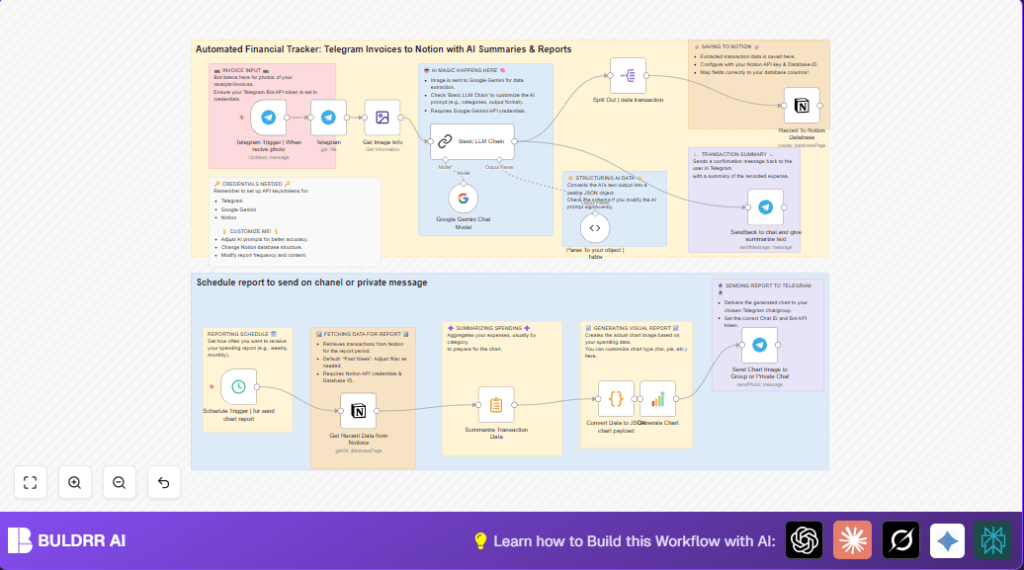

What This Automation Does
This workflow takes invoice photos sent in Telegram and turns them into detailed expense records in Notion automatically.
It solves the problem of spending many hours typing invoice details manually.
When a photo is received, AI reads the invoice data and saves each item in Notion.
Later, it sends you a clear spending report as a chart in Telegram.
This saves time and reduces entry mistakes.
The inputs are Telegram photos of invoices.
The process is extracting data with AI and saving it to Notion.
The outputs are new Notion expense entries and weekly Telegram reports with charts.
Each step is designed for easy automation without manual effort.
Tools and Services Used
- Telegram Bot API: Receives invoice photos from your chats.
- Google Gemini AI: Extracts structured invoice data from images.
- Notion API: Stores each expense line as a separate database entry.
- n8n Automation Platform: Operates the whole workflow connecting all parts.
Beginner Step-by-Step: How to Use This Workflow in n8n
Import the Workflow
- Inside n8n editor, click Import from File.
- Select the downloaded workflow file from this page.
Configure Credentials and IDs
- Add Telegram Bot API Key in the Telegram Trigger and Telegram nodes.
- Provide Google Gemini API Key in the Google Gemini Chat Model node.
- Set Notion API Key and connect to the correct expense database in the Record To Notion Database node.
- Update Telegram Chat ID where messages and reports get sent.
Review AI Prompt and Code
- Check the prompt in the Basic LLM Chain node matches your invoice categories.
- Copy the code in the chart payload node if edits needed; it formats data for the chart.
Test and Activate
- Send a test invoice photo to your Telegram bot to see if data appears in Notion.
- Manually trigger the schedule to check report sending.
- Activate the workflow to run continuously.
You can also visit self-host n8n if needing to run this workflow on your server.
Workflow Inputs, Processing, and Outputs
Inputs
- Invoice photos sent via Telegram chat.
- Scheduled timer to trigger reports weekly.
Processing Steps
- Telegram Trigger catches incoming photo messages.
- Telegram node downloads the photo file for processing.
- Edit Image node validates the photo file.
- Google Gemini Chat Model node runs AI to extract invoice fields.
- Basic LLM Chain formulates the AI prompt for proper JSON output.
- Parse To your object | Table node converts AI text into JSON.
- Split Out node separates each expense item.
- Record To Notion Database node adds items as pages.
- Telegram node sends confirmation message back.
- Scheduled trigger fetches recent expenses and summarizes by category.
- Code node formats data for the chart.
- Generate Chart node creates bar chart image.
- Telegram node sends chart report.
Outputs
- New detailed expense records saved in Notion.
- Confirmation messages in Telegram chat.
- Weekly spending summary charts delivered in Telegram.
Customization Ideas
- Change AI prompt categories to better fit your spending habits.
- Modify schedule trigger for report timing (daily, monthly).
- Add extra Notion properties like vendor or payment type.
- Switch chart type to pie or line by editing the chart payload code.
Common Issues and Fixes
Wrong Telegram photo file_id
Photo size array index may not be correct, causing “file_id” errors.
Check actual sizes in Telegram Trigger output and adjust the path accordingly.
AI output not fitting JSON schema
Error stemming from prompt and parser schema mismatch.
Double-check the Basic LLM Chain prompt and the Parse To your object | Table schema match exactly.
Notion API rate limits or failing to save entries
Too many rapid requests cause failures.
Add delay nodes or error workflows around Record To Notion Database node to slow requests down.
Pre-Production Checklist
- Bot can read photos and send messages in target chat.
- Google Gemini keys are valid with enough quota.
- Notion database columns match mapped fields.
- Test send invoice photo via Telegram, verify Notion entry.
- Trigger schedule manually to check report generation.
Deployment Guide
Turn on the workflow to run continuously in n8n.
Check workflow logs for errors or stalled executions.
Ensure schedule trigger timing fits report delivery needs.
If deploying on own server, see self-host n8n for details.
Summary of Benefits and Outcomes
✓ Save 4+ hours weekly by automating invoice data entry.
✓ Reduce mistakes from manual typing.
✓ Get detailed and categorized expense data in Notion fast.
✓ Receive regular, clear spending reports as charts in Telegram.
✓ Focus more on business, less on bookkeeping.
