

What this workflow does
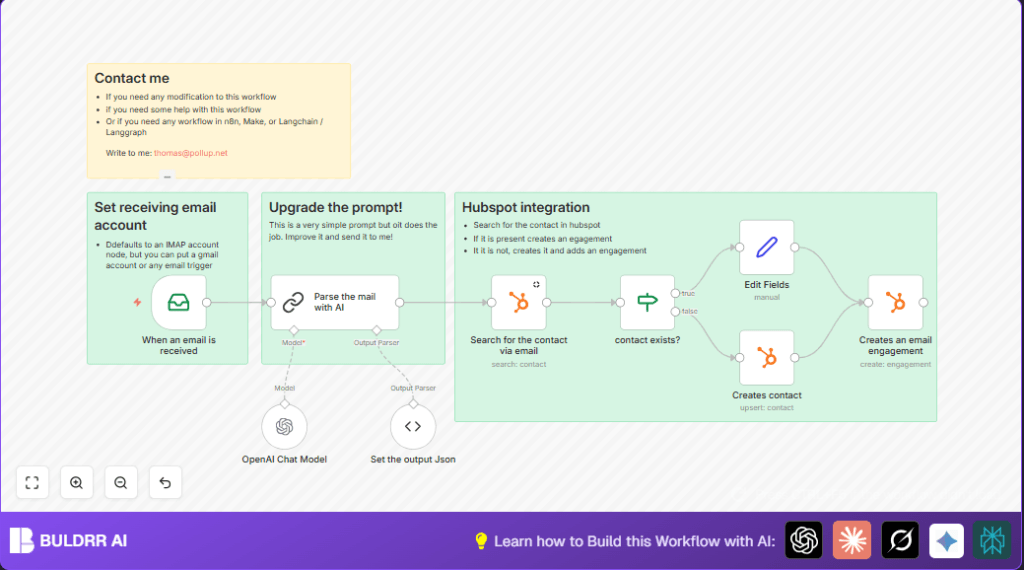
This workflow reads new emails, finds contact details inside them using AI, then checks if the contact is already in HubSpot.
If not found, it adds new contacts with full info, then saves the email as an interaction on the contact.
This helps users stop wasting time copying email info manually and avoid duplicate contacts, keeping HubSpot clean and updated.
Tools and services used
- n8n: Workflow automation platform.
- IMAP email server: Receives emails (e.g., Gmail, Outlook).
- OpenAI API: AI parsing of email text to extract contacts.
- Langchain nodes: Running AI prompt chains in n8n.
- HubSpot API: Searching and adding contacts, logging engagements.
Who should use this workflow
This is good for sales teams or anyone manually adding email contacts to HubSpot.
They want to save hours of data entry and stop mistakes like missed or duplicate contacts.
How this workflow works: Inputs → Processing → Outputs
Inputs
Processing Steps
- Read the email via Email Read IMAP node.
- Extract contact details using AI prompt in OpenAI Chat Model and Parse the mail with AI (Langchain).
- Search HubSpot contacts by email using Search for the contact via email HubSpot node.
- Use IF node contact exists? to check if contact ID returned.
- If contact missing, create new contact with AI data in Creates contact node.
- If contact present, just update contact info or continue.
- Log email as engagement linked to contact via Creates an email engagement node.
Outputs
- New or updated contacts in HubSpot CRM.
- Emails saved as engagements on contact timelines in HubSpot.
Beginner step-by-step: How to use this workflow in production inside n8n
Step 1: Import the workflow
- Download the workflow using the Download button on this page.
- Inside n8n editor, click on the menu and select “Import from File”.
- Choose the downloaded workflow file to import it.
Step 2: Configure credentials and API Keys
- Add your IMAP email account credentials in the Email Read IMAP node.
- Put your OpenAI API key in the OpenAI Chat Model node.
- Connect HubSpot API with client ID and secret in the HubSpot nodes.
- Check and update any IDs, emails, inbox folders, or contact fields if your HubSpot uses custom properties.
Step 3: Test the workflow
- Run the workflow on a test email to check if it extracts info correctly.
- Verify the contact is found or created in HubSpot and that email shows under engagements.
Step 4: Activate the workflow for automatic email processing
- Enable the workflow in n8n to start listening for new emails.
- Make sure the Email Read IMAP node is polling or triggering as preferred.
After that, the workflow automatically processes incoming emails and updates HubSpot without manual steps.
Common customization ideas
- Improve AI parsing prompt to add job title or social media links.
- Swap the Email Read IMAP node for a Gmail node if you want Gmail API instead of IMAP.
- Enhance the IF node logic to handle emails with multiple contacts or missing emails.
- Add custom HubSpot fields like lead source or tags in the contact creation node.
- Send Slack or email notifications to sales reps when new contacts are created.
Troubleshooting common issues
- Problem: No emails received in Email Read IMAP node.
Cause: Wrong IMAP server or credentials.
Fix: Double-check mail server, port, and username/password or OAuth setup. - Problem: AI node outputs empty or bad data.
Cause: Bad prompt formatting or missing output parser.
Fix: Review AI prompt, and confirm the JSON output parser node is connected correctly. - Problem: HubSpot search returns no contacts.
Cause: API access or email filter errors.
Fix: Check HubSpot API keys and test email filter logic.
Pre-production checklist
- Check that Email Read IMAP node gets recent emails.
- Test OpenAI parsing on sample emails to ensure contact info extracts well.
- Verify HubSpot search finds contacts accurately.
- Confirm contact creation and engagement log nodes work with test data.
- Backup the n8n workflow and credentials before going live.
Deployment notes
Enable the workflow inside n8n to watch for new emails.
You can set polling frequency on the IMAP node or choose an event webhook trigger if supported.
Regularly check HubSpot for new contacts and email logs to confirm proper operation.
Change AI parsing prompts if some info is missed or wrongly extracted.
For more control over hosting, consider using self-host n8n.
Summary
✓ Saves 3-5 hours weekly by automating email to HubSpot contact entry.
✓ Cuts errors from manual data copying and contact duplication.
✓ Logs all emails as engagements on the right contacts.
✓ Uses AI prompts to pick out structured details from email text.
→ Produces cleaner, updated HubSpot CRM without extra work.
