

What this workflow does ⚙️
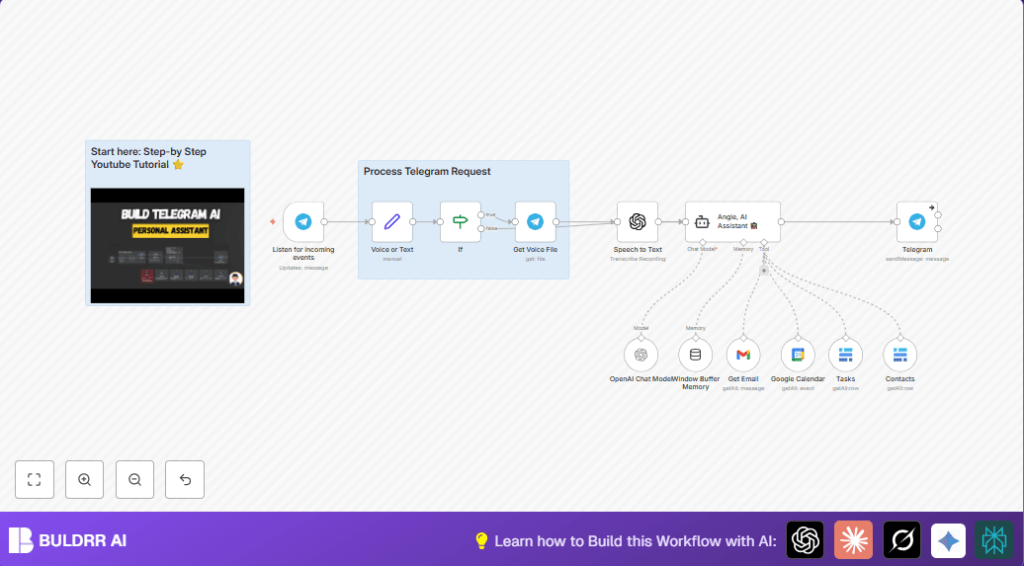
This workflow listens to messages in Telegram, either text or voice.
It understands what the user wants using AI.
Then it fetches recent unread emails from Gmail, upcoming Google Calendar events, and tasks or contacts from Baserow.
Finally, it sends back a clear answer inside Telegram fast.
It helps users save time by not switching apps to find information.
Who should use this workflow
- Busy people: Those managing emails, calendars, and tasks daily.
- Telegram users: Users who want quick info inside Telegram app.
- Non-technical users: Anyone wanting smart help without manually checking apps.
Tools & Services used
- Telegram Bot API: Receives user messages.
- OpenAI API: Converts speech to text and runs AI assistant using GPT-4.
- Gmail API: Gets unread emails, filtering out promotions.
- Google Calendar API: Retrieves relevant calendar events by date.
- Baserow API: Fetches tasks and contact info from tables.
- n8n automation platform: Runs the workflow and connects nodes.
Inputs → Processing steps → Outputs
Inputs
- Incoming Telegram messages, either text or voice.
Processing steps
- Listen for Telegram messages using Telegram Trigger.
- If voice message, use Telegram Get File to get audio, then transcribe with OpenAI speech-to-text node.
- Send text (or transcribed speech) to LangChain AI assistant Agent node to understand user intent.
- AI agent calls Gmail node to fetch unread emails after specified date and summarises key details.
- AI agent calls Google Calendar node to get relevant events filtered by date.
- AI agent queries Baserow tool nodes to get contact and task tables data.
- Store conversation context in Window Buffer Memory node keyed by Telegram user ID.
- Send compiled response back to user via Telegram node as Markdown text.
Output
- A clear, concise AI-generated answer with email summaries, calendar events, and tasks inside Telegram chat.
Beginner step-by-step: How to use this workflow in n8n
Step 1: Download and Import Workflow
- Click the Download button on this page to get the workflow file.
- Inside the n8n editor, use “Import from File” to load the downloaded workflow.
Step 2: Configure Credentials and IDs
- Add your Telegram Bot API credentials in the Telegram Trigger and Telegram nodes.
- Input your OpenAI API Key in the speech-to-text and LangChain Agent nodes.
- Connect Gmail OAuth2 details in the Gmail node.
- Set Google Calendar OAuth2 in the Calendar node.
- Add Baserow API Key and update table IDs for contacts and tasks.
- Check labels, email filters, calendar date ranges, and user IDs are correct if needed.
Step 3: Test the Workflow
- Send a text or voice message to your bot in Telegram.
- Confirm the AI replies with email, calendar, and task info summaries.
Step 4: Activate the Workflow
- Click “Activate” in the n8n editor to start running the workflow live.
- Make sure n8n runs continuously for 24/7 availability. Use self-host n8n if you want full control.
Common problems and how to fix them 🔧
Issue: Telegram messages do not trigger workflow
Make sure Telegram bot webhook URL matches the one in Telegram Trigger.
Check bot token is valid and authorized.
Issue: Voice message transcription fails
Verify Telegram Get File node gets correct file ID.
Confirm OpenAI API key has speech-to-text permission.
Issue: Unwanted promotional emails appear
Adjust Gmail node label filters to exclude promotions and spam folders.
Issue: Missing calendar events
Double-check Google Calendar OAuth credentials and date filter range.
Customizations ✏️
- Change the AI assistant name and style by editing the system prompt in LangChain Agent node.
- Support other languages by updating language code in OpenAI speech-to-text node.
- Adjust Google Calendar date filters for broader or narrower event ranges.
- Enable email attachment summaries in the Gmail node.
- Add more Baserow nodes to query extra project data or notes.
Summary of benefits and outcome
✓ Access latest emails, calendar appointments and tasks inside Telegram fast.
✓ Avoid wasting time opening multiple apps to find info.
✓ Get spoken voice messages converted to text for easy handling.
✓ Have ongoing chat memory for better conversations.
✓ Use a simple workflow setup with common tools connected.
