
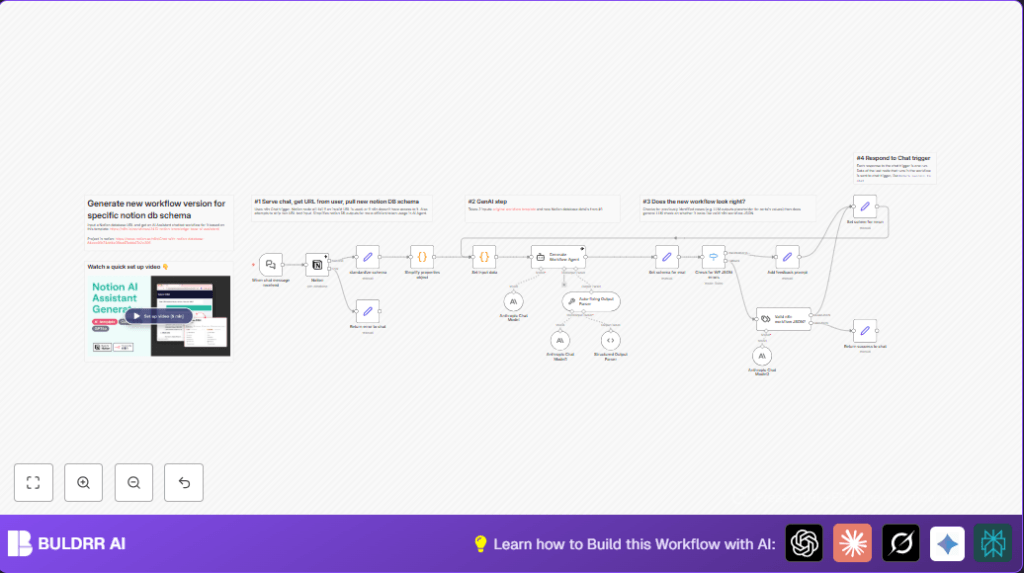

What this workflow does
This workflow takes a Notion database URL as input and gives you a ready-to-use AI assistant workflow for that database. It solves the problem of building new AI workflows from scratch for every database with a unique setup. You get custom workflow JSON that you can use right away in n8n.
The AI reads the database schema, cleans complex data fields, and edits a template workflow to fit your database. In the end, you get a clean workflow to import and run.
Who should use this workflow
This workflow is for people who manage many Notion databases with different structures. It helps teams quickly create AI helpers for their data without needing deep programming or writing workflows from zero.
If you want faster knowledge sharing with less manual work adapting AI assistants, this workflow saves time and cuts mistakes.
Tools and services used
- Notion API: Gets database details.
- n8n Workflows: Automates the whole process.
- AI Language Models (Anthropic or OpenAI): Edits and creates new workflows.
- Chat Trigger node: Accepts the Notion database URL from users.
Beginner step-by-step: How to build this in n8n
Step 1: Import the workflow
- Download the workflow file using the Download button on this page.
- Open your n8n editor workspace that you use for building workflows.
- Use the Import option and select “Import from File” to load the downloaded workflow.
Step 2: Configure the workflow
- Add all required API Keys and credentials, like Notion API Key and your AI model API Key.
- Check if any IDs, emails, channels, folders, or tables in the workflow need updating to your environment.
- If there is a prompt or URL in the workflow input, copy and paste it as shown for correct input.
Step 3: Test the workflow
- Run the workflow once inside n8n to confirm it works and fetches correct data.
- Watch for errors and fix any credential or permission problems.
Step 4: Activate for production
- Once testing passes, turn on the workflow by enabling the Webhook node that listens for input.
- Start using the workflow by pasting Notion database URLs to get your AI workflow JSON generated fast.
- Consider self-host n8n for better control and reliability if needed.
Inputs, Processing Steps, and Output explained
Inputs
- User enters a Notion database URL in the chat input.
- API credentials are ready for Notion and AI models.
Processing Steps
- Parse the Notion URL to get the database ID.
- Call the Notion API to retrieve database schema.
- Use a Code node to clean and reduce schema details into simple pieces like id, name, type, and options.
- Prepare inputs including the schema and a workflow template for the AI model.
- Send instructions and data to an AI Agent node configured with a system prompt to adapt the template workflow to the user’s database.
- Use auto-fixing parsing nodes to correct AI output JSON if needed.
- Validate final JSON with a Text Classifier node.
Output
- Return valid, ready-to-import n8n workflow JSON.
- This JSON can be copied and deployed to instantly create the AI assistant for the input database.
Handling edge cases and failures
If the Notion URL is wrong or inaccessible, the database fetch will fail.
Use error messages to tell the user the URL is invalid and ask for a correct one.
If the AI agent generates wrong or broken JSON, auto-corrector nodes try to fix it automatically.
If validation still fails, send a clear message to the user explaining generation did not succeed and ask them to retry.
Customization ideas
- Add support for more Notion property types in the Code node to handle complex data better.
- Switch between AI models like Anthropic and OpenAI to check output quality and API cost.
- Enhance validation logic to detect more JSON issues and give detailed error feedback.
- Change the initial chat message prompts to better guide users on what URL format to input.
Summary and benefits
✓ Quickly get tailored AI assistant workflows for any Notion database.
✓ Save hours of manual editing JSON and reduce error risk.
→ Enter a Notion database URL and get formatted AI workflow JSON fast.
→ Deploy workflows easily inside n8n with no deep coding.
