
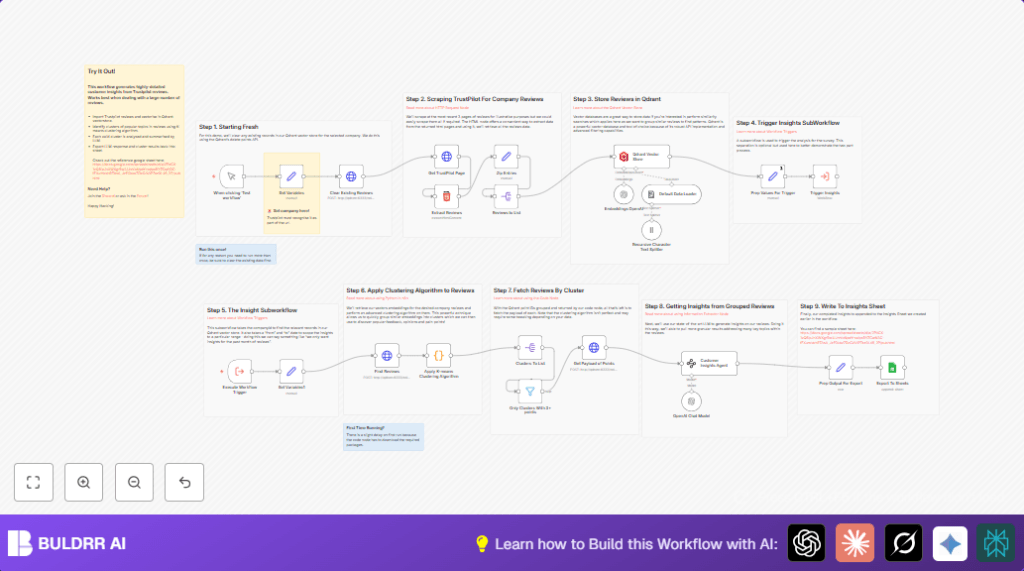

What This Automation Does
This n8n workflow fetches recent Trustpilot reviews for a chosen company.
It finds key patterns and groups similar comments automatically.
Then it writes simple summaries and suggests how to improve service.
The result is a fast way to understand many reviews without reading each one by hand.
Tools and Services Used
- Trustpilot website: Source of product or service reviews.
- n8n: Automation builder to run workflow steps.
- OpenAI API: Creates embeddings and writes summaries.
- Qdrant Vector Database: Stores and searches vectors of review data.
- Google Sheets: Places final insights for easy reading.
How This Workflow Works (Input → Process → Output)
Inputs
- The company website slug or ID from Trustpilot for reviews.
- OpenAI API key for embedding and GPT-4.
- Qdrant database access key.
- Google Sheets account connected for export.
Processing Steps
- Clear old data in Qdrant to avoid duplicates.
- Fetch up to 3 pages of recent reviews from Trustpilot.
- Extract review author, rating, text, date, and links from HTML.
- Merge all extracted fields into single review records.
- Split array to handle each review individually.
- Generate vector embeddings for each review text using OpenAI.
- Store these embeddings plus metadata into Qdrant.
- Call a subworkflow to cluster review vectors using K-means.
- Filter clusters with fewer than three reviews.
- Fetch full review data for each cluster.
- Use GPT-4 to write summaries, sentiment, and suggestions for each cluster.
- Format this info and add it to Google Sheets.
Output
- Clear JSON review records saved in Qdrant.
- Clustered groups of similar reviews.
- Easy-to-read summaries with sentiment and improvement ideas.
- Google Sheets file with insights for team sharing.
Beginner Step-by-Step: How to Use This Workflow in n8n
Step 1: Import the Workflow
- Download the workflow file using the Download button on this page.
- Open your n8n editor.
- Click on menu and choose “Import from File”.
- Select the downloaded file and import.
Step 2: Configure Credentials and Settings
- Add your OpenAI API Key in n8n Credentials.
- Enter Qdrant API access keys where required.
- Connect Google Sheets account using OAuth2.
- Update the company ID in the Set Variables node with the target Trustpilot company slug.
- If needed, update Google Sheets file ID, sheet name, or folder paths.
Step 3: Test and Run
- Manually trigger the workflow using the play button.
- Watch node outputs to ensure reviews are fetched and processed.
- Check Google Sheets for the insights summary.
Step 4: Activate for Production
- Turn on the workflow to run on schedule or via webhook.
- Regularly monitor n8n execution logs.
- Consider self-host n8n for better control and privacy.
Common Edge Cases and Troubleshooting
- If no reviews show after extraction, check and update CSS selectors.
- If Qdrant calls fail, verify stored credentials for API access.
- If clustering breaks with an error on first run, wait for Python dependencies to install.
- If Google Sheets export does not work, confirm OAuth connection and sheet permissions.
Customization Ideas
- Change the page count for review fetch to get more or less data.
- Adjust number of clusters in the K-means code node for finer or broader grouping.
- Modify date range to analyze specific periods.
- Add new data fields from Trustpilot by updating CSS selectors.
- Send insights to Slack or email instead of Google Sheets.
Summary
→ This workflow takes many Trustpilot reviews and groups similar feedback.
→ It writes easy summaries with sentiment and suggestions.
→ It saves lots of time and avoids missing important points.
→ Users get clear reports in Google Sheets ready to share.
Code Snippet: K-means Clustering Algorithm
This Python code groups review embedding vectors into clusters automatically.
The clusters help find common topics in the data.
import numpy as np
from sklearn.cluster import KMeans

point_ids = [item.id for item in _input.first().json.result.points]
vectors = [item.vector.to_py() for item in _input.first().json.result.points]
vectors_array = np.array(vectors)

kmeans = KMeans(n_clusters=min(len(vectors), 5), random_state=42).fit(vectors_array)
labels = kmeans.labels_

clusters = {}
for label in set(labels):
    clusters[label] = vectors_array[labels == label]

output = []
for cluster_id, cluster_points in clusters.items():
    points = [point_ids[i] for i in range(len(labels)) if labels[i] == cluster_id]
    output.append({
        "id": f"Cluster {cluster_id}",
        "total": len(cluster_points),
        "points": points
    })

return {"json": {"output": output }}