
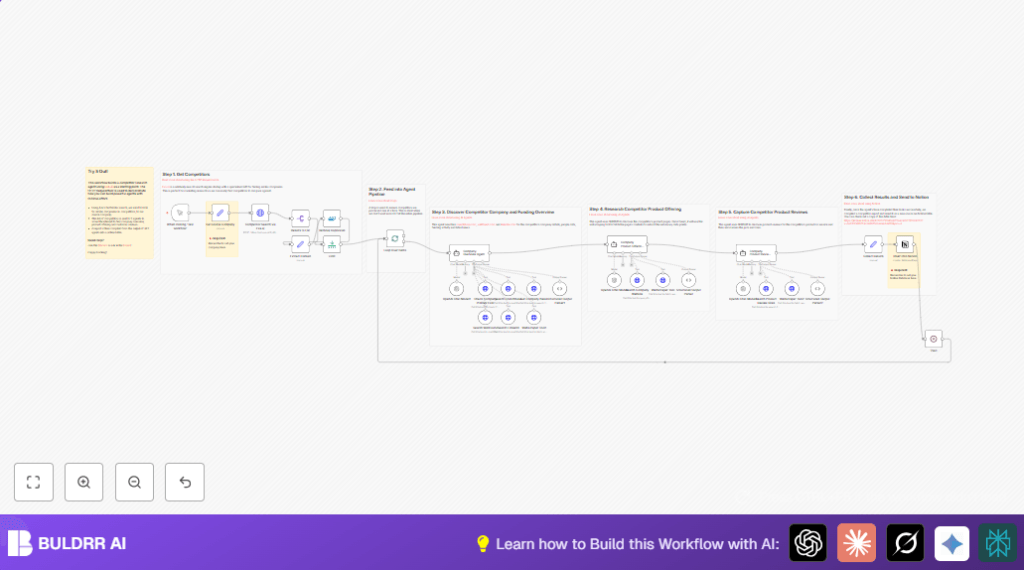

What this workflow does
This workflow automates the process of finding and analyzing competitor companies for a given business website.
It stops the long, manual work of looking for competitors’ funding, leadership, products, prices, and customer reviews.
At the end, the workflow creates a clear, organized competitor report and uploads it to Notion.
Who should use this workflow
Anyone who needs fast, reliable competitor research without spending hours gathering data by hand should use this.
It fits well for product managers, business analysts, marketing teams, or SaaS startups wanting quick insights.
Tools and services used in this workflow
- n8n nodes: Uses specialized nodes like HTTP Request and SplitInBatches for control and data flow.
- Exa.ai API: Finds competitor companies based on a source company URL.
- SERPAPI: Provides Google-style searches for company profiles, news, and reviews.
- Firecrawl API: Scrapes competitor websites to get detailed product and pricing information.
- OpenAI API: Powers AI agents that extract structured data and summarize insights.
- Notion API: Saves the final competitor analysis report into a Notion database for team access.
Inputs, processing steps, and output
Inputs
- Start with a single source company URL (for example, https://notion.so).
- API keys for Exa.ai, SerpAPI, Firecrawl, OpenAI, and Notion must be set beforehand.
Processing steps
- Send the source company URL to Exa.ai to get a list of similar competitor URLs.
- Split competitor URLs into individual items and remove any duplicates.
- Limit the competitor list to 10 entries to manage system load.
- Process each competitor one by one using a loop in the workflow.
- For each competitor, run an AI agent that collects company overview details from Crunchbase, WellFound, and LinkedIn via SERPAPI and scraping.
- Run another AI agent to find product details such as pricing, plans, and technologies via web scraping using Firecrawl.
- A third AI agent searches review platforms like Trustpilot and Product Hunt, extracts customer reviews, and summarizes both positive and negative points.
- Combine all data into one structured report object.
- Insert the compiled report into the configured Notion database for team visibility.
Output
The output is a detailed competitor analysis report saved inside Notion, showing company background, funding, product features, pricing info, and customer feedback, all in one place.
Beginner step-by-step: How to use this workflow in n8n
Step 1: Import the workflow file
- Download the workflow file from the Download button on this page.
- Open the n8n editor where you want to use the workflow.
- Use the Import from File option to load the workflow.
Step 2: Add credentials and update settings
- Add your API keys for Exa.ai, SerpAPI, Firecrawl, OpenAI, and Notion inside n8n’s credential manager.
- Open the node labeled Set Source Company and update the URL to the company you want to analyze.
- Check the Insert Into Notion node and replace the Notion database ID with your own.
Step 3: Test the workflow
- Trigger the workflow manually with the Manual Trigger node to run one test cycle.
- Verify the competitor report appears correctly in Notion.
Step 4: Activate the workflow
- Once the test runs well, activate the workflow to start running by schedule or your chosen trigger.
- Monitor executions in n8n to check all steps complete without errors.
Note: For full control and privacy, consider self-host n8n.
Possible edge cases and failures
If an API key is wrong or expired, some nodes will show “401 Unauthorized” errors. Fix this by updating the credentials inside n8n.
If the source company URL is wrong or inactive, Exa.ai may return no competitor results. Check the URL and try a known live site.
Sometimes, data from scraping or AI agents may be missing or incomplete. Use the debug feature to check responses. Adjust prompts or handle errors to improve data accuracy.
Customization ideas
- Change the company URL to research different competitors.
- Adjust the competitor limit node to analyze more or fewer companies.
- Add new data fields by modifying AI agent parsers to include extra details.
- Switch the final data output to Google Sheets or databases if preferred over Notion.
- Add error handling in the batch loop to skip problematic competitors without stopping the workflow.
Summary and results
✓ Saves more than 6 hours of manual research per week.
✓ Produces structured competitor profiles with funding, products, and reviews.
✓ Centralizes data into the Notion platform for easy team access.
→ Turns slow, error-prone competitor research into automated, consistent reports.
