

What This Automation Does
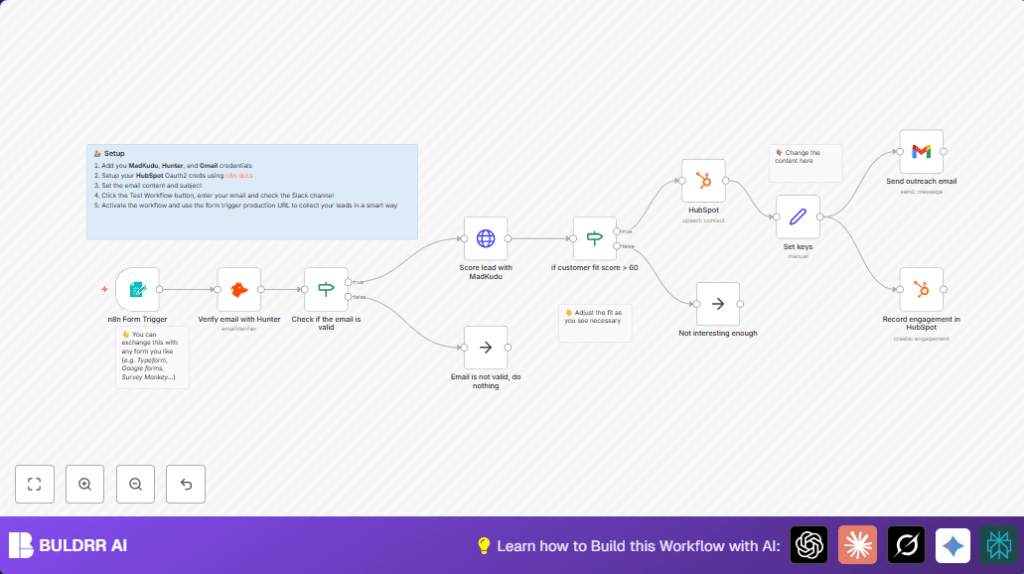
This workflow checks leads from a contact form and sends email if leads look good.
It stops bad emails early and scores leads with MadKudu.
Only leads scoring over 60 get emails sent and recorded in HubSpot.
This lets sales focus on good leads fast without manual sorting.
- Input: Email from a contact form.
- Processing: Verify email with Hunter node to skip bad emails.
- Score lead with MadKudu’s API using the given email.
- Filter leads to only those with fit score over 60.
- Fetch or update contact in HubSpot CRM using OAuth2.
- Prepare personalized email content with dynamic fields.
- Send email via Gmail OAuth2 node.
- Log engagement in HubSpot CRM for tracking.
- Output: Qualified leads get emails and CRM updates.
This workflow cuts hours of manual work.
It stops spammy or invalid addresses.
It makes outreach automatic and trackable.
Beginner Step-by-Step: How to Use This Workflow in n8n Production
Import Workflow
- Download the workflow file by clicking the Download button on this page.
- Open n8n editor, click on “Import from File” and select downloaded workflow.
Configure Credentials and Settings
- Go to each node needing API keys or OAuth2 and add your credentials:
- Hunter API key in Hunter node.
- MadKudu API key in HTTP Request node.
- HubSpot OAuth2 credentials in HubSpot nodes.
- Gmail OAuth2 in Gmail node.
- Update any IDs, emails, form paths, or URLs in nodes to match your real data.
- Make sure the contact form’s webhook URL matches the Form Trigger node’s webhook URL.
Test and Activate
- Use the form preview in Form Trigger node to submit test emails.
- Watch workflow executions to confirm email validation, scoring, and emails sent.
- If all works as expected, toggle workflow Active to “On” to run live.
If hosting on a private server, consider self-host n8n for full control.
Inputs, Processing Steps, and Outputs Explained
Inputs
- Email entered by lead in form field “What’s your business email?”.
Processing Steps
- Form Trigger node catches lead submissions.
- Hunter node checks email validity, returns status.
- IF node decides to continue if email status = “valid”.
- HTTP Request node calls MadKudu API to get lead score.
- Second IF node filters leads with score > 60.
- HubSpot node searches or updates contact by email.
- Set node builds personalized email content.
- Gmail node sends the email to the lead.
- HubSpot node records email engagement to CRM.
Outputs
- Qualified leads get outreach email.
- CRM records kept up to date.
- Low quality or invalid leads stopped early.
Tools and Services Required
- n8n: Automation platform to create the workflow.
- Hunter API: Email verification service.
- MadKudu API: Lead scoring service.
- Google Gmail OAuth2: To send outreach emails.
- HubSpot CRM with OAuth2: Contact and engagement management.
Customization Ideas
- Change the Form Trigger’s email field label or add more fields to collect richer lead data.
- Adjust lead score threshold in the IF node to fit your sales criteria.
- Edit the Set node’s email message and subject for different campaigns.
- Swap Gmail node for another email provider if desired.
- Use other CRM nodes instead of HubSpot based on your stack.
Common Problems and Fixes
- Email verification fails: Check Hunter API key and quota.
- MadKudu scoring errors: Verify API URL and HTTP header authentication token.
- Emails not sending: Reauthorize Gmail OAuth2 or verify recipient email existence.
Preparation Checklist Before Live Use
- Test form with good and bad emails.
- Confirm Hunter returns “valid” or “invalid” as expected.
- Verify MadKudu returns numeric scores correctly.
- Ensure HubSpot nodes connect with OAuth2 and handle contacts.
- Test Gmail node to confirm email delivery.
- Backup workflow JSON before activating.
Deployment Instructions
Switch workflow status to Active.
Embed Form Trigger webhook URL in your website or landing page.
Watch n8n dashboard for execution logs and errors.
Turn on retry logic to handle temporary API failures.
Summary of Benefits
✓ Saves hours of manual lead sorting and outreach.
✓ Prevents bad and invalid leads from getting emails.
✓ Automatically scores leads on quality using MadKudu.
✓ Sends personalized emails automatically.
✓ Updates HubSpot CRM with contacts and engagement.
✓ Keeps sales team focused on best leads.
✓ Easy to customize fields, messages, and thresholds.
