
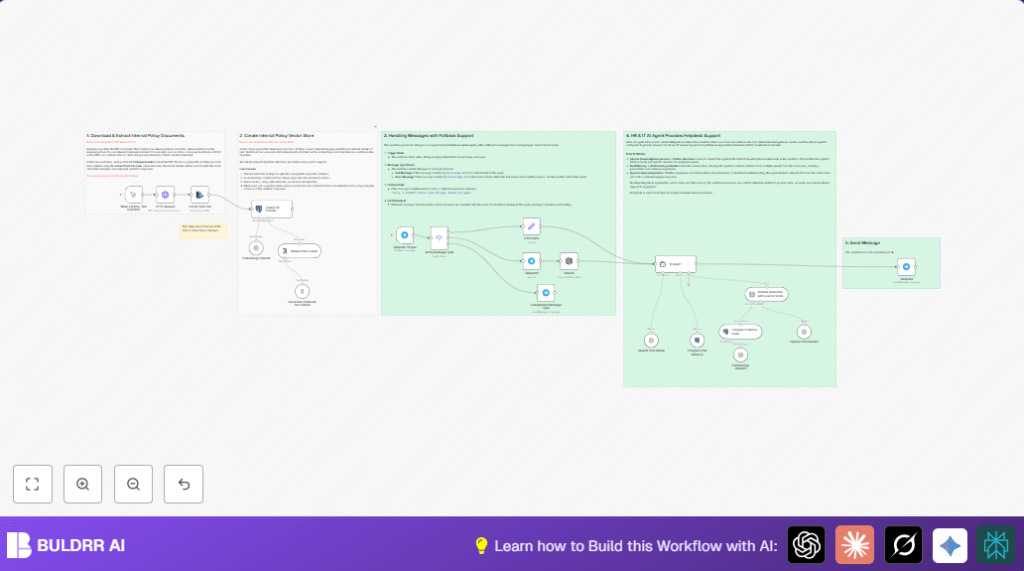

What this workflow does
This workflow creates an AI helper for HR and IT questions inside a company chat.
It reads company policy PDFs, makes them easy to search, and answers questions sent in text or voice on Telegram.
The workflow cuts the workload of HR teams by giving fast, clear answers to employees.
Who should use this workflow
Companies with many employee questions about HR policies or IT helpdesk topics can use this.
It works well for HR managers or support teams who want to save time and avoid missing urgent messages.
This method suits teams using Telegram for communication and who want AI help to answer common queries.
Tools and services used
- n8n: Automates the whole process and runs the workflow.
- PostgreSQL with PGVector: Stores text chunk vectors for fast search.
- OpenAI API: Creates text embeddings and transcribes voice messages.
- Telegram Bot API: Receives employee text and voice messages.
- PDF files: Contain company policies downloaded via HTTP request.
How this workflow works (Input → Process → Output)
Inputs
- PDF URLs for company policy documents.
- Telegram messages as text or voice sent by employees.
Processing Steps
- Download PDF using a HTTP Request node.
- Extract text from PDF using Extract from File node.
- Split text into 2000-character chunks with Recursive Character Text Splitter node.
- Generate vector embeddings for each text chunk using Embeddings OpenAI node.
- Store embeddings and related data in PostgreSQL via Create HR Policies vectorStorePGVector node.
- Listen for Telegram messages with a Telegram Trigger node.
- Check if message is text or voice using a Switch node.
- If voice, download file and transcribe to text using Telegram1 node and OpenAI node (transcription mode).
- Combine text and transcribed text fields via Edit Fields node to standardize input.
- Send question text to AI Agent node with system prompt and vector search memory.
- Maintain chat context using Postgres Chat Memory node.
Outputs
- Instant answers sent back as Telegram messages through Telegram node.
This gives employees fast access to internal policy answers.
HR teams save time by not replying manually to each question.
Beginner step-by-step: How to build this workflow in n8n
Step 1: Import the workflow file
- Download the workflow file using the Download button on this page.
- In the n8n editor, click “Import from File” and select the downloaded file.
Step 2: Add credentials
- Go to each node needing credentials like OpenAI and Telegram.
- Enter your OpenAI API key in the OpenAI nodes.
- Fill in your Telegram Bot API token in the Telegram Trigger and Telegram send nodes.
- Set PostgreSQL credentials in vector store and memory nodes.
Step 3: Update settings
- In the HTTP Request node, check and update the internal policy PDF URL(s) to your own documents if needed.
- In database-related nodes, verify database name, schema, and tables are correct.
- In the AI Agent node, review the system prompt and change if company voice or details are different.
Step 4: Test the workflow
- Use the manual trigger or send Telegram messages to your bot for testing.
- Watch the execution logs and confirm PDF text extracts correctly.
- Check that voice messages transcribe and that text replies come back on Telegram.
Step 5: Activate for production
- Once tests work, turn on the workflow in n8n.
- Monitor the workflow when users start asking questions live.
- Adjust prompts or add new PDFs over time to keep the knowledge base fresh.
If using self-host n8n, visit here for help setting up.
Common problems and fixes
No text appears after PDF extraction?
The PDF may be made of images or have protections stopping text extract.
Try using OCR or check the file is text-based.
OpenAI embedding fails or errors?
Check the API key is valid and has quota.
Make sure text chunks are not too long or malformed.
Bot does not respond to voice messages?
Verify Telegram API token is correct.
Test voice file downloading steps in the workflow to find failures.
Ways to customize this workflow
- Change PDF URLs in HTTP Request node to update help documents anytime.
- Change text chunk size in the Recursive Character Text Splitter node for a better balance of performance and accuracy.
- Add support for more message types like pictures or documents in the Switch node.
- Modify the AI system prompt in the AI Agent node to fit your company style or specific topics.
- Switch PostgreSQL vector store to a different database or vector tool if needed.
Summary of benefits and results
✓ Saves HR and IT teams hours every day by automating answers.
✓ Quickly answers employee questions from text or voice.
✓ Keeps answers consistent and based on official company policies.
✓ Stores conversation history in PostgreSQL for better chat flow.
✓ Works inside Telegram, a common employee chat platform.
✓ Easy to update knowledge base by adding new PDF documents.
