

What this workflow does
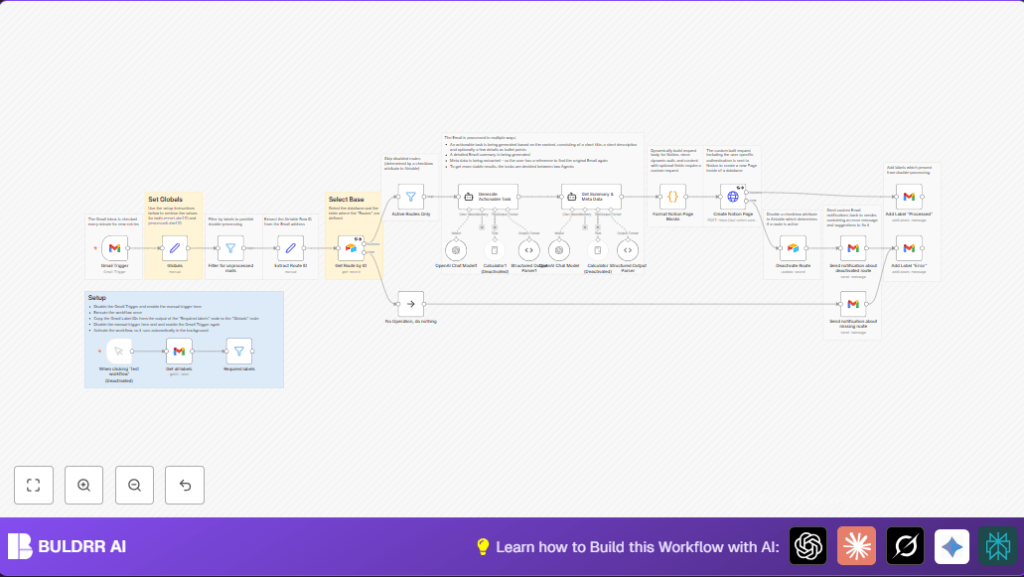
This workflow connects Gmail inbox with Notion. It reads new emails and turns them into tasks in Notion. It uses AI to understand the email and write task titles, descriptions, and summaries. This saves time and stops errors from manual work.
The workflow checks Gmail every minute for new messages. It finds special IDs in the email address to send the task to the right place in Notion. It uses Airtable to know which tasks to accept. It then calls AI to create clear tasks and summaries from the email. Finally, it makes new pages in Notion with all details.
Who should use this workflow
This is for project managers, team leads, or workers who get many task emails every day. They want to skip typing task lists and keep work organized in Notion without mistakes.
It also fits anyone who needs fast, automatic task organization from emails using AI.
Tools and services used
- Gmail API: To read emails and manage labels.
- Notion API: To create new database pages for tasks.
- Airtable API: To store and check route info, tokens, and database IDs.
- OpenAI GPT-4o model: To analyze email content and make task summaries.
- n8n automation platform: Runs the whole workflow.
Use self-host n8n for better privacy and control if hosting the workflow.
Inputs, Processing, and Outputs
Inputs
- New Gmail messages labeled INBOX.
- Email “to” addresses with route IDs in plus alias format.
- Airtable routes data including tokens and database IDs.
Processing Steps
- Trigger every minute to check Gmail INBOX.
- Filter out emails already processed or marked error.
- Extract route ID from recipient email using regex.
- Fetch route info from Airtable; skip inactive routes.
- Use OpenAI GPT-4o twice: one for task extraction, another for detailed summary and meta.
- Format AI results into Notion blocks for title, text, bullet points.
- Send HTTP POST request to Notion API with user token and database ID.
- Label email as Processed if success, or Error if fails.
- If error, deactivate route in Airtable and notify sender by email.
Outputs
- New task pages created in user-specific Notion databases.
- Gmail labels set to prevent double processing.
- Error notifications sent on failure.
Beginner step-by-step: How to build this in n8n
Import the workflow
- Download the workflow file using the Download button on this page.
- Open your n8n editor.
- Use “Import from File” in n8n to load the downloaded workflow.
Set up credentials
- Add Gmail OAuth2 credentials for inbox and label access.
- Add Notion API integration token with page creation rights.
- Enter Airtable API key and specify base and table names.
- Add OpenAI API key with GPT-4o access.
Configure IDs and routes
- Update Globals node with current Gmail label IDs for “Processed” and “Error”.
- Verify Airtable has correct active routes with tokens and Notion database IDs.
- Adjust route ID extraction regex if your email alias format differs.
Test and activate
- Test the workflow by sending a test email matching your route format.
- Check if a new page appears in Notion as expected.
- If test works, activate the workflow toggle in n8n for live processing.
Monitor executions in n8n for errors or retries.
Customization ideas
- Change the AI prompt in task generation node for more detailed or simpler tasks.
- Adjust the email alias regex in Extract Route ID node to match new email formats.
- Add support for images or links in emails by editing Notion formatting code.
- Enhance notifications by adding Slack messages using HTTP Request nodes.
- Batch multiple emails in one run instead of one at a time for speed.
Handling errors and edge cases
- “401 Unauthorized” error means Notion token is wrong or expired. Fix by rechecking token in Airtable.
- Emails processed multiple times may be due to wrong label IDs in Globals node. Update label IDs by fetching them again.
- Route ID extraction fails if email alias format changes. Update regex pattern accordingly.
- Inactive routes skip processing. Reactivate routes in Airtable if needed.
- Silent failures happen if error flows are not connected. Verify all error paths in n8n.
Summary of main results
✓ Saves hours of manual typing by turning emails into Notion tasks.
✓ Stops task loss and errors from manual data entry.
✓ Automatically organizes tasks in correct Notion databases based on email alias.
✓ Uses AI to make clear task titles and detailed summaries.
→ Runs every minute to keep task lists up to date.
