

What This Automation Does ⚙️
This workflow automates writing and publishing WordPress blog posts without manual work.
It picks a category that was used least recently, writes a unique SEO-friendly article, and posts it with a featured image.
This solves the problem of repetitive topics and slow publishing.
The system gets categories from WordPress, filters out ones not wanted, and tracks how often each is used in a Postgres database.
It uses AI to make fresh article titles and full blog content formatted with WordPress blocks.
Images get generated or placeholder ones created, downloaded, then uploaded to WordPress as featured media.
Finally, the post is published, and use data saved for next time.
This saves time and helps keep content fresh and organized.
Tools and Services Used
- WordPress REST API: To get categories, upload media, and publish posts.
- PostgreSQL database: Tracks category usage so posts have good topic variety.
- OpenAI GPT API: Generates unique, SEO-friendly titles and full post content.
- n8n automation platform: Runs the entire workflow in scheduled intervals.
Inputs, Processing, and Outputs
Inputs
- WordPress domain URL and API credentials.
- PostgreSQL database connection and credentials.
- OpenAI API key for content generation.
- Schedule trigger set to run periodically.
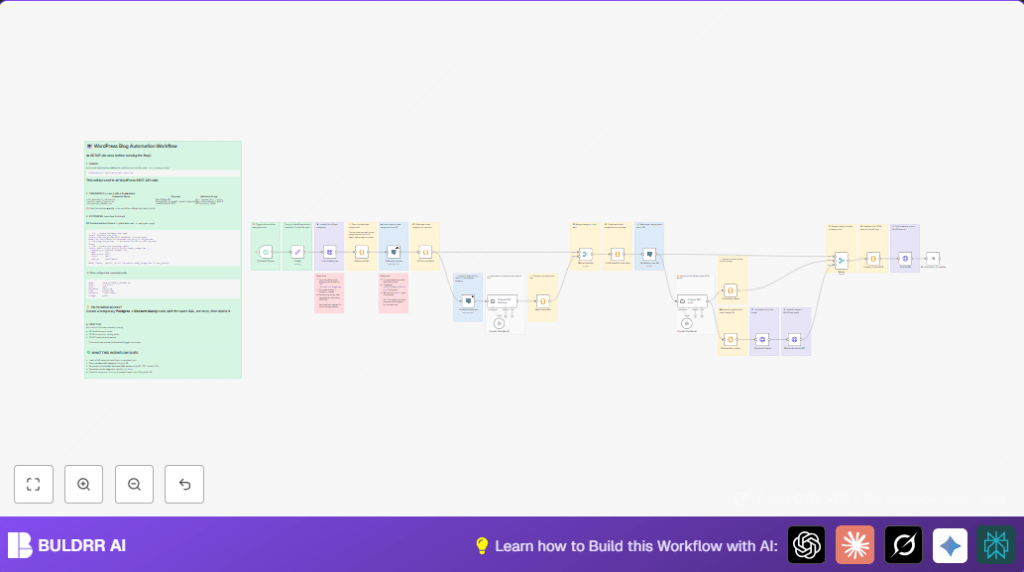
Processing Steps
- Load all categories from WordPress.
- Filter out unwanted categories with code.
- Query Postgres for recent category use.
- Select the least recently used category.
- Get last 10 headlines from Postgres for that category.
- Send info to OpenAI to get a new unique SEO title.
- Build the full article content formatted with WordPress HTML blocks via OpenAI.
- Create or get placeholder image URL for cover.
- Download the image and upload it to WordPress media.
- Combine all post data (title, content, image, category).
- Publish the post on WordPress.
- Update Postgres DB with usage info for category tracking.
Outputs
- New WordPress post with fresh SEO content.
- Post linked to a diverse category.
- Featured image uploaded and assigned.
- Postgres DB updated to track used category.
Beginner Step-by-Step: How to Use This Workflow in n8n
Prepare to Use the Workflow
- Download the workflow JSON file from the Download button on this page.
- Open your n8n editor where you manage workflows.
- Choose “Import from File” and upload the downloaded JSON to import this workflow.
Configure the Workflow Settings
- In the imported workflow, open the Config node and update the
domainfield with the actual WordPress site URL. - Enter your WordPress API credentials in the HTTP Request nodes that post to the WordPress API.
- Make sure Postgres credentials and database details are correct in the Postgres nodes.
- Enter your OpenAI API key in the OpenAI Langchain Agent nodes.
- If excluded category IDs differ for your site, update the array of IDs in the Category Filter code node.
Test and Activate
- Run the workflow manually once inside n8n to check for errors.
- Check that posts are created correctly on your WordPress site.
- If all works right, activate the Schedule Trigger to run the workflow on its set schedule.
- Monitor logs regularly for any failures or API issues.
- For improved reliability, consider self-host n8n so the workflow runs from a stable environment.
Customizations ✏️
- Change excluded categories by updating the
excludeIdsarray in the Category Filter node. - Adjust posting frequency by changing the Schedule Trigger settings.
- Improve images by plugging in an AI image generator instead of using placeholder URLs in the Placeholder creator node.
- Refine the AI prompts in OpenAI Langchain Agent nodes to better fit your blog’s style or brand voice.
- Extend Postgres table structure to store more post metadata like author or tags.
Troubleshooting 🔧
Cannot fetch categories: REST API returns 403 Forbidden
Security plugins might block WordPress REST API calls.
Try whitelisting your automation server’s IP or temporarily disable REST API restrictions.
OpenAI nodes fail with authentication error
Make sure the OpenAI API key entered in the nodes is valid and not expired.
Update credentials in n8n if needed.
Postgres node returns empty result or connection error
Check database credentials, ensure the used_categories table exists.
Test connection with a manual SQL query node.
Pre-Production Checklist ✅
- Confirm WordPress URL is correct in Config node.
- Test WordPress API using Load Categories node.
- Ensure Postgres DB connects and has required table via Selecting recent.
- Check OpenAI generates reasonable titles and content from AI Agent SEO Headings and AI Agent SEO writer.
- Confirm Schedule Trigger is switched on.
- Run a full test run manually and verify posted content.
Summary of Benefits and Results
✓ Saves many hours of writing and manual posting work.
✓ Keeps blog topics varied by tracking category use.
✓ Creates unique, SEO-friendly titles and content.
✓ Handles featured image creation and upload automatically.
✓ Publishes posts continuously on a schedule without delays.
