

What This Automation Does
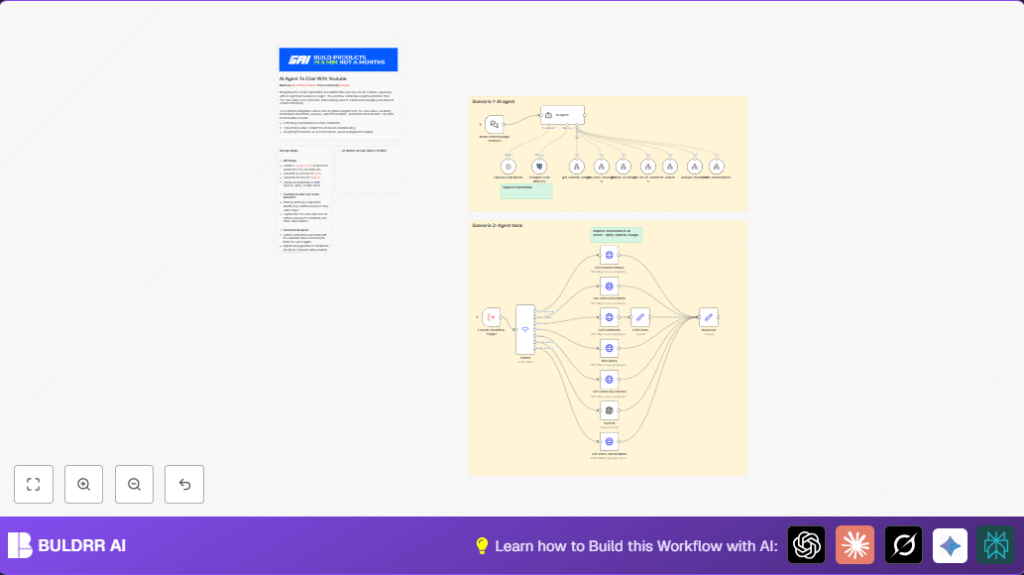
This n8n workflow automates getting YouTube channel info, videos, comments, transcripts, and thumbnail analysis.
It solves the problem of wasting time collecting video data and comments manually.
The workflow saves hours and gives clear insights fast.
It uses YouTube Data API, OpenAI, and Apify to get channel details, video lists, analyze comments with sentiment, transcribe videos, and check thumbnails.
It stores chat memory in Postgres for smart conversations.
Results help content creators make better videos and grow their audience.
Inputs, Processing, and Outputs
Inputs
- User sends a chat message with commands via webhook.
- Channel handle, video ID, or search query included.
- API keys for YouTube, OpenAI, and Apify configured in credentials.
Processing Steps
- The chat trigger in the Webhook node receives message.
- AI Agent node reads message and decides action.
- Switch node routes command to proper YouTube API call or transcription.
- Get Channel Details node retrieves channel ID and info by handle.
- Run Query or Get Videos by Channel node fetch videos by channel or search terms.
- Get Comments node gathers top comments and replies for videos.
- Edit Fields node formats comments for easy reading.
- Get Video Transcription node uses Apify to convert video audio to text.
- OpenAI node analyzes thumbnails with custom prompts.
- Postgres node manages chat history to keep conversations clear.
Outputs
- Formatted JSON or text answers sent back to chat interface.
- Video insights including channel data, comments with sentiment, transcripts, and thumbnail reviews.
Who Should Use This Workflow
Content creators with YouTube channels who want to understand their audience quickly can use this.
This helps marketers, strategists, or managers who want fast, reliable video data without manual work.
You do not need deep technical skills once setup is done.
Tools and Services Used
- YouTube Data API: Gets channel, video, and comment info.
- OpenAI: Processes chat inputs, analyzes thumbnails, and extracts sentiment.
- Apify: Transcribes video audio to text.
- Postgres: Stores chat session data for memory.
- n8n: Runs the workflow with Webhook node, Switch node, and HTTP Request nodes.
Beginner Step-by-Step: How to Use This Workflow in n8n
Step 1: Import the Workflow
- Download the workflow JSON file using the Download button on this page.
- Open n8n editor where workflows are managed.
- Click “Import from File” and select the downloaded JSON file.
Step 2: Configure Credentials
- Go to Credentials in n8n.
- Add your API keys for Google Cloud (YouTube Data API), OpenAI, Apify, and Postgres if used.
- Confirm keys are correct and saved.
Step 3: Update IDs and URLs
- If needed, update channel handles, video URLs, or table names in input nodes.
- Check any prompt or JSON code snippets for placeholders and replace with your values.
Step 4: Test the Workflow
- Trigger the workflow by sending a sample chat message to the URL from the Webhook node.
- Watch the execution in n8n editor to see if data returns properly.
- Fix any credential or input errors if results are missing.
Step 5: Activate Workflow for Production
- Toggle the workflow status to ON.
- Use your front-end or chat system connected to the webhook URL to send real user requests.
- Regularly monitor API key limits and errors in n8n dashboard.
- If self hosting n8n, consider self-host n8n for more control and reliability.
Important Code Snippets and Prompts
Apify Video Transcription JSON Body
Paste this in the Get Video Transcription node body field to transcribe video URL from input:
{
 "startUrls": [
 "{{ $('Execute Workflow Trigger').item.json.query.video_url }}"
 ]
}
Formatting YouTube Comments (Example JavaScript)
Used in Edit Fields node to make comments readable:
items.map(item => {
  let comments = '';
  item.json.comments.forEach(comment => {
    comments += comment.author + ': ' + comment.text + '\n';
    if(comment.replies) {
      comment.replies.forEach(reply => {
        comments += '  ' + reply.author + ': ' + reply.text + '\n';
      });
    }
  });
  item.json.formattedComments = comments;
  return item;
});
Custom Prompt for Thumbnail Analysis
Set this in OpenAI node prompt field:
Analyze the thumbnail image at this URL.
Give feedback about design, colors, and how well it might catch viewers’ attention.
Suggest improvements to increase engagement.
Troubleshooting Common Issues
- HTTP 403 Forbidden from YouTube nodes: Check if YouTube Data API is enabled and API key is valid.
- Empty comments: Confirm video ID is correct and comments are public.
- Transcription fails: Use public video URLs and verify Apify API key.
- AI Agent gives wrong answers: Check OpenAI key and update prompt for clarity.
Customization Ideas
- Change video sorting order in search nodes for top viewed or newest.
- Add an OpenAI sentiment analysis node on comments for positive or negative feedback.
- Update thumbnail prompt to focus on brand colors or style guides.
- Adjust chat memory length in Postgres for longer or shorter conversations.
- Batch process many channels by adding a loop over a channel list.
Summary of Benefits and Results
✓ The workflow automates YouTube data gathering fast.
✓ Saves hours of manual video and comment review work.
✓ Gives clear, formatted insights for better content decisions.
✓ Combines APIs and AI for an easier way to understand channel performance.
→ Users get more audience knowledge and improved video strategies.
→ Workflow runs automatically from chat messages, so data is always fresh.
