

What This Workflow Does
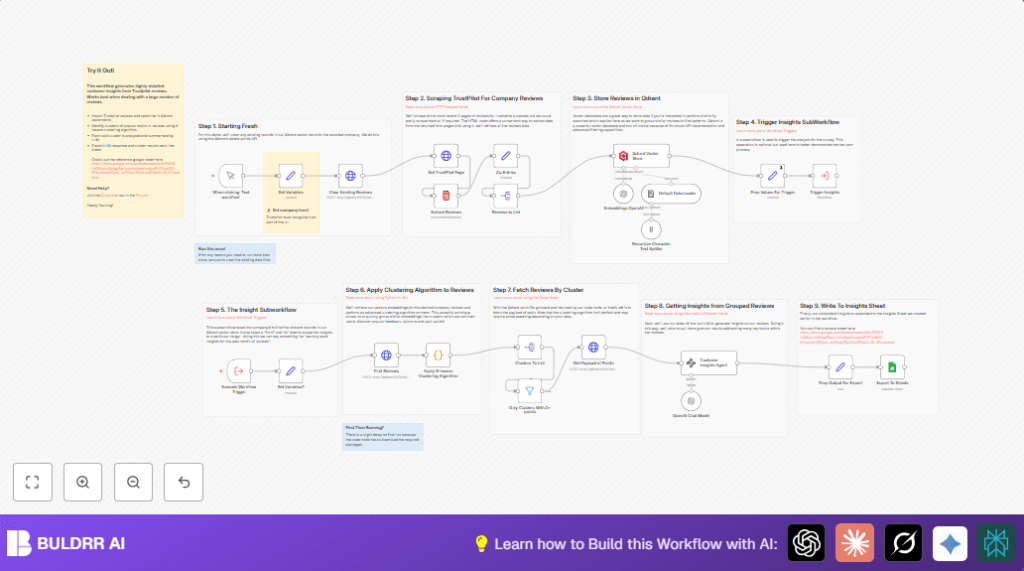
This workflow helps you automatically collect and analyze customer reviews from Trustpilot for a specific company domain.
It solves the problem of manually reading many reviews, which takes hours and can miss important feedback.
The workflow groups similar reviews, finds main topics, rates sentiment, and creates summaries.
At the end, it saves these insights in Google Sheets for easy sharing.
This lets you quickly understand customer opinions and improve your business.
Who Should Use This Workflow
If you manage online customer reviews and find manual reading slow or tiring, this workflow fits well.
Marketing analysts, customer service managers, or small business owners tracking Trustpilot will get faster insights.
It is good for those who want clear, organized feedback without spending many hours reading each review by hand.
Tools and Services Used
- n8n: The automation platform where the workflow runs.
- Trustpilot: Source of customer reviews by company domain.
- OpenAI API: Used to convert reviews to vector embeddings and to generate review summaries and sentiment.
- Qdrant Vector Database: Stores review embeddings for similarity search and clustering.
- Python Environment inside n8n: Runs K-means clustering on review vectors.
- Google Sheets: Saves and shares the review insights and raw data.
Note: For more control or privacy, consider self-host n8n.
Inputs, Processing Steps, and Outputs
Inputs
- The company’s Trustpilot domain URL set as a variable.
- Access credentials for OpenAI API, Qdrant, and Google Sheets.
Processing Steps
- Clear old reviews from the Qdrant vector database for the chosen company.
- Scrape the first three pages of latest Trustpilot reviews using HTTP requests.
- Extract detailed review data like author, rating, title, body, dates, and country from the HTML using CSS selectors.
- Convert review title and text into semantic vectors using OpenAI embeddings.
- Store the review vectors and metadata in Qdrant for similarity and clustering.
- Fetch reviews from Qdrant matching a selected date range.
- Apply Python K-means clustering on the stored vectors to group similar reviews.
- Filter clusters to keep only those with three or more reviews.
- Retrieve full review data for each cluster from Qdrant.
- Send each cluster’s reviews to OpenAI GPT-4o-mini to generate sentiment ratings, summarized insights, and suggested improvements.
- Format this information and export it to a Google Sheets document.
Outputs
- A Google Sheet with organized customer insights per cluster.
- Sentiment scores and suggested improvements for each review group.
- Raw review data clustered by similarity for additional reference.
Beginner Step-by-Step: How to Build the Workflow in n8n
Import the Workflow
- Use the Download button on this page to get the workflow file.
- Inside n8n editor, go to the main menu and choose “Import from File.”
Upload the downloaded JSON file.
Configure Credentials and Variables
- Provide OpenAI API credentials in the Embeddings OpenAI and Customer Insights Agent nodes.
- Add Qdrant API credentials in the respective Qdrant nodes.
Check the URL and authentication token are correct. - Connect Google Sheets with proper OAuth credentials in the Export To Sheets node.
Provide the Google Sheets document ID and sheet name if needed. - Set your company’s Trustpilot domain in the Set Variables node. For example, “www.freddiesflowers.com.”
Test and Activate
- Run the workflow once manually to see if it scrapes, embeds, clusters, and exports data correctly.
- If there are errors, check credentials and node configurations.
Adjust CSS selectors in Extract Reviews if Trustpilot updated their site. - When tests succeed, activate the workflow to run on schedule or trigger as you want.
Remember, for more control or privacy in production, consider self-host n8n.
Customization Ideas
- You can increase the pages fetched in Get TrustPilot Page node beyond the default 3 to get more reviews.
- Change the maximum number of clusters by editing the
n_clustersparameter in the Python Apply K-means Clustering Algorithm node. - Edit date range filters in Set Variables1 node to analyze reviews for past months or custom periods.
- Swap out Qdrant for another vector database if preferred and compatible with n8n.
- Adjust the sentiment categories or messages in the system prompt inside Customer Insights Agent for your business style.
Common Issues and Troubleshooting
- Qdrant HTTP 401 Unauthorized: This means Qdrant API keys are wrong or expired.
Check and update credentials in n8n settings. - OpenAI API Request Failed: Possibly from bad API keys or rate limit exceeded.
Verify keys and monitor usage. - Python Node Errors or Delays: Missing sklearn package causes failure.
Install sklearn on the n8n server or allow runtime installation. - Empty or Wrong Review Extraction: Trustpilot HTML changed, breaking CSS selectors.
Update selectors in Extract Reviews node to fix.
Summary of Results
✓ The workflow automates Trustpilot review collection and analysis.
✓ It clusters reviews by similarity, rates sentiment, and provides key insights.
✓ Final reports are saved in Google Sheets for easy review sharing.
✓ Saves many hours of manual work and helps focus on real customer feedback.
✓ Works with configurable page limits, cluster counts, and date ranges.
