
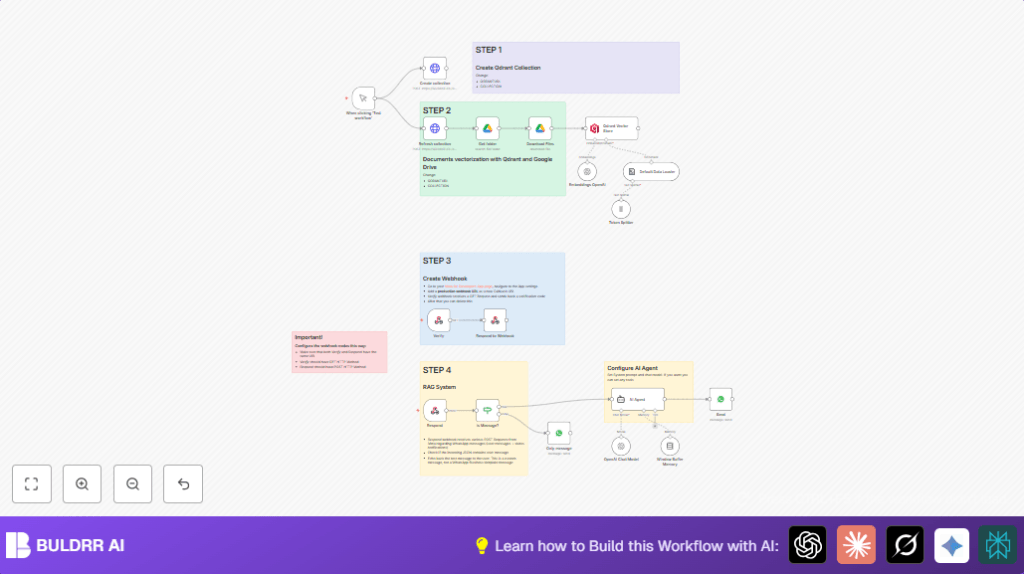

What this workflow does
This workflow helps an electronics store answer WhatsApp customer questions fast and right.
It gets messages sent by customers, looks up product documents from Google Drive, and uses AI to make smart answers.
Then, it sends the reply back on WhatsApp without needing extra staff.
This stops slow replies and mistakes. Customers get quick, correct info about electronics products and support.
Tools and services used
- Meta for Developers WhatsApp API: Gets WhatsApp message events and sends replies.
- Google Drive: Where product manuals and support docs are stored.
- Qdrant vector search API: Holds document vectors for quick semantic search.
- OpenAI GPT-4o-mini model: Generates context-aware chatbot answers.
- n8n automation platform: Connects all parts and runs the workflow.
Who should use this workflow
This is for electronics stores that get many WhatsApp questions about products and support.
Stores needing faster replies without extra staff will find it helpful.
It’s also good for anyone wanting an AI chatbot that reads their product files and chats on WhatsApp.
Inputs, processing, and outputs
Inputs
- WhatsApp text messages sent by customers through Meta webhook.
- Product and support documents from a Google Drive folder.
Processing steps
- Webhook verification to make sure Meta can send data.
- Filter incoming WhatsApp events to get only customer messages.
- Download product documents from Google Drive and convert to plain text.
- Create and refresh a Qdrant collection to store document vector embeddings.
- Generate text embeddings from documents using OpenAI embedding model.
- Insert embeddings into Qdrant vector store for quick semantic search.
- Use an AI agent with GPT-4o-mini and conversation memory to answer customer queries based on the vector search.
- Send AI-generated reply back to customer on WhatsApp using WhatsApp Business API.
- If message is not text or no message, send a polite default reply.
Outputs
- Quick AI-powered text replies sent back on WhatsApp to customers.
- Updated vector store with latest product info for semantic search.
Beginner step-by-step: How to use this workflow in n8n
Step 1: Import the workflow
- Download the workflow file using the Download button on this page.
- Open n8n editor and click on “Import from File.”
- Choose the downloaded workflow and import it.
Step 2: Configure credentials and settings
- Add API keys and credentials for OpenAI, Qdrant, Google Drive, and WhatsApp Business API in n8n Credentials.
- Update the Google Drive node Get folder with your correct folder ID that holds product docs.
- Change the Qdrant URL and collection name in HTTP nodes Create collection and Refresh collection to your Qdrant account details.
- If needed, edit system prompt in the AI Agent node to change how AI answers customers.
- Check the Verify webhook node has the correct path and method for Meta’s webhook verification.
Step 3: Test the workflow
- Manually trigger nodes like Create collection and Refresh collection to set up Qdrant.
- Test uploading documents by running the Google Drive Get folder and Download Files nodes.
- Send a WhatsApp message from a test customer number and watch the reply sent from n8n.
Step 4: Activate for production
- Turn on the workflow toggle button to enable live processing.
- Set Meta webhook URL in Meta for Developers to point to your n8n webhook URL.
- Monitor workflow runs through n8n dashboard for errors or failures.
- Schedule regular document refresh and vector update if product files change.
For better control, you may consider self-host n8n to run this workflow on your own server.
Customization ideas
- Edit the AI Agent node system prompt to match your store’s voice or product lineup.
- Change document folder in Google Drive node to use different support files.
- Switch OpenAI chat model to other versions like gpt-4 for better or cheaper responses.
- Add handling for media messages or templates in WhatsApp by extending the message filter node.
- Build multi-language answers by introducing language detection and changing AI prompts dynamically.
Failure and edge cases handling
If webhook verification fails, check that Verify node and the connected Respond to Webhook node return the exact hub.challenge parameter from Meta.
If no customer message gets processed, verify the IF node path matches latest Meta webhook JSON structure.
If OpenAI API runs out of quota, monitor quota on OpenAI dashboard and throttle API calls or upgrade plan.
If unsupported media or non-text messages arrive, a default polite message reply is sent indicating only text is supported.
Summary of results
✓ Fast and accurate WhatsApp replies using AI based on store documents.
✓ Saves hours of manual replying and reduces mistakes.
✓ Automatically updates knowledge base and vector store from Google Drive.
✓ Works without needing extra staff or complex setups.
✓ Easy to customize for different languages or products.
