
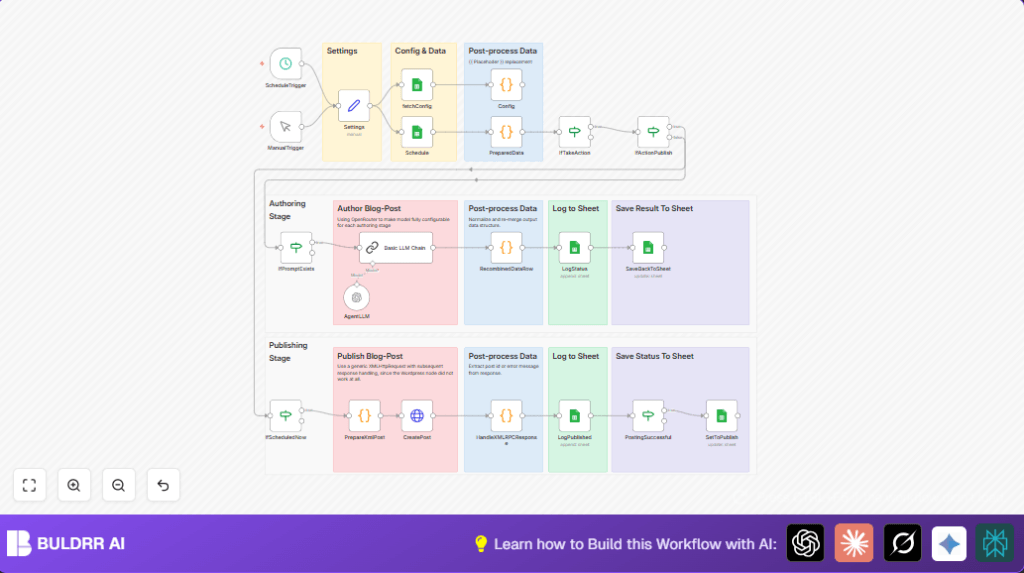

What This Automation Does ⚙️
This workflow reads blog post plans from Google Sheets.
It writes blog posts using OpenAI.
Then it publishes posts to WordPress automatically.
It also updates the sheet with what happened.
This saves lots of manual work and avoids mistakes.
Who Should Use This Workflow
If you manage blog posts often and feel stuck with manual copying or delays, this workflow can help.
It is good for content managers who want less busy work.
You don’t need to be a tech expert to run it.
Tools Used in This Workflow
- n8n Automation Platform: Runs the workflow nodes.
- Google Sheets: Stores blog schedules and prompts.
- OpenAI API: Generates blog content from prompts.
- WordPress XML-RPC: Publishes posts automatically.
Workflow Inputs, Processing, and Outputs
Inputs
- Blog post schedule rows from Google Sheets.
- Configured prompt templates and model settings from Config sheet.
- Current date and time to check publishing triggers.
- Authentication data for Google Sheets, OpenAI, and WordPress.
Processing Steps
- Load schedule and config data from sheets.
- Replace placeholders in prompts using schedule data.
- Check if action is needed based on status and schedule.
- Send prompt to OpenAI to create blog content.
- Clean and merge AI output back into row data.
- Prepare XML payload and send to WordPress for posting.
- Parse WordPress response to confirm publishing.
- Update Google Sheets with status and logs.
Outputs
- Published blog posts on WordPress.
- Updated Google Sheets status fields showing completed or errors.
- Logs with timestamps for auditing workflow runs.
Beginner Step-by-Step: How to Use This Workflow in n8n
1. Download and Import the Workflow
- Click the Download button on this page to get the workflow file.
- Open n8n editor where you want to run this automation.
- Use “Import from File” option to load the workflow JSON.
2. Configure Credentials and Settings
- Add Google Sheets OAuth2 credentials in n8n credentials manager.
- Add your OpenAI API Key or compatible OpenRouter credentials.
- Add WordPress username and application password in the Settings node.
- Update spreadsheet URL, sheet names, and WordPress site URL in the Settings node.
- If needed, update prompt templates or model names in the Config sheet.
3. Test and Activate
- Trigger the workflow with the ManualTrigger node for an initial test run.
- Check Google Sheets for updates and WordPress for created posts.
- Fix errors if any appear, then activate the workflow.
- The ScheduleTrigger will run automatically according to your set time.
- Monitor logs inside Google Sheets for workflow status and issues.
If self-hosting n8n, consider self-host n8n for better control.
Customization Ideas ✏️
- Change the publish action word in Settings node to trigger different actions.
- Use other language models by changing model names in Config sheet.
- Add more placeholders in the PreparedData code node for dynamic data.
- Update WordPress URL if using a custom domain.
- Adjust how often the ScheduleTrigger runs to fit publishing needs.
Troubleshooting ????
- Google Sheets shows empty or auth error: Re-add Google OAuth credentials in n8n and check spreadsheet access.
- AI returns wrong or empty content: Verify prompts exist and match action names in Config sheet.
- WordPress publish fails with XML-RPC errors: Check username and app password, correct URL, and XML escaping code.
Pre-Production Checklist ✅
- Confirm spreadsheet URLs and tab names in Settings are correct.
- Test Google Sheets and OpenAI credentials to ensure connection.
- Run the workflow manually through the ManualTrigger node to check functionality.
- Validate schedule sheet has future dates and correct actions set.
- Make sure XML-RPC publishing is enabled on WordPress with a valid application password.
- Backup spreadsheet data regularly to avoid loss on updates.
Deployment Guide
Switch the workflow from inactive to active inside n8n editor.
The ScheduleTrigger node will check hourly for posts to publish.
Watch your Google Sheets log tabs for status and any errors.
Use the ManualTrigger node anytime for urgent runs or tests.
Summary of Results
✓ Save 4-6 hours per week on manual blog tasks.
✓ Reduce manual mistakes by about 90%.
✓ Automate writing, publishing, and logging blog posts.
✓ Get clear audit logs in Google Sheets.
✓ Focus time freed for content strategy and creativity.
