

What This Automation Does
This workflow checks new Gmail emails to find possible phishing attacks fast.
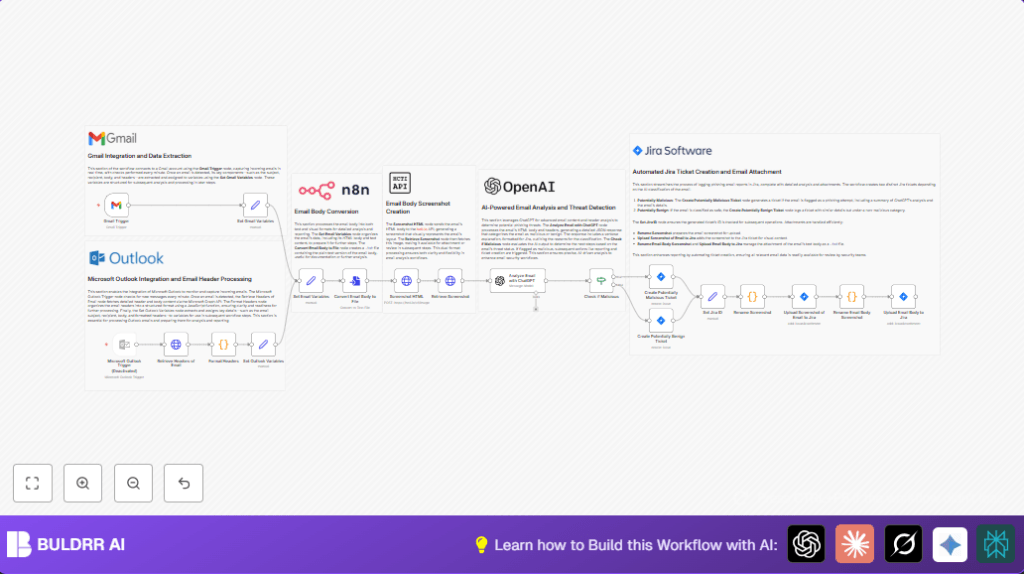
It grabs email details, makes a picture of the email, and uses ChatGPT-4 to say if it might be phishing.
Then it opens a Jira ticket with all the info and the picture for the security team.
This helps teams spot bad emails quickly and keep track of threats without missing anything.
Tools and Services Used
- Gmail: Monitors inbox for new emails using OAuth2.
- hcti.io API: Converts the email’s HTML content into a screenshot image.
- OpenAI ChatGPT-4: Analyzes email content and headers to check for phishing signs.
- Jira Software Cloud: Creates tickets and uploads screenshots as attachments automatically.
- n8n automation platform: Runs and connects all nodes in a workflow for seamless processing.
Inputs, Processing Steps, and Output
Inputs
- New email data from Gmail, including subject, recipient, HTML, and headers.
Processing Steps
- Extract email details for easier access.
- Send the email HTML to hcti.io to get a screenshot URL.
- Download the screenshot image from the URL.
- Rename the image file for Jira compatibility.
- Ask ChatGPT-4, using email data and image info, to check if email is phishing.
- Create a detailed Jira ticket with email content and AI analysis.
- Attach the renamed screenshot image to the Jira ticket.
Output
- Jira ticket containing email info, AI phishing report, and screenshot attachment.
Beginner Step-by-Step: How to Use This Workflow in n8n
Import and Setup
- Download the workflow file using the Download button on this page.
- Inside the n8n editor, click on “Import from File” and select the downloaded workflow.
- Add or update all necessary credentials: Gmail OAuth2, hcti.io API key and password, OpenAI API key, Jira API token and project details.
Configuration
- Check any hardcoded IDs, emails, channels, or project keys in the workflow nodes and update them to match your company’s settings.
- If the ChatGPT node has a prompt or code, copy or customize the prompt provided in this guide if needed.
- Test the workflow by sending a test email to your monitored Gmail and watch the workflow run in the execution pane.
Activation
- Once testing is successful, activate the Gmail Trigger node to start listening for new emails live.
- Deploy the workflow to run continuously, making sure your n8n instance has internet access.
- If self hosting n8n, verify your server and networking setup as per self-host n8n recommendations.
Customization Ideas
- Enable Outlook support by turning on the disabled Outlook trigger and settings in the workflow.
- Replace hcti.io with a local HTML to image tool to keep email content fully private when hosting n8n yourself.
- Change the ChatGPT prompt to add more security checks or output format for other ticket systems.
- Use extra code nodes to extract URLs and test them for phishing links more deeply.
Troubleshooting
- Problem: Gmail Trigger does not activate.
Cause: Wrong or expired OAuth2 token.
Fix: Reconnect Gmail OAuth2 with proper scopes in n8n. - Problem: Screenshot HTML HTTP Request fails.
Cause: Bad hcti.io credentials or wrong form data.
Fix: Check Basic Auth and confirm thehtmlBodyis a clean HTML string. - Problem: Jira ticket not created.
Cause: Faulty Jira API token or wrong project key.
Fix: Verify Jira credentials and project IDs exactly.
Pre-Deployment Checklist
- Make sure Gmail, hcti.io, OpenAI, Jira credentials are valid and active.
- Send test emails and confirm new Gmail messages show in the workflow.
- Check that HTTP calls to hcti.io succeed and generate image URLs.
- Confirm ChatGPT node returns a good analysis without errors.
- Manually create a Jira ticket using the workflow nodes to make sure Jira permissions are correct.
Summary of Benefits and Results
✓ Detect suspicious Gmail emails automatically.
✓ Create visual screenshots of emails for easier review.
✓ Use AI help (ChatGPT-4) to analyze phishing risks.
✓ Automatically raise Jira tickets with all details.
✓ Save time and reduce errors in phishing email response.
✓ Keep proper audit trail and notifications for security team.
