
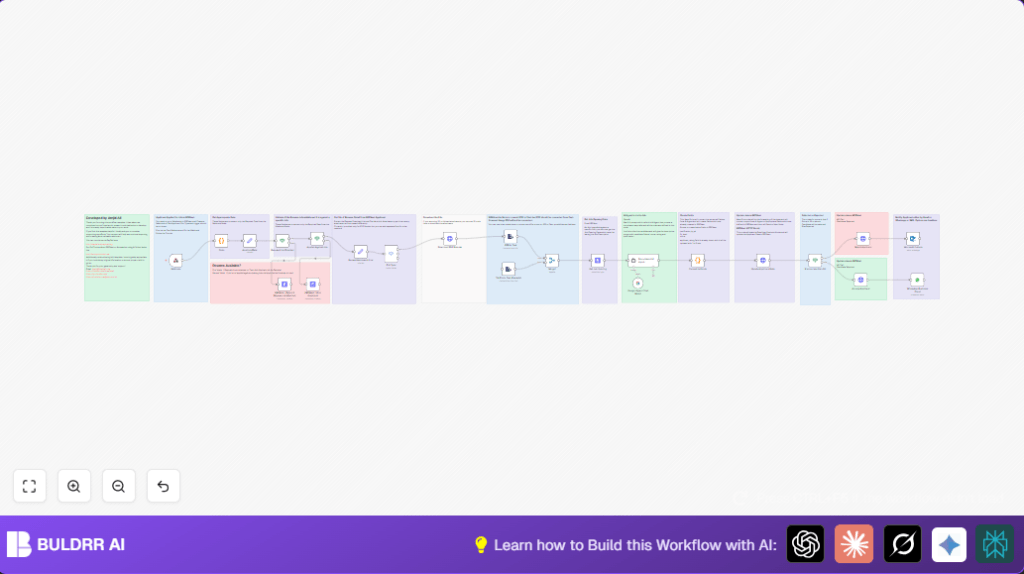

What This Workflow Does
This workflow watches new job applications in ERPNext. It checks if each application has a resume and relates to a job opening. If yes, it downloads the PDF resume, changes it to text, and uses Google Gemini AI to score the candidate’s fit. Then, it updates the candidate’s record in ERPNext and sends notifications by email or WhatsApp based on the score.
This stops the manual work of sorting resumes and speeds up hiring decisions. It helps avoid mistakes and keeps candidates informed on time.
Who Should Use This Workflow
This is good for HR or recruitment teams using ERPNext who want less manual work. Anyone who wants quick and fair candidate review can try this. Basic n8n knowledge and accounts with ERPNext, Google Gemini AI, Outlook, and WhatsApp Business API are needed.
Tools and Services Used
- ERPNext API: Work with Job Applicant and Job Opening data.
- n8n Automation Platform: Run and manage the workflow.
- Google Gemini Langchain: AI scoring and analysis of resumes.
- Microsoft Outlook: Send email notifications.
- WhatsApp Business Cloud API: Send WhatsApp messages.
Beginner Step-by-Step: How to Use This Workflow in n8n
Download and Import
- Download the workflow file using the Download button on this page.
- Open n8n editor where you want to add the workflow.
- Use “Import from File” option and select the downloaded workflow file.
Configure Credentials and Settings
- Add credentials for ERPNext API, Google Gemini API, Microsoft Outlook, and WhatsApp Business Cloud if not already saved.
- Update any IDs, email addresses, WhatsApp phone numbers, or ERPNext document names inside nodes if default ones do not match your setup.
- Check the Code Node named Convert to Fields contains the correct regex and fields as explained.
- Ensure the webhook URL is pinned and correctly set in ERPNext Webhook settings for new job applications.
Test and Activate
- Run one test by creating a sample application in ERPNext that triggers the webhook.
- Watch n8n for successful execution and results updating ERPNext and sending notifications.
- Fix any errors shown like authorization or missing fields.
- When test works fine, activate the workflow to run always for live data.
- Optionally, consider self-host n8n for better privacy and control.
Inputs, Processing, and Outputs
Inputs
- New job applicant data via ERPNext webhook.
- Attached resume file link (PDF only supported).
- Job opening reference from applicant data.
Processing Steps
- Check if resume link is valid and job opening is specified.
- Download PDF resume and extract text.
- Fetch job description from ERPNext.
- Send resume text and job description to Google Gemini AI for scoring.
- Extract structured AI fields using JavaScript code node.
- Update candidate record in ERPNext with AI analysis.
- Decide candidate status based on AI score threshold (80).
- Send notification to candidate by email or WhatsApp.
Outputs
- ERPNext job applicant records updated with fit level, score, rating, and justification.
- Candidate status changed to Accepted, Rejected, or Hold automatically.
- Candidate receives communication about application outcome on email or WhatsApp.
Edge Cases and Error Handling
- No resume or invalid link causes automatic rejection or hold.
- Unsupported file types skip conversion and reject application.
- Download failures from inaccessible resume URLs trigger errors.
- AI output parsing fails if format changes, needing code update.
- ERPNext API errors mean rechecking credentials and permissions.
- Notification sending fails if Outlook or WhatsApp credentials are invalid.
Customization Ideas
- Add support for DOC or JPG resumes with OCR nodes.
- Change AI score threshold in the decision node to fit your policy.
- Add SMS or Slack notifications in addition to current options.
- Adjust AI prompt in Google Gemini node for specific roles or languages.
- Add more fields mapping or candidate profile enrichment from AI.
Code Example to Parse AI Output
This JavaScript code extracts four fields from AI text output to store in ERPNext:
// Input text from the AI output
const textOutput = $json.output || '';

function extractFields(text) {
  const fields = {};
  const fitLevelMatch = text.match(/FitLevel:\s*(.+)\n/);
  const scoreMatch = text.match(/Score:\s*(\d+)\n/);
  const ratingMatch = text.match(/Rating:\s*(\d+)\n/);
  const justificationMatch = text.match(/Justification:\s*([\s\S]+)/);
  fields.fit_level = fitLevelMatch ? fitLevelMatch[1].trim() : null;
  fields.score = scoreMatch ? scoreMatch[1].trim() : null;
  fields.applicant_rating = ratingMatch ? ratingMatch[1].trim() : null;
  fields.justification_by_ai = justificationMatch ? justificationMatch[1].trim() : null;
  return fields;
}

return { json: extractFields(textOutput) };
Summary
✓ Saves hours by automating resume screening.
✓ Improves candidate evaluation speed and fairness.
✓ Updates ERPNext records automatically with AI scores.
✓ Sends timely notifications to candidates.
✓ Easy to configure and extend for more formats and notifications.
