

What this workflow does
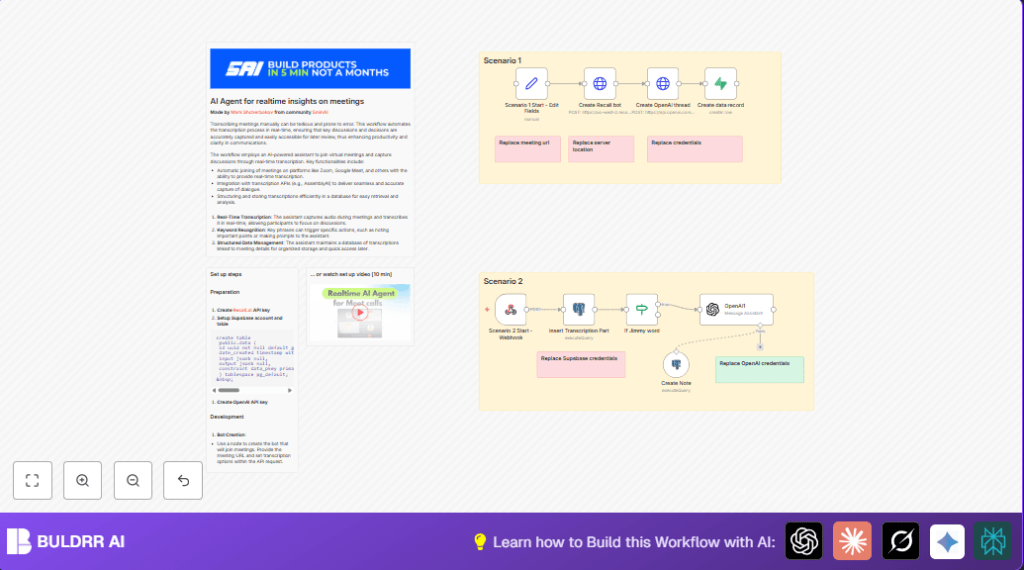
This workflow automatically joins a meeting on platforms like Google Meet.
It captures live speech and makes text transcriptions in real-time.
The system sorts these transcriptions and creates short meeting notes.
This saves time and stops mistakes from writing notes manually.
Who should use this workflow
Teams working remotely that use Google Meet or similar programs.
People who spend many hours typing notes during meetings.
Anyone wanting quick, correct meeting summaries without extra work.
Tools and services used
- Recall.ai API: Creates bot that joins meetings and sends real-time transcription.
- OpenAI API: Processes transcriptions to make clear summaries and insights.
- PostgreSQL database: Stores transcription pieces and notes.
- Supabase: Manages structured data records for easy access.
- n8n automation platform: Runs and controls this workflow with nodes like Webhook node and HTTP Request node.
Inputs, processing steps, outputs
Inputs
- Meeting URL, e.g., Google Meet link.
- Recall.ai API Key for bot creation and transcription.
- OpenAI API Key for AI processing of text.
- Database connections for PostgreSQL and Supabase.
Processing Steps
- Create a bot with Recall.ai to join the meeting.
- Relay live speech to the webhook in n8n.
- Store transcript parts with order, speaker name, and time in PostgreSQL.
- Detect keywords to trigger special notes with OpenAI.
- Use OpenAI to summarize and make insights from the conversation.
- Save final meeting notes back to the database for review.
Outputs
- Real-time transcript storage with speakers and timestamps.
- AI-generated insightful notes highlighting meeting points.
- Structured database records for easy search and later access.
Beginner step-by-step: How to build this in n8n
Import and setup workflow
- Download the workflow file using the Download button on this page.
- Inside n8n editor, go to “Import from File” and select the downloaded file.
Configure required fields
- Add Recall.ai API Key in n8n credentials.
- Add OpenAI API Key similarly.
- Connect your PostgreSQL database with proper access.
- Link Supabase account and set the target table.
- Update the
meeting_urlfield inside the Set node named Scenario 1 Start – Edit Fields with the meeting link to join.
Test and activate
- Run the workflow once to make sure no errors happen.
- Watch logs for transcription reception and OpenAI responses.
- Activate the workflow toggle in n8n to start using it live.
- For more control on data and hosting, consider self-host n8n.
Common edge cases and failures
- If the Recall.ai API returns “401 Unauthorized”, check API Key validity in credentials and update if expired.
- If Webhook node does not receive transcript data, ensure webhook URL matches Recall bot settings exactly.
- If no AI notes are created after transcription parts, confirm keyword filters in If Jimmy word node are working; adjust keyword if needed.
- Case sensitivity in keyword detection can cause missed triggers; use proper string matching.
Customization ideas
- Change the keyword in the If Jimmy word node to other words important to your meetings.
- Switch transcription provider by editing JSON body in the Create Recall bot HTTP Request node.
- Modify AI assistant prompt in the OpenAI1 node to change summarizing style or tone.
- Add new fields to the PostgreSQL table to include extra details like participant info.
- Support other meeting platforms by updating meeting URL patterns as allowed by Recall.ai.
Example SQL query for inserting transcription parts
This query adds new transcript pieces maintaining order into the JSON field output.dialog in PostgreSQL.
UPDATE public.data
SET output = jsonb_set(
  output,
  '{dialog}',
  (
    COALESCE((output->'dialog')::jsonb, '[]'::jsonb) ||
    jsonb_build_object(
      'order', (COALESCE(jsonb_array_length(output->'dialog'), 0) + 1),
      'words', 'transcript words here',
      'speaker', 'speaker name',
      'date_updated', to_jsonb(now()::text)
    )
  )
)
WHERE input->>'recall_bot_id' = $1
RETURNING input->>'openai_thread_id' as thread_id;
This SQL keeps all transcription segments sorted and linked to the proper meeting session for AI processing.
Example OpenAI prompt expression for dialogue formatting
This JavaScript expression takes the dialogue array, filters recent updates, sorts by order, and builds a text string usable as AI prompt.
=
 JSON.parse($('Insert Transcription Part').item.json.dialog)
  .filter(item => item.date_updated && new Date(item.date_updated) >= new Date($('Insert Transcription Part').item.json.date_updated))
  .sort((a, b) => a.order - b.order)
  .map(item => `${item.words}\n${item.speaker}`)
  .join('\n\n')
This helps OpenAI understand the conversation flow clearly.
Summary of results and benefits
✓ Saves hours of manual transcription per week.
✓ Reduces errors from manual note-taking.
✓ Provides live transcription with speaker names and timing.
✓ Generates useful, AI-created meeting insights and notes.
✓ Stores data in structured, searchable databases like PostgreSQL and Supabase.
→ Makes meeting follow-ups and decisions faster and clearer.
