

What This Automation Does
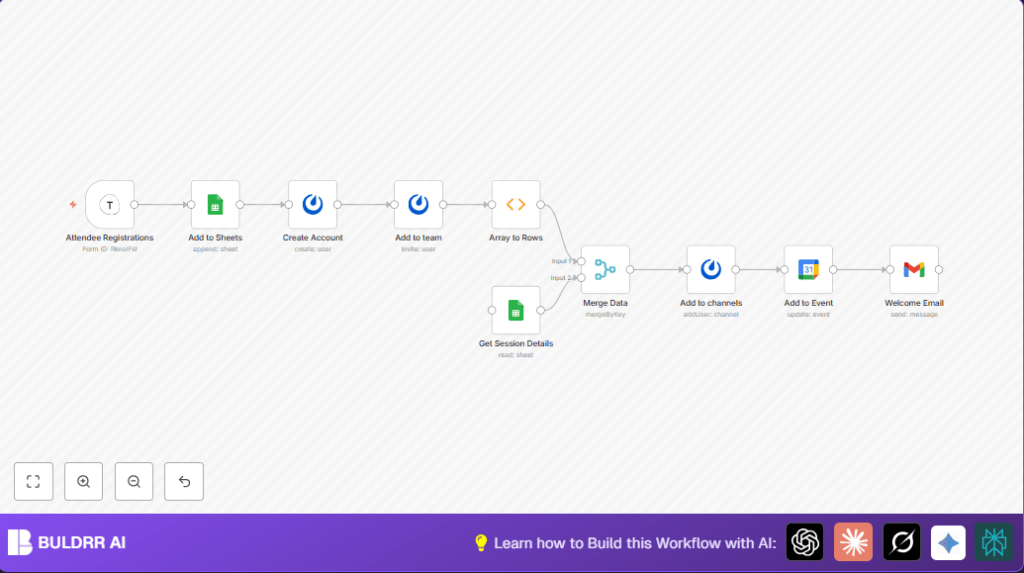
This workflow takes new event registration info from Typeform and uses it to handle all needed onboarding steps automatically.
It adds attendee data to Google Sheets, creates Mattermost user accounts, invites those users to teams and channels, updates Google Calendar invites, and sends welcome emails.
This saves event coordinators a lot of manual work and avoids mistakes in the process.
Inputs, Processing, and Outputs
Inputs
- Typeform responses: Collect attendee info and session choices.
- Google Sheets data: Holds attendee master list and session details.
Processing Steps
- Trigger workflow on new Typeform submission.
- Append attendee data into Attendees sheet.
- Create user account on Mattermost with full name and email.
- Invite user to Mattermost team.
- Turn session preferences array into individual rows via a JavaScript function.
- Fetch session details from Sessions sheet.
- Merge session rows with session details by session name.
- Add user to Mattermost channels corresponding to sessions.
- Update Google Calendar events to include attendee email.
- Send personalized welcome email via Gmail with credentials and session info.
Output
An up-to-date attendee spreadsheet, valid Mattermost accounts in proper teams and channels, updated Google Calendar events, and timely welcome emails.
Tools and Services Used
- Typeform: Collects event registration details.
- Google Sheets: Stores attendee and session data.
- Mattermost API: Manages user accounts, team invitations, and channel memberships.
- Google Calendar API: Updates event attendees.
- Gmail API: Sends welcome emails.
Beginner Step-by-Step: How to Use This Workflow in n8n
Step 1: Import the Workflow
- Download the workflow file using the Download button on this page.
- Inside the n8n editor, click on the menu and choose “Import from File”.
- Select the downloaded workflow file to import.
Step 2: Configure Credentials and IDs
- Open each node that requires credentials.
- Add or update your API Keys or OAuth2 credentials for Typeform, Google Sheets, Mattermost, Google Calendar, and Gmail.
- Check the spreadsheet IDs, sheet names, calendar IDs, team IDs, and email addresses; update them as needed to match your setup.
Step 3: Test the Workflow
- Send a test registration via the Typeform used for this workflow.
- Watch the workflow trigger and run in n8n.
- Check outputs at every step for errors or missing data.
Step 4: Activate the Workflow
- Switch the workflow toggle to “active” in n8n to run automatically on new submissions.
- Monitor initial runs to confirm everything works smoothly.
If self hosting n8n, refer to helpful resources like self-host n8n to manage secure credentials and efficient execution.
Common Edge Cases and Failures
- Typeform Trigger fails if wrong form ID or missing API credentials.
- Google Sheets does not append data if permissions or spreadsheet ID is wrong.
- Mattermost user creation fails if email or password format is invalid.
- Invitation to teams may fail if team ID is incorrect or email syntax is wrong.
- Function node code errors can stop session splitting steps from running.
- Google Calendar updates fail if event ID or calendar ID is wrong.
- Gmail node does not send if OAuth2 authentication is missing or recipient email is invalid.
Customization Ideas
- Change the Typeform question parsed in the Function node to handle different session choice formats.
- Adjust Gmail email message for branding, event details, or legal disclaimers.
- Add delay and reminder emails before the event using additional Gmail or Mattermost nodes.
- Replace Google Calendar node with Microsoft Outlook Calendar if needed, updating credentials accordingly.
- Include extra attendee details like dietary preferences by adding columns to Sheets and adjusting nodes.
Summary of Results
✓ Saves event coordinators many manual hours by automating registration processing.
✓ Ensures new users are created and invited to correct chat teams and channels without errors.
✓ Keeps Google Sheets attendee roster updated live.
✓ Syncs attendee session registrations with Google Calendar event invites automatically.
✓ Sends personalized welcome emails promptly, improving attendee experience.
