

1. What This Workflow Does ⚙️
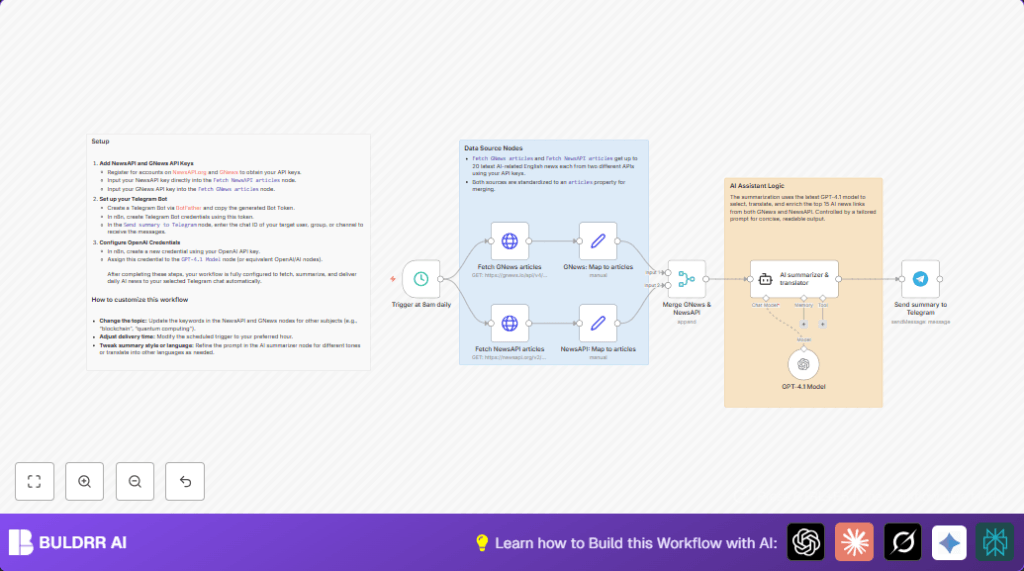
This workflow fetches the latest 20 AI news articles from two big news APIs, merges them, and removes duplicates.
It then uses OpenAI GPT-4.1 to pick the top 15 articles, summarize, and translate them to Traditional Chinese, keeping technical terms in English.
Finally, it sends the summary to a Telegram chat every day at 8 AM.
This saves time and stops mistakes from manual reading or translation.
2. Tools and Services Involved
- GNews API: Fetches AI news articles.
- NewsAPI.org: Another source for AI news articles.
- OpenAI GPT-4.1 model: Selects, summarizes, and translates news.
- Telegram Bot API: Sends news summary to Telegram chat.
- n8n Workflow Automation: Connects and automates all steps.
3. Who Should Use This Workflow?
This workflow is for people who want daily AI news without reading or translating many articles.
It helps those who struggle with manual curation and accuracy in translation, especially for technical AI terms.
4. Inputs, Processing Steps, and Output
Inputs
- API keys for GNews and NewsAPI to get AI news.
- OpenAI API key to use GPT-4.1 model.
- Telegram Bot token and chat ID for message delivery.
Processing Steps
- Two HTTP Request nodes get 20 AI articles each from GNews and NewsAPI.
- Set nodes extract articles arrays from each API response.
- Merge node combines both lists and removes duplicates.
- AI summarizer node with a clear prompt tells GPT-4.1 to pick top 15 relevant articles, translate to Traditional Chinese, keep English technical terms, and include URLs.
- OpenAI GPT-4.1 model node refines the text output for fluency and correctness.
- Telegram Bot node sends the final summary message to the specified chat.
Output
A clear, concise AI news summary in Traditional Chinese delivered on Telegram daily at 8 AM.
The summary includes article links and preserves technical terms correctly.
5. Beginner Step-by-Step: How to Use This Workflow after Importing in n8n
Download and Import
- Download the workflow file using the Download button on this page.
- Open n8n editor where you want to deploy the workflow.
- Use “Import from File” to bring the downloaded workflow into your n8n.
Configuration
- Go to Credentials in n8n and add valid API Keys for NewsAPI and GNews.
- Add OpenAI API key with GPT-4.1 access.
- Add Telegram Bot token credentials and set the correct target chat ID in the Telegram Bot node.
- If needed, update any IDs, emails, channels, or tables used in the workflow.
- Check the AI summarizer node’s prompt to make sure it matches this:
=You are an AI news assistant. Your tasks:
1. Select the 15 most relevant articles on AI technology progress and applications from {{$json.articles}}.
2. Translate them to accurate Traditional Chinese; don't translate commonly used technical English terms.
3. Make sure to include the article URL for each item.
4. Begin output with today's date (e.g., '早安,這是 {{ $now.format('yyyy/MM/dd') }} 的 AI 新聞:')
Output only the summary.
Testing and Activation
- Run the workflow manually once to verify everything works and results are sent to Telegram.
- Fix any errors if found, such as Api key issues or chat ID problems.
- Activate the workflow to start automatic daily runs at 8 AM.
- For self-host n8n, ensure the server and credentials remain valid for uninterrupted runs.
6. Common Issues and Fixes
- API key errors: Check if keys are valid and correctly entered in Credentials.
Refresh expired keys. - Telegram messages not sent: Check the chat ID is correct and bot has access to the chat.
Use /start message to get chat info if unsure. - AI summarizer gives weird results: Look carefully at the prompt text for typos.
Ensure OpenAI has enough tokens for large summaries. - Merge node not combining articles well: Confirm both input connections to the Merge node are correct.
Check for duplicate article filtering rules.
7. Customization Ideas
- Change the search keyword in both HTTP Request nodes from
AIto other topics likeblockchainorquantum computing. - Modify the schedule trigger node to send news at any hour you prefer (not just 8 AM).
- Alter the AI summarizer prompt for translation into other languages or a different style (formal or casual).
- Increase or decrease the number of articles summarized.
- Duplicate the Telegram node to send summaries to multiple chats or groups.
8. Pre-Production Checklist
- Verify all API Keys for NewsAPI, GNews, OpenAI, and Telegram are active and correct.
- Test HTTP Request nodes manually to see if they return news articles.
- Test AI summarizer node with sample data to check output quality.
- Send test messages in Telegram with the Bot to verify chat ID and permissions.
- Backup the entire workflow before turning it live.
9. Deployment Guide
Enable the workflow in n8n to start running at 8 AM daily.
Watch the executions tab for errors or issues.
For hosting n8n, make sure server uptime and API key renewals are managed well.
Use logs in n8n to know if messages reach Telegram successfully or if nodes fail.
10. Summary of Benefits ✓
✓ Saves over one hour daily by automating news fetching and translation.
✓ Prevents mistakes from manual translation and missed articles.
✓ Sends ready-to-read AI news summary in Traditional Chinese on Telegram every morning.
✓ Uses multiple news sources for comprehensive coverage.
✓ Easy setup inside n8n with adjustable keywords and delivery times.
