

What This Automation Does
This workflow takes receipt images sent by the user on Telegram and turns them into organized expense entries automatically.
It solves the problem of slow, manual entry of receipts by reading data from images fast and adding it to a Google Sheets file.
The result is a saved time of hours every week and accurate expense records with quick confirmations on Telegram and SMS.
How the Workflow Works
Inputs
- Receipt images sent by users via Telegram.
Processing Steps
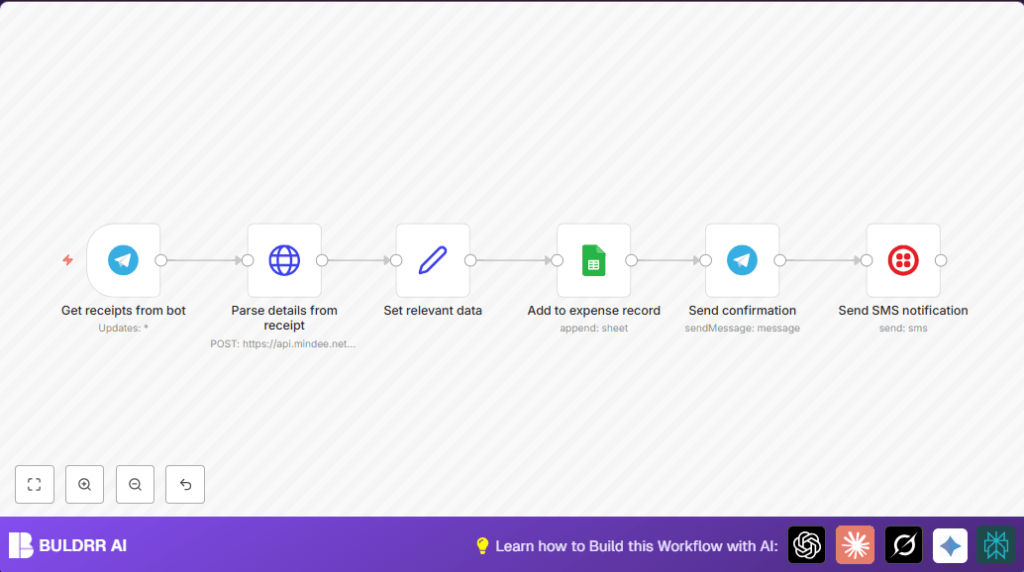
- Telegram Trigger catches receipt images and downloads them.
- HTTP Request sends images to Mindee API which reads key data like amount and merchant.
- Set Node extracts needed fields from Mindee’s response into clean variables.
- Google Sheets Node adds the extracted receipt info as a new row to a spreadsheet.
- Telegram Node sends back a message confirming the receipt was added with details.
- Twilio Node sends an SMS alert with summary and link to the sheet.
Outputs
- New row in Google Sheets with accurate receipt data.
- Confirmation message sent to user on Telegram.
- SMS notification sent to a configured phone number.
Who Should Use This Workflow
This is useful for small business owners, freelancers, or anyone who collects receipts and needs a fast way to log expense data.
The automation saves you time by removing manual entry and cuts errors that hurt reimbursements or tax filing.
Tools and Services Used
- Telegram Bot API: Receives user messages.
- Mindee API: Extracts text and data from receipt images.
- Google Sheets API: Stores expense data in spreadsheet rows.
- Twilio Programmable SMS: Sends notification messages.
- n8n Automation Platform: Runs the workflow.
Beginner Step-by-Step: How to Use This Workflow in n8n
Import the Workflow
- Download the workflow file by clicking the Download button on this page.
- Open your n8n editor where you want to run this automation.
- Click on “Import from File” and select the downloaded workflow file.
Configure Credentials and IDs
- Add your Telegram bot credentials in the Telegram Trigger and Telegram nodes.
- Fill in your Mindee API Key inside the HTTP Request node headers.
- Update the Google Sheet ID and range inside the Google Sheets node.
- Add your Twilio Account SID, Auth Token, and phone numbers in the Twilio node.
Test and Activate
- Send a test receipt image via Telegram to your bot and watch the workflow run.
- Check that new rows appear in Google Sheets and that confirmation messages arrive on Telegram and via SMS.
- Once tested, toggle the workflow to active to run in production.
For self-host n8n users, make sure your webhook URL is accessible on the internet and all credentials are correct. See self-host n8n for helpful info.
Troubleshooting Common Problems
Telegram Trigger Does Not Download Images
Make sure the “Download Media” option is enabled on the Telegram Trigger node.
HTTP Request to Mindee Fails or Has No Data
Confirm “Send Binary Data” is enabled and the Mindee API key is correctly added to the header.
Google Sheets Rows Do Not Appear
Check the Google Sheet ID is correct and that OAuth2 credentials have permissions.
SMS Messages Not Sent
Verify Twilio credentials and phone numbers in the Twilio node are correct and active.
Customization Ideas
- Change the SMS notification node to an Email node to notify via email instead.
- Use a different receipt OCR API by swapping out the HTTP Request node URL and authentication.
- Add a manual approval step after data extraction by inserting a conditional or code node.
- Adjust category mapping in the Set node for custom expense classifications.
- Support multiple Telegram users by sorting entries by user in Google Sheets using Telegram user fields.
Summary
✓ Saves time by automating receipt data entry.
✓ Reduces errors by extracting exact details from images.
✓ Keeps expense data organized in Google Sheets.
✓ Provides instant confirmation on Telegram and SMS.
→ Helps users keep accurate expense records for taxes and reports.
→ Works with simple setup and can run on shared or self-host n8n environments.
