
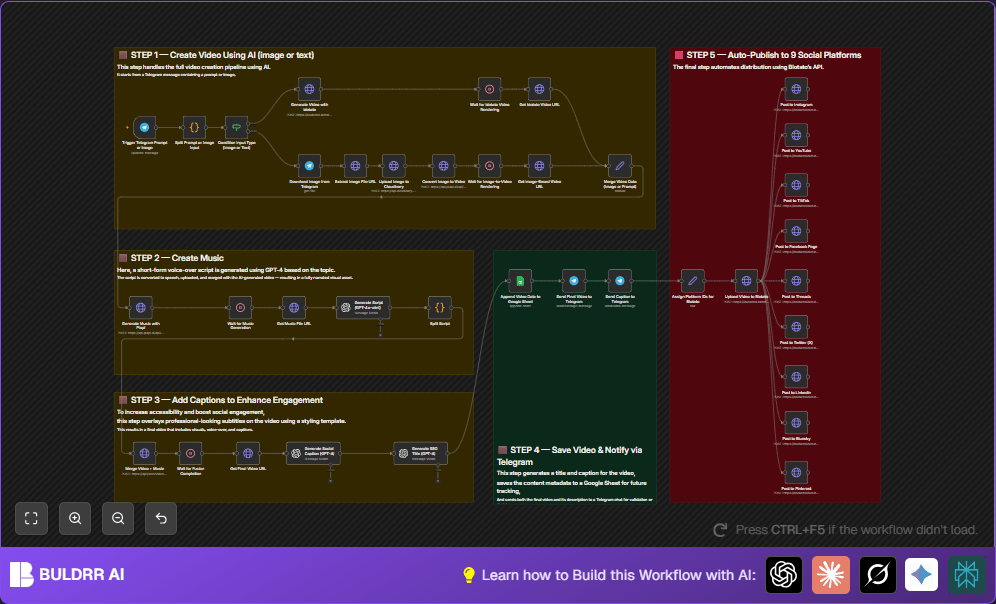

What This Automation Does
This workflow listens for messages on Telegram that have video ideas or pictures.
It makes short AI videos with music and captions automatically.
It sends the videos to nine social media sites like Instagram and YouTube.
The user gets a message on Telegram with the finished video.
The workflow also keeps track of video info in Google Sheets.
Who Should Use This Workflow
Anyone making many short videos for social media.
People who want to save hours and avoid copy-paste mistakes.
Users who want videos with good captions and music without extra work.
Tools and Services Used
- Telegram Bot API: Receives user messages on Telegram.
- Blotato API: Creates videos from text and publishes to multiple social sites.
- Piapi AI: Generates music and converts images to video clips.
- OpenAI GPT-4: Writes captions, scripts, and titles for videos.
- Google Sheets API: Saves video metadata for tracking.
- Cloudinary: Temporarily hosts uploaded images online.
- n8n automation platform: Handles the workflow with all API calls.
Beginner Step-by-Step: How to Use This Workflow Inside n8n
1. Import the Workflow
- Download the workflow file using the Download button on this page.
- Open the n8n editor where the workflow runs.
- Click “Import from File” and choose the downloaded workflow.
2. Configure Credentials and IDs
- Add Telegram Bot Token credentials in the Telegram Trigger node.
- Insert API Keys for Blotato, Piapi, and OpenAI in their respective HTTP request and OpenAI nodes.
- Set up Google Sheets credentials with OAuth and update sheet IDs or folders in the Google Sheets nodes.
- Check Cloudinary upload preset and API keys are correct in the HTTP request node for image upload.
3. Review Prompts and Code Snippets
- Look at the Code nodes parsing Telegram messages; ensure the input matches your expected formats.
- Copy any necessary prompt text inside the OpenAI nodes if you want to customize captions or script generation.
4. Test and Activate
- Send a test video prompt or image to the Telegram bot to see if the workflow triggers.
- Check execution results inside the workflow to catch errors.
- When tests pass, toggle the workflow to active for production use.
Make sure webhook URLs are accessible from the internet.
For full control and stable operation, consider self-host n8n.
Workflow Inputs, Processing, and Outputs Explained
Inputs
- Telegram messages with text prompts or images from users.
Processing Steps
- The Telegram Trigger gets new messages.
- A Code node cleans and splits the message into video prompt, caption idea, and music style.
- An If node chooses whether the input is text or image.
- For images, the workflow downloads the photo and uploads it to Cloudinary.
- Piapi AI creates a short video from the image and waits for processing.
- For text prompts, Blotato API generates the video, waiting for it to finish.
- Music is generated by Piapi based on the music style chosen.
- OpenAI GPT-4 writes two overlay text lines using the caption idea.
- Video and music are merged with captions into a final video asset via an API.
- Created video metadata is saved to Google Sheets.
- The workflow posts the final video and captions to nine social platforms using Blotato’s publishing API.
- A Telegram message sends the video back to the user with details.
Outputs
- AI-generated social videos with music and caption overlays.
- Updated row entries in Google Sheets tracking video info.
- Posted content across multiple social accounts automatically.
- Confirmation messages on Telegram with video link.
Common Failures and Edge Case Handling
- If Telegram messages are empty or missing input, the workflow uses an If node to stop errors.
- If API keys are invalid, HTTP request nodes return errors—check keys immediately.
- Delays in AI video or audio processing are handled by Wait nodes set to fixed intervals (2 minutes).
- Make sure Telegram bot has proper webhook and file permission setups to avoid download problems.
- OpenAI node failures usually happen because of bad prompt syntax or API limits; test prompts separately.
Customization Ideas
- Change video style or template by editing the JSON “style” or “template.id” in the Blotato HTTP request node.
- Rewrite the social caption prompt in the OpenAI node to adjust the mood or tone.
- Add new social platforms by updating platform ID lists and adding HTTP requests to Blotato’s API nodes.
- Switch to a cheaper or newer OpenAI model by editing the model in OpenAI nodes.
- Set video duration longer or shorter in Piapi’s video generation request parameters.
Summary of Benefits
✓ Saves hours previously spent on video creation and posting.
✓ Stops mistakes from manual copying and pasting.
✓ Creates videos with good music and clear captions automatically.
✓ Posts content to 9 social media platforms without extra work.
✓ Tracks all video details in an easy Google Sheets log.
Next Steps
Try adding analysis tools to capture video views and engagement.
Use AI to improve captions further with sentiment or tone detection.
Add video scheduling or closed captions for better accessibility.
The workflow supports many ways to grow content quickly and simply.
