
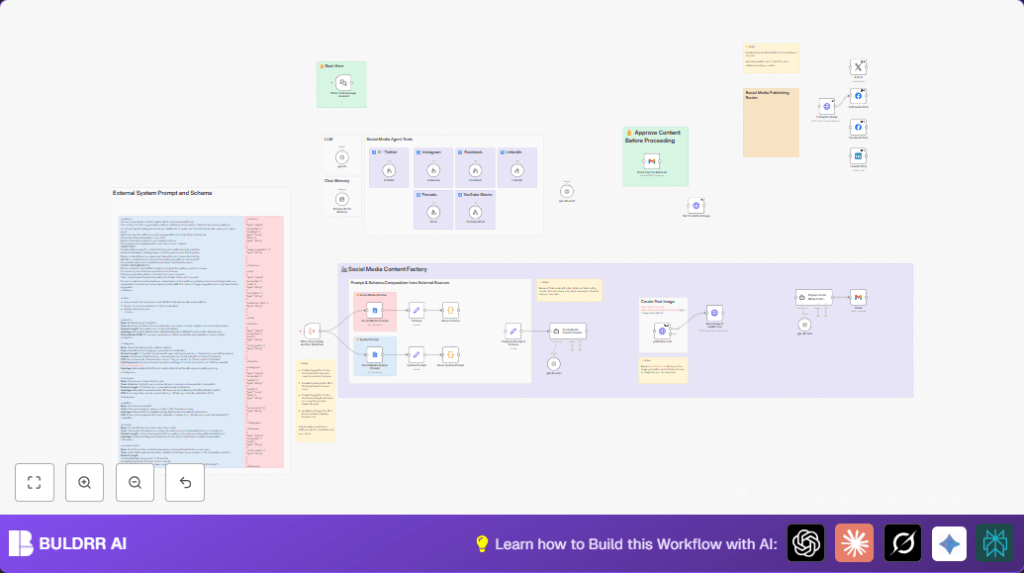

What this workflow does
This workflow makes social media posting faster and easier. It solves the problem of spending hours making posts for many channels by using AI to write and create posts automatically. The result is fast, consistent posts ready for different social platforms with pictures and proper style.
It helps create posts for X, Instagram, Facebook, LinkedIn, Threads, and YouTube Shorts. It follows specific rules for each platform and uploads posts with images after approval. The workflow also keeps a copy of each post saved for later use.
Who should use this workflow
This automation is good for social media managers who need to post on many platforms daily. It helps those who want to save time and avoid mistakes in formatting or hashtags.
Users who want to control content quality with approval steps will also find it helpful. Beginners and experienced users of n8n who want to automate repetitive social media tasks benefit from this workflow.
Tools and services used
- LangChain AI Tool Workflows: For AI content creation tailored by platform.
- Google Docs: Stores JSON schemas and system prompts as XML formatted documents.
- pollinations.ai API: Generates suggested images for social posts.
- imgbb.com API: Hosts generated images for use in social posts.
- Social Media APIs: Includes X (Twitter) OAuth2, Facebook Graph API, LinkedIn OAuth2 for posting.
- Gmail API with OAuth2: Sends emails requesting content approval.
- Google Drive: Saves generated JSON post data centrally.
- n8n automation platform: Runs the workflow with nodes connected in sequence.
Inputs, processing steps, and outputs
Inputs
- User sends a chat prompt through When chat message received node.
- Google Docs URLs provide schemas and system prompts for platforms.
Processing steps
- Parse XML content from Google Docs to get JSON schemas and prompts.
- Combine user prompt and platform rules into one AI prompt.
- Use LangChain Agent to generate posts matching platform formats.
- Create images with pollinations.ai based on post content.
- Upload images to imgbb.com and link them in posts.
- Send approval request emails via Gmail with generated content.
- Wait to confirm double approval before posting.
- Route approved posts to correct social media APIs.
- Save post JSON data into Google Drive for records.
Outputs
- Fully formed social media posts with formatted text, hashtags, images, and CTAs.
- Posts published automatically on X, Instagram, Facebook, LinkedIn, Threads, and YouTube Shorts.
- Approval emails sent and logged.
- Stored post data ready for analytics or reposting.
Beginner step-by-step: How to use this workflow in n8n
Importing the workflow
- Download the workflow file using the Download button on this page.
- Open your n8n editor where you manage workflows.
- Use the “Import from File” feature in n8n to load the downloaded workflow.
Configuring credentials and settings
- Add API Keys or OAuth2 credentials for OpenAI, social media platforms (X, Facebook, LinkedIn), Gmail, imgbb.com, and pollinations.ai.
- Update Google Docs URLs in nodes for the social media schemas and prompts, if needed.
- Change IDs, email addresses, email recipient lists, social media page IDs, or Google Drive folders as necessary to match your accounts.
- Check code and prompt nodes for exact values to paste as needed, like prompt templates or schema parsing functions.
Testing
- Trigger the workflow once by sending a chat message matching the input pattern to verify it runs as expected.
- Check the content generated, approval email sent, and preview the social posts.
Activating for production
- Once testing is successful, activate the workflow in n8n to run automatically when chat messages arrive.
- Make sure the webhook URLs for the chat trigger are publicly accessible.
- Monitor logs for any errors and update credentials if tokens expire.
- Consider using self-host n8n if needed for stable operation.
Common issues and how to solve
- Workflow does not start when chat prompt is sent: Check that When chat message received node webhook URL matches in LangChain chat app. Test with curl or test prompt.
- JSON schema parsing errors: Verify Google Docs have correct XML tags and well-formed JSON. Review parse nodes for match.
- Image generation fails or returns no image: Confirm pollinations.ai API key validity and network access. Retry or change image API if needed.
- Posts fail to publish: Check all social media API credentials, ensure tokens are valid and have posting rights.
Customization ideas
- Update Google Docs schemas or prompt files for changes in platform requirements or hashtags.
- Replace pollinations.ai with another image API by changing the HTTP Request node URL and parameters.
- Switch AI model in LangChain nodes to another OpenAI model like GPT-4o or GPT-4o-mini for style changes.
- Add more approval email recipients or adjust response times by modifying the Gmail nodes.
- Add new social media platforms by creating LangChain workflows and API nodes in the publishing router.
Summary of results
✓ Saves 4-5 hours daily by automating content creation and posting.
✓ Ensures posts fit each social platform’s style and technical rules.
✓ Generates and hosts images automatically for posts.
✓ Adds a controlled approval process before posting.
✓ Keeps all posts organized and stored in Google Drive.
→ Gives users more time and less worry over posting errors.
→ Removes manual steps for better productivity and consistency.
