
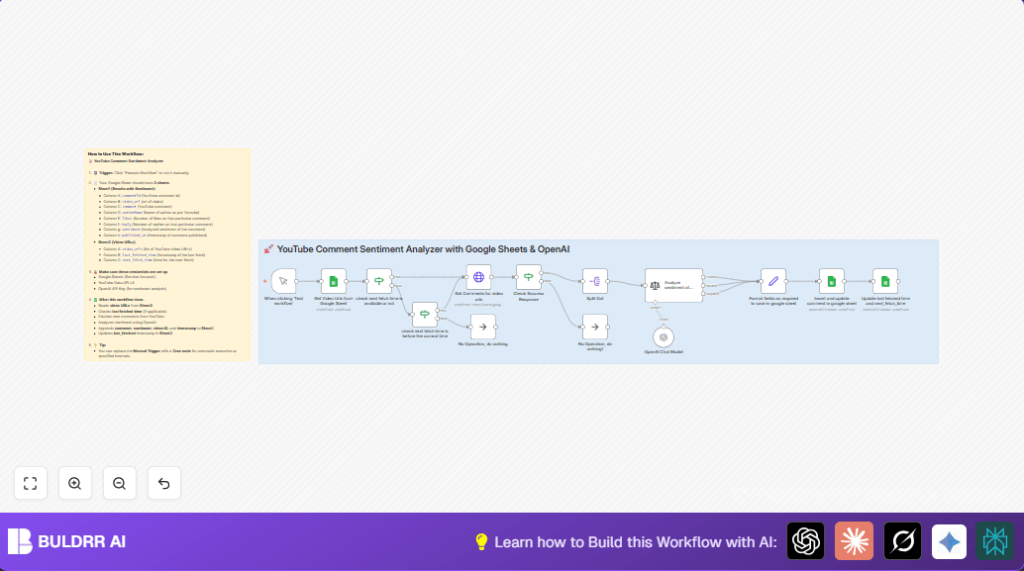

What this workflow does
This workflow reads YouTube video URLs from a Google Sheet and fetches recent comments automatically.
It sends each comment to OpenAI’s GPT-4o-mini model to analyze if the sentiment is Positive, Neutral, or Negative.
Then it saves the comments and sentiment back into another Google Sheet for easy review.
This saves hours of manual work reading and sorting comments, helping users see what viewers feel quickly.
Who should use this workflow
This workflow is for someone who manages multiple YouTube channels or videos.
It is useful if manually checking all comments takes too long or misses important feedback.
Anyone wanting fast, organized insights on audience feelings from many comments will benefit.
It works even if the user does not want to write code or handle APIs directly.
Tools and services used
- Google Sheets: Stores the input video URLs and the output comments with sentiments.
- YouTube Data API v3: Retrieves up to 100 recent comments for each video automatically.
- OpenAI API with GPT-4o-mini model: Analyzes the sentiment of every YouTube comment text.
- n8n: Automates the whole process inside a no-code workflow editor.
Inputs, processing steps, and outputs
Inputs
- List of YouTube video URLs in a Google Sheet (with columns for last and next fetch times).
- API credentials for Google Sheets, YouTube Data API, and OpenAI.
Processing Steps
- Read video URLs and timestamps from Google Sheet.
- Check if new comments should be fetched based on timing (to avoid repeated fetch quickly).
- Call YouTube Data API to get up to 100 recent comments for each video.
- Verify successful API response before processing.
- Split comments into separate items for analysis.
- Send each comment text to OpenAI GPT-4o-mini for sentiment classification into Positive, Neutral, or Negative.
- Format necessary fields like comment ID, author, likes, replies, sentiment, and timestamps.
- Insert new or update existing comments’ data in the Google Sheet.
- Update the last fetched time and next fetch time in the Google Sheet for scheduling next runs.
Outputs
- Google Sheet updated with comments details and sentiment labels for all monitored videos.
- Timestamps updated to prevent unnecessary API calls.
Beginner step-by-step: How to use in n8n production
Download and import workflow
- Use the Download button on this page to get the workflow file.
- Inside the n8n editor, use the Import from File option to load the workflow.
Configure credentials and settings
- Add your Google Sheets Service Account credentials in the Google Sheets nodes.
- Provide your YouTube Data API key in the HTTP Request node Get Comments for video urls.
- Set your OpenAI API key in the OpenAI Chat Model node.
- Update the Google Sheet IDs, sheet names, or service account email if they are not set correctly.
Test and activate
- Click Execute Workflow to test if comments load and sentiment labels appear in your Google Sheet.
- Fix any errors like authorization or API quotas before continuing.
- Activate the workflow in n8n for scheduled or manual runs.
If you want automatic runs, replace the Manual Trigger with a Cron node and schedule frequency.
For users running self-host n8n, keep API quotas and timings in mind.
Edge cases and failures
- Google Sheets access errors happen if you don’t share your sheet with the service account email. Give Editor rights for smooth access.
- YouTube API errors mean wrong API keys, missing permissions, or quota limits. Check keys and console for quota usage.
- OpenAI node may fail if the API key is wrong or prompts are misconfigured. Test prompts in OpenAI playground to verify.
- If comment replies exist, they are not analyzed by default. This can be customized if desired.
- The workflow will skip fetching when next_fetch_time is in the future to avoid repeats. Tweak timing logic if needed.
Customization ideas
- Replace the Manual Trigger node with the Cron node to automate runs regularly.
- Add more sentiment categories like Very Positive or Very Negative in the OpenAI prompt for finer results.
- Increase maxResults parameter over 100 in YouTube API node if API quota allows for fetching more comments.
- Include replying comment sentiment by looping through replies in comments and sending to OpenAI.
Summary of workflow results
✓ Saves hours per week by automating comment reading and sentiment detection.
✓ Organizes comment data and sentiment clearly in Google Sheets.
✓ Avoids repeated API calls by using fetch timing checks.
✓ Supports multiple videos managed at once via spreadsheet URLs.
✓ Easy to test and activate inside n8n with API keys and credentials.
