
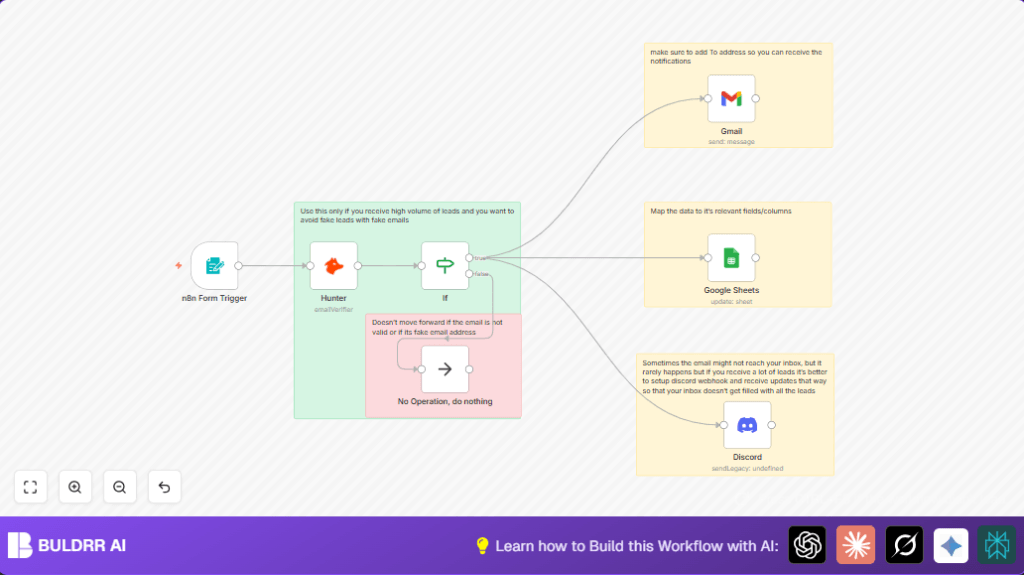

What this workflow does
This workflow collects lead data through a simple form and checks if emails are real.
It stops fake emails from cluttering the list.
Valid leads go into Google Sheets and notify the team by email and Discord.
You save time and get good leads fast.
Inputs:
Users send Name, Email, and Queries through the form.
Processing steps:
The form data goes to the Form Trigger.
The email is checked for validity using Hunter node.
If valid, leads update or add in Google Sheets.
An email notification is sent with Gmail node.
A team message is sent with Discord node.
Invalid emails stop the process to avoid waste.
Output:
A clean, updated lead list in Sheets, email alerts received, and team updates in Discord channel.
Who should use this workflow
This workflow is useful for people who get many leads from online forms but struggle with fake emails.
It helps marketing teams or sales departments clean leads fast.
Anyone who wants to avoid wasting time on fake contacts and wants alerts for new real leads can use this.
Tools and services used
- n8n Form Trigger: To capture user inputs from a web form.
- Hunter API: To verify if emails are real or fake.
- Google Sheets: To store and update lead data in a spreadsheet.
- Gmail: To send email notifications for valid leads.
- Discord Webhook: To send team notifications as formatted messages.
Beginner step-by-step: How to use this workflow in n8n
1. Import the workflow
- Download the workflow file using the Download button on this page.
- Open your n8n editor.
- Click on “Import from File” and select the downloaded workflow JSON.
2. Configure the workflow
- Add your API credentials: Hunter API Key, Google Sheets OAuth, and Gmail OAuth.
- Update the Google Sheets node with your spreadsheet ID and sheet name if different from defaults.
- Set the Gmail node recipient email address where notifications will go.
- Paste your Discord webhook URL into the Discord node for team alerts.
3. Test the workflow
- Submit a test entry through the Form Trigger or simulate input data.
- Check if the email is validated, data appears in Google Sheets, an email arrives, and the Discord message posts.
4. Activate for production
- Switch the workflow toggle to “active” in n8n editor.
- The workflow is now ready to run automatically whenever someone submits the form.
Follow this simple setup to start capturing and verifying leads in your n8n without building from scratch.
For fuller control or to host independently, use self-host n8n.
Workflow input, process, and output
Input:
Form submissions with Name, Email, and Query fields.
Process:
1. Form Trigger captures submitted info.
2. Hunter node verifies if email is real or fake.
3. If node checks if email verification is positive.
4. Valid leads get updated or entered into Google Sheets.
5. Gmail node sends an email notice about the lead.
6. Discord node posts a message in a channel with lead info.
7. Invalid emails cause workflow to stop with a No Operation node.
Output:
A filtered, clean lead list and real-time notifications by email and Discord.
Edge cases or failures
- If the Hunter node fails to validate an email, the workflow stops early.
- Invalid API keys for Hunter or Gmail cause error in the workflow.
- Wrong spreadsheet ID or sheet name means leads won’t update correctly.
- Gmail sending limits or lack of OAuth permission can block notification emails.
- Discord webhook misconfiguration stops team notifications.
Check credentials and configurations closely to avoid failures.
Customization ideas
- Add or remove form fields in Form Trigger to capture different lead details.
- Modify Google Sheets update condition to match on Email instead of Name.
- Change Gmail message formatting or add attachments as needed.
- Replace Discord node with Slack or Teams node for different team alerts.
Summary
✓ Form captures Name, Email, and Query from leads.
✓ Hunter confirms if emails are real before saving.
✓ Google Sheets holds all valid leads neatly.
✓ Gmail sends alert emails about new leads.
✓ Discord posts team messages with lead info.
→ Stops fake leads and saves time from manual entry.
→ Keeps team updated in real-time across channels.
