

What this workflow does
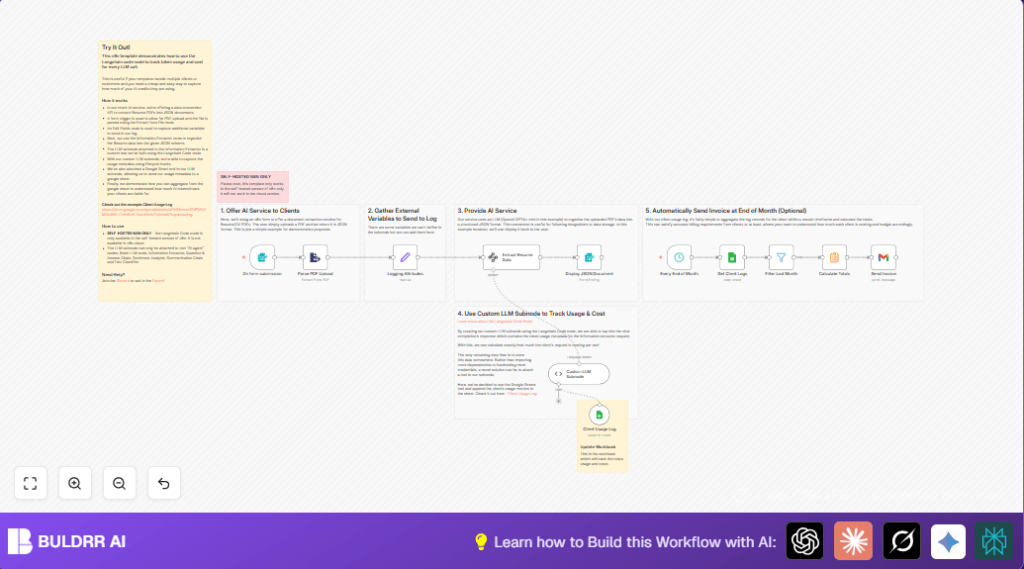
This workflow helps manage AI usage and billing for clients who submit resumes in PDF form. It extracts text from uploaded PDFs, converts the raw data into structured resume information, tracks AI token use per request, and logs all costs for billing. At month end, it totals clients’ usage and sends automatic invoices by email.
The workflow solves the problem of manual tracking and billing for AI service costs. It ensures accurate cost calculation per client and removes the risk of undercharging or losing money on AI usage.
Who should use this workflow
This workflow is built for small or growing services that use AI models to process resumes or documents. Users who want to automate billing by capturing AI token usage specifically per client will benefit most.
It fits well with businesses that receive resumes as PDF files and want a transparent way to extract data while tracking costs precisely.
Tools and services used
- n8n automation platform: Runs the workflow and integrates other tools.
- OpenAI API: Provides AI model for text extraction and processing.
- Langchain integration in n8n: Manages AI calls and token usage tracking.
- Google Sheets: Stores detailed logs of AI usage and cost per client.
- Gmail service node: Sends monthly invoice emails to clients.
How this workflow works
Inputs
Clients upload a resume as a PDF file using the Form Trigger node, which collects the file and a billing confirmation.
Processing steps
- The PDF is converted to text using the Extract from File node.
- The Set node adds fixed workflow data and client ID to log this request.
- The extracted text is passed to Langchain’s Information Extractor node, which outputs structured JSON resume data.
- A custom Langchain Code node reads token usage metadata from the OpenAI response, calculates cost per token, and prepares a log row.
- The usage and cost data are appended as a new row in Google Sheets using the connected Google Sheets Tool.
- The extracted resume JSON is shown back to the client through a Form node configured as a completion screen.
- On the last day each month, a Schedule Trigger node starts monthly aggregation of client logs.
- Google Sheets are queried for logs matching the client and current month.
- Token usage and costs are summed with a Summarize node.
- An invoice email is sent via the Gmail node with the billing summary.
Output
Clients get structured resume data as JSON on submission. The service owner receives detailed usage logs per request. At month end, clients get invoices showing AI resource consumption and cost.
Beginner step-by-step: Using this workflow in n8n production
Step 1: Import the workflow
- Download the workflow file using the Download button on this page.
- Open the n8n editor where you want to use this workflow.
- Choose “Import from File” and upload the downloaded workflow file.
Step 2: Add credentials and API keys
- In n8n, open each node that needs credentials (OpenAI, Google Sheets, Gmail).
- Paste your OpenAI API key into the Langchain nodes configurations.
- Ensure Google Sheets nodes have proper OAuth2 credentials linked.
- Set Gmail credentials with OAuth2 access to send emails.
Step 3: Configure IDs and emails
- Update the client ID in the Set node if you want dynamic clients.
- Confirm the Google Sheet ID and sheet name are correct in the Google Sheets nodes.
- Set the recipient email address in the Gmail node.
Step 4: Test the workflow
- Submit a sample PDF resume through the form URL generated by the Form Trigger node.
- Check extracted data is shown and logged correctly in the Google Sheet.
- Review token usage and cost calculations in the sheet.
Step 5: Activate for production
- Turn on the workflow switch in n8n for automatic runs.
- Enable the monthly Schedule Trigger node to automate billing emails.
If hosting or running n8n on your server, see self-host n8n for help.
Inputs → Process → Output summary
Inputs: PDF resume files uploaded by clients plus billing consent.
Process: Convert PDF to text, extract resume details as JSON, track AI token usage and costs via Langchain Code node, and log details in Google Sheets. Monthly batch sums costs and triggers invoice emails.
Outputs: Structured resume JSON visible to clients on form completion and a detailed Google Sheets log of usage with cost per client. Monthly emailed invoices show precise AI service charges.
Potential issues and fixes
- Google Sheets appends fail silently: Check sheet name, spreadsheet ID, and OAuth2 tokens for correctness.
- Invoice emails not sent: Verify Gmail OAuth2 credential setup and client email addresses.
- Information Extractor gives empty or error output: Ensure input text from PDF is non-empty and JSON schema format is exact.
Suggestions for customization
- Make client IDs dynamic by linking them from the form input to support many clients.
- Adjust per-token cost values in the Langchain Code node code to match current AI pricing.
- Improve invoice email templates in the Gmail node with logos and payment links.
- Add extra client info like emails or project numbers into the Google Sheets log.
Results and benefits
✓ Clients upload resumes easily and get structured feedback.
✓ AI usage is tracked precisely per client with token-level details.
✓ Billing is automated monthly with accurate cost calculation.
✓ Saves time by removing manual tracking work.
→ Reduces billing errors and lost revenue risks.
→ Supports scaling with many clients without extra effort.
