

What This Workflow Does
This workflow copies contact data between Pipedrive and HubSpot automatically.
It fixes the problem of contacts being wrong or old in one system or the other.
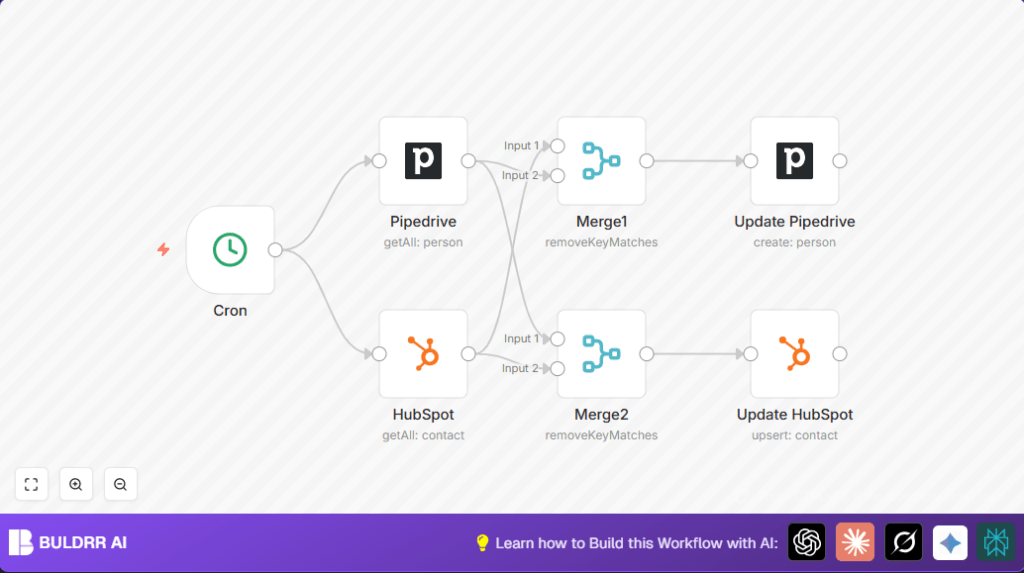
Every set time, it checks all contacts in both CRMs, finds differences by email, and updates the contact info to match.
This means contact lists stay right in both places without needing manual work.
Tools and Services Used
- Pipedrive API: Accesses contacts data in Pipedrive.
- HubSpot API: Accesses contacts data in HubSpot.
- n8n: Runs the automation workflow to sync data automatically.
- Cron node: Triggers the workflow on a schedule.
- Pipedrive node: Fetches and updates contacts in Pipedrive.
- HubSpot node: Fetches and updates contacts in HubSpot.
- Merge nodes: Compares emails to find differences between CRMs.
Inputs, Processing Steps, and Output
Inputs
- All contacts from Pipedrive.
- All contacts from HubSpot.
Processing Steps
- Step 1: The Cron node starts the process on your chosen schedule.
- Step 2: The Pipedrive node pulls all contacts from Pipedrive.
- Step 3: The HubSpot node pulls all contacts from HubSpot.
- Step 4: Two Merge nodes match email addresses between the two sets and find contacts that differ.
- Step 5: The Update Pipedrive node fixes Pipedrive contacts with latest names and emails from HubSpot.
- Step 6: The Update HubSpot node fixes HubSpot contacts with latest names and emails from Pipedrive.
Output
Both Pipedrive and HubSpot have updated, accurate contact info matching each other.
Who Should Use This Workflow
If you use both Pipedrive and HubSpot without syncing, this helps keep data correct.
You save time by not fixing contacts by hand.
Small or medium sales teams that want fewer errors and better outreach will get benefits.
Beginner Step-by-Step: How to Use This Workflow in n8n for Production
1. Download and Import the Workflow
- Click the Download button on this page to save the workflow file.
- Open the n8n editor where you want to run this.
- Click on the menu and pick Import from File.
- Select the saved workflow file to load it inside n8n.
2. Configure Required Credentials
- Go to credentials inside n8n.
- Add or select valid API Keys for Pipedrive and HubSpot.
- Make sure these API Keys have permission to read and update contacts.
3. Adjust Settings if Needed
- Check if any IDs, emails, or lists need changing in the update nodes.
- Update any specific contact fields you want to sync.
4. Test the Workflow
- Run the workflow once manually inside n8n to see if it fetches and updates data correctly.
- Check execution logs for errors or warnings.
5. Activate the Workflow
- Turn the workflow to Active so it runs on the schedule set in the Cron node.
- Monitor first few runs to confirm data is syncing as expected.
Note: For running constantly without interruptions, using self-host n8n is advised.
Customizations and Tips
- Change how often syncing runs by editing the Cron node schedule.
- Add syncing for phone numbers or company names by editing the update node fields.
- Add filter nodes before merges to sync only contacts from certain lists.
- Always test changes carefully before activating.
Common Problems and Fixes
Problem: No contacts come from Pipedrive node
Reason: API Key expired or wrong.
Fix: Update API Key in n8n Credentials and test connection again.
Problem: Merge nodes do not find any differences
Reason: Email property names in merge settings might be incorrect.
Fix: Check the JSON data returned from both nodes, update merge property names to match exactly.
Pre-Production Checklist
- Ensure Pipedrive and HubSpot API Keys in n8n are valid and have proper access.
- Run the workflow manually to verify contact fetching and updating works.
- Verify emails are compared correctly and only differing contacts update.
- Make backup of all CRM data before starting automation in real environment.
Deployment Guide
After setting up, enable the workflow by switching it to Active.
Run it manually a few times and watch the logs to be sure updates happen as expected.
For stable running, use self-host n8n or have reliable internet and API access.
Summary
✓ Syncs contact data automatically between Pipedrive and HubSpot using n8n.
✓ Saves 3-5 hours each week by removing manual updates.
✓ Keeps both sales teams working from correct and updated contacts.
→ Runs on a schedule controlled by the Cron node.
→ Uses simple node steps: fetch, compare by email, and update contacts.
