

What This Workflow Does
This workflow copies Microsoft Outlook Calendar events into a Notion database every minute.
It helps by saving time and stopping errors from copying event details by hand.
The workflow finds new or changed events in Outlook and then creates or updates pages in Notion to match.
This way, the Notion database stays current with Outlook Calendar without extra work.
Who Should Use This Workflow
This workflow is perfect for people who manage Microsoft Outlook Calendars and use Notion for organizing projects.
If manual copying between Outlook and Notion wastes time or causes mistakes, this automation helps.
Tools and Services Used
- n8n: An automation platform to build and run the workflow.
- Microsoft Outlook Calendar via Microsoft Graph API: To get calendar events.
- Notion API: To create or update pages in a Notion database.
- OAuth2: For secure authorization to both Microsoft and Notion services.
Workflow Inputs, Processing, and Outputs
Inputs
- Schedule trigger running every minute to start the process.
- OAuth2 credentials for Microsoft Graph to fetch Outlook events.
- Notion API token to access the target database.
- Database ID and property names in Notion where the events will be stored.
Processing Steps
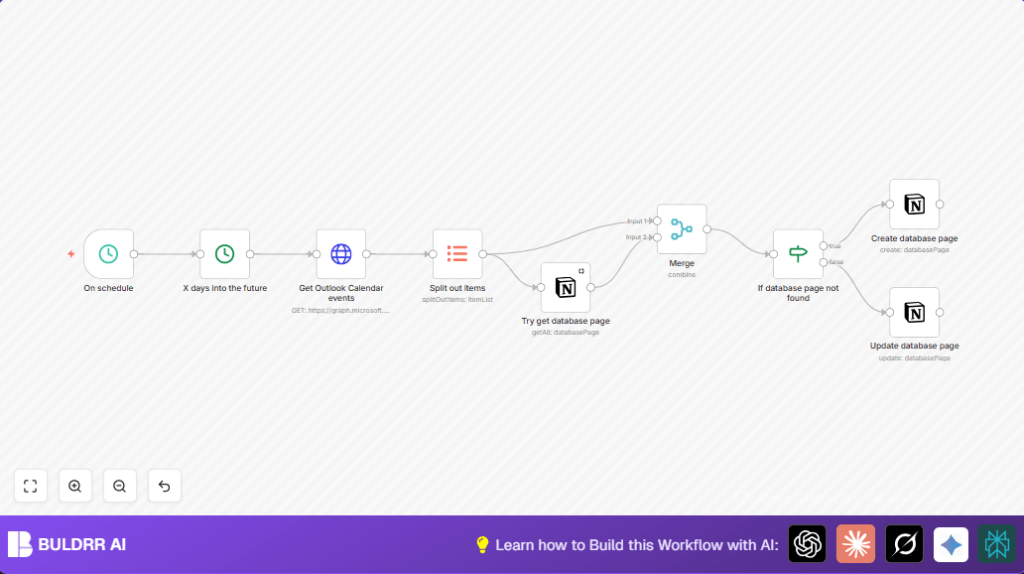
- The schedule trigger activates every minute.
- A Date & Time node calculates an end date 365 days after the current date.
- An HTTP Request node calls Microsoft Graph API to get all calendar events between now and the future date.
- An Item Lists node splits the received bulk events into individual event items.
- A Notion node tries to find if each event already exists in the database by matching an Event ID property.
- A Merge node combines the Outlook event data with any existing Notion page data using matching IDs.
- An If node checks if the Notion page for the event exists or not.
- If no page exists, a Notion node creates a new database page with event details: title, date range, event link.
- If a page exists, another Notion node updates that page with current event data.
Output
The Notion calendar database gets new pages added or existing pages updated to mirror Outlook events.
This lets you see Outlook events inside Notion automatically, without manual work.
Beginner Step-by-Step: How To Use This Workflow in n8n
Import the Workflow
- Download the workflow file using the Download button on this page.
- In the n8n editor, click “Import from File” and load the downloaded workflow.
Configure Credentials
- Add OAuth2 credentials for Microsoft Graph API (with calendar read permission).
- Add Notion API credentials with token access to your database.
Set IDs and Properties
- Update the Notion database ID and property names in relevant nodes to match your setup.
- If needed, check the Microsoft Graph API query parameters for correct date formats.
Test and Activate
- Run the workflow manually once to check if it fetches and creates/updates Notion pages correctly.
- If all works, toggle the workflow to active so it runs every minute automatically.
- Monitor workflow executions in n8n logs for errors or issues.
For users running a server or VPS setup, consider self-host n8n for better control.
Customizations and Ideas
- Change the schedule frequency in the Schedule Trigger node to run less or more often according to needs.
- Add more Notion properties like attendees, location, or description using mapped Outlook event fields.
- Filter events by status or keywords after fetching to sync only important calendar items.
- Add Slack or email nodes to send alerts when new or updated events sync into Notion.
Handling Common Issues
- Notion API error “Unauthorized”: The API key might be invalid or expired. Renew it in credentials and update nodes.
- Microsoft Graph API failing or returning no data: OAuth2 token may be expired or missing calendar permissions. Reauthorize and check Azure settings.
Summary of Results
✓ Every Outlook calendar event new or changed is added or updated in Notion automatically.
✓ Time spent on manual copying is saved each day.
✓ The Notion database always shows the latest Outlook schedule.
→ You get an easier, error-free way to track calendar events inside Notion.
