
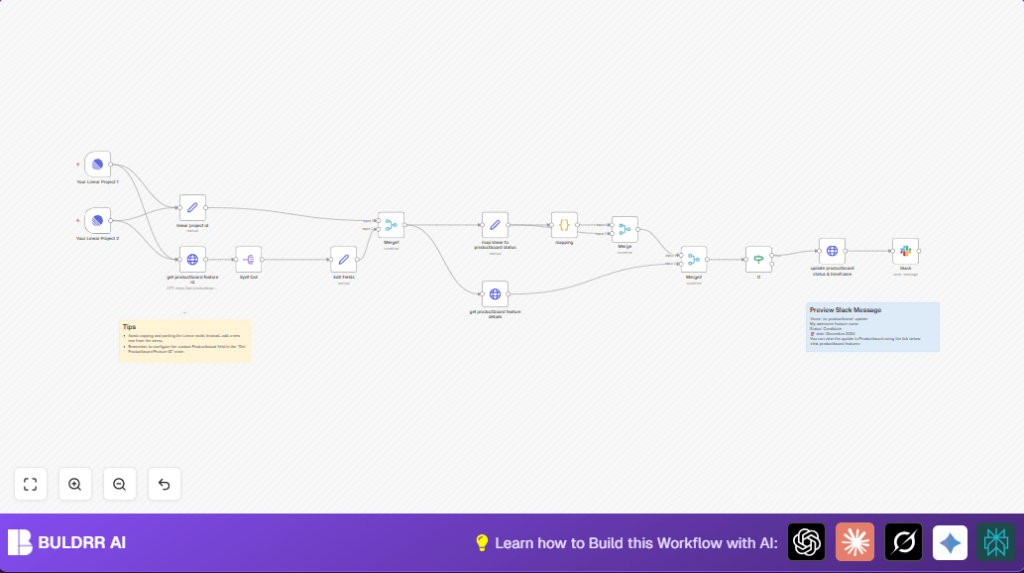

What This Automation Does
This workflow copies project status and timeline updates from Linear to Productboard automatically.
It stops the user from manually updating two systems.
When a project changes in Linear, the workflow finds the linked Productboard feature and updates its status and dates.
Then it notifies the team on Slack with the new info.
This saves hours of work and keeps information accurate.
Tools and Services Used
- Linear API: Sends project update events.
- Productboard API: Fetches and updates features data.
- Slack API: Sends notifications to team channels.
- n8n Automation Platform: Runs the whole workflow.
Workflow Inputs, Process, and Outputs
Inputs
- Linear project updates for specified teams.
- Productboard features linked by custom field to Linear projects.
- User Slack channel details for notifications.
Processing Steps
- Linear triggers fire on project changes.
- The workflow extracts project details like ID, status, start and target dates.
- It calls Productboard to find features linked by the Linear project ID.
- Features data is split and prepared for merging.
- Linear and Productboard data get joined using matching URLs.
- Linear project status is translated to Productboard’s status categories via JavaScript code.
- The workflow gets detailed Productboard feature info for comparison.
- If status or timeframe differ, the feature is updated in Productboard.
- Slack sends a message with the project’s updated status and timeframe.
Outputs
- Productboard features stay current with Linear projects.
- Slack updates keep teams informed with accurate data.
- Less manual work and errors in syncing important information.
Beginner Step-by-Step: How to Use This Workflow in n8n
1. Download and Import the Workflow
- Click the Download button on this page to get the workflow JSON file.
- Open your n8n editor (cloud or local).
- Choose Import from File and select the downloaded file.
2. Configure Credentials
- Add your Linear API key credentials in n8n for the Linear Trigger nodes.
- Create Productboard HTTP credentials with your API key for the HTTP Request nodes.
- Set up Slack API credentials with chat permissions in the Slack node.
3. Update IDs and Keys
- Change the team IDs inside Linear Trigger nodes to match your teams.
- Update the Productboard custom field UUID in the HTTP nodes if needed.
- Verify the Slack channel name is correct in the Slack node settings.
4. Test and Activate
- Run the workflow once to test if it triggers and updates correctly.
- Check Slack if the notification arrives.
- If all works, toggle the workflow active to let it run continuously.
- Monitor from n8n dashboard for any errors.
That is enough to get the workflow working without needing to build from zero.
You keep full control and can adjust settings later.
Common Problems and How to Fix Them
- 401 Unauthorized from Productboard API: Check API key credentials and re-input them in n8n.
- No triggers firing from Linear Trigger: Confirm team IDs and check that Linear webhooks are enabled.
- Slack message not sent: Verify Slack token permissions and channel name.
- Wrong feature updates: Validate custom field UUID matches the one in Productboard.
Customizations You Can Make
- Change the Productboard custom field UUID to target different feature links.
- Edit the JavaScript status mapping code to add new Linear or Productboard statuses.
- Modify the Slack message blocks to include extra project details or user mentions.
- Add more Linear Trigger nodes for other teams or resource types like issues.
- Insert error handling nodes after HTTP calls to retry or log failures.
Deployment and Hosting
After testing, enable the workflow in n8n for automatic syncing.
You can run n8n in cloud or on your own server with self-host n8n.
Monitoring the workflow logs helps catch any syncing problems early.
Summary
✓ Automates syncing of project status and dates from Linear to Productboard.
✓ Cuts manual work and avoids update mistakes.
✓ Sends team Slack notifications to stay informed.
✓ Easy to import, configure, and run in n8n.
✓ Helps keep product planning accurate and efficient.
