

What This Workflow Does
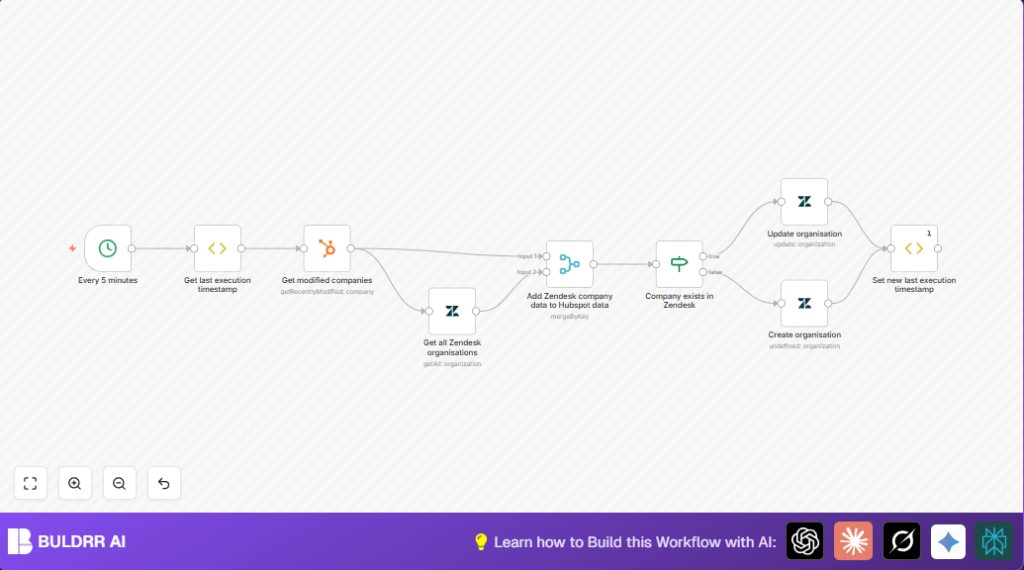
This workflow checks for company changes in HubSpot every 5 minutes and copies those changes to Zendesk organizations.
It stops manual updates and errors.
The user gets up-to-date company data on both sides without extra work.
The workflow fetches the last time it ran to only get new changes, gets HubSpot companies changed since then, and pulls all Zendesk organizations.
It compares company names to find matches.
If a company is already in Zendesk, it updates the info.
If it is missing, it adds the company as a new organization.
This keeps data synced regularly without mistakes or wasted time.
Tools and Services Used
- n8n: Workflow automation platform.
- HubSpot API: Provides company data and change history.
- Zendesk API: Accesses and updates organization data.
Inputs, Processing Steps, and Outputs
Inputs
- Last execution timestamp saved in workflow static data.
- Recently modified companies from HubSpot filtered by last execution time.
- All existing Zendesk organizations.
Processing Steps
- Compare all HubSpot companies and Zendesk organizations by company name.
- Check if a Zendesk organization already exists for a HubSpot company.
- Update Zendesk organizations if company info has changed.
- Create new Zendesk organizations for missing HubSpot companies.
- Save the current run time as the last execution timestamp for the next run.
Outputs
- Updated Zendesk organizations matching HubSpot changes.
- New Zendesk organizations created from new HubSpot companies.
- Fast, accurate, and automatic syncing of company data between HubSpot and Zendesk.
Who Should Use This Workflow
This is best for teams managing customer info in both HubSpot and Zendesk.
Anyone who spends time retyping or copying company details will save hours and reduce mistakes.
Users who want automatic updates and better data matching between CRM and support tools will find this helpful.
It fits companies who want to keep customer data consistent with little manual work.
Beginner Step-by-Step: How to Use This Workflow in n8n
Step 1: Download and Import
- Click the Download button on this page to get the workflow file.
- Open n8n editor.
- Use the “Import from File” option in n8n to upload the downloaded file.
Step 2: Configure Credentials
- Go to each node that connects to HubSpot or Zendesk.
- Add your API Key or API credentials for both HubSpot and Zendesk.
- Make sure the API keys have correct access to read companies and update organizations.
Step 3: Update Any IDs or Fields if Needed
- If your HubSpot or Zendesk account uses custom fields or requires specific IDs, update those inside the nodes.
- Check the expressions used, like company names or domains, match your data format.
Step 4: Test the Workflow
- Run the workflow once manually inside the editor.
- Watch the results in each node’s output panel for errors or mismatches.
- Check if companies were created or updated in Zendesk by this test run.
Step 5: Activate for Production
- Once verified, toggle the active switch in the top right corner of the editor.
- Make sure your n8n instance stays online, such as through self-host n8n or cloud.
- The workflow will run every 5 minutes now and keep syncing automatically.
Customization Ideas
- Change sync timing in the cron node to 10 or 15 minutes for lighter load.
- Add more HubSpot fields like phone numbers, addresses in Zendesk update and create nodes.
- Filter HubSpot companies by domain or tag before syncing to Zendesk.
- Add notifications via email or Slack after sync completes to inform the team.
- Try different merge logic like inner join in the Merge node for more exact matching.
Troubleshooting Tips
Authentication Failed on Zendesk Node
Make sure the Zendesk API Key and domain in node credentials are correct and not expired.
Re-enter keys if needed in the credential section.
No Companies Returned from HubSpot Recently Modified Node
Check if the last execution timestamp is correct or if no company changed since last run.
Try running the workflow manually to force update or change cron timing.
Merge Node Returns Empty Results
Double-check JSON paths used for company names in HubSpot and Zendesk nodes.
Use n8n debug panel to see exact JSON data to fix paths like properties.name.value or name.
Pre-Production Checklist
- Run the workflow manually to confirm it works.
- Verify API credentials with test queries in HubSpot and Zendesk nodes.
- Check the saved last execution timestamp updates after each run.
- Inspect sample data merging correctly using debug output for nodes.
- Backup important company and organization data before first sync.
Deployment Guide
Turn on the workflow using the active toggle switch in n8n editor.
Keep the n8n server running, for example by using self-host n8n or the cloud service.
Look at the execution list to catch any errors or skips.
Change the Cron node frequency if system load is high.
Summary of Results
→ Stops manual copying of company details.
→ Keeps HubSpot and Zendesk company data synced every 5 minutes.
✓ Saves hours of work each week.
✓ Reduces errors and confusion from out-of-date info.
✓ Helps customer service get correct company data fast.
