
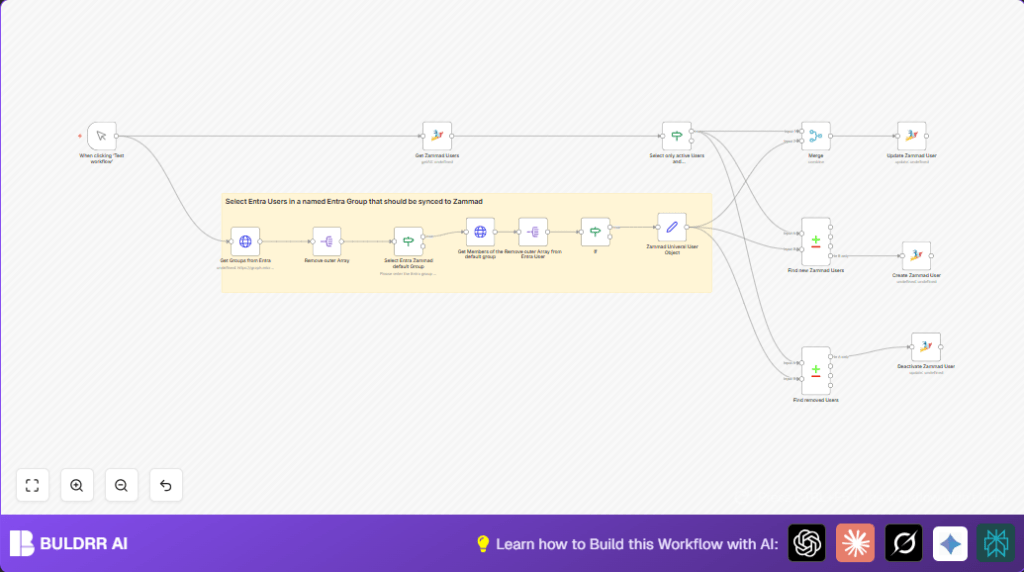

What this workflow does
This workflow automatically syncs users from a chosen Microsoft Entra group to Zammad user accounts.
It solves the problem of manual syncing, saving time and reducing errors.
The workflow creates new users, updates existing ones, and deactivates users who no longer belong to the Entra group.
After running, the Zammad user list matches the specified Entra group exactly.
Who should use this workflow
This is for people who manage Zammad and Microsoft Entra user access.
If syncing users manually takes too much time or causes mistakes, this workflow can help.
It is useful for IT admins or customer support teams that want accurate user lists in Zammad.
Tools and services used
- Microsoft Entra (formerly Azure AD): Source of user and group data.
- Microsoft Graph API: To get group and user data from Entra.
- Zammad Helpdesk: Where user accounts are created, updated, or deactivated.
- n8n Automation: Runs the workflow and connects APIs.
- OAuth2 Credentials: Used for Microsoft Graph API authentication.
- Zammad API Key: Used for Zammad user management.
How the workflow works
Inputs
The workflow starts when you manually trigger it or schedule it in n8n.
It needs Microsoft OAuth2 credentials and a Zammad API Key configured.
Processing Steps
- Get all groups from Microsoft Entra.
- Select the specified group by matching its display name (like “ENTRA”).
- Get all users in the selected Entra group.
- Transform Entra user data into a standard format for Zammad.
- Get all active users from Zammad who are linked to Entra.
- Compare lists to find new users to add to Zammad.
- Update existing Zammad users if their data changed.
- Deactivate Zammad users who are no longer in the Entra group.
Output
The Zammad user accounts are synchronized with the Entra group.
New users appear in Zammad.
Existing users have updated info.
Inactive users get deactivated.
Beginner step-by-step: How to use this workflow in n8n
1. Import the workflow
- Download the workflow file by clicking the Download button on this page.
- Open the n8n editor.
- Click Import from File and select the downloaded workflow file.
2. Add your credentials
- Open the imported workflow and find nodes that need credentials (Microsoft OAuth2 and Zammad API Key).
- Add or update these credential settings with your API keys or tokens.
- Update any group names or IDs if you want to sync a different Entra group.
3. Test the workflow
- Click the Manual Trigger node and run the workflow.
- Check the execution to see if users were fetched and synced correctly.
4. Activate the workflow for production
- Replace the Manual Trigger with a Schedule Trigger node if you want automatic syncing.
- Activate the workflow in n8n by clicking Activate.
- Monitor workflow runs regularly to ensure sync works well.
For users running self-host n8n, import and credential management works the same.
Customization ideas
- Change the target Entra group name in the filter node to sync different user sets.
- Add more user fields like department or job title in the user object mapping node.
- Use Zammad API to also change user roles based on Entra group membership.
- Use a schedule trigger node for automatic regular syncing.
- Add logging nodes to save actions for auditing user changes.
Common problems and solutions
401 Unauthorized error from Microsoft Graph API
Cause: OAuth2 credentials might be wrong or expired.
Solution: Refresh or recreate OAuth2 credentials with proper permissions.
Zammad API errors on user creation or update
Cause: Missing required user fields or incorrect field mapping.
Solution: Check Zammad node for correct required fields and fix mappings.
Workflow does not run on testing
Cause: Manual Trigger not executed properly.
Solution: Always click “Execute Workflow” button after selecting Manual Trigger.
Expected final results
✓ Zammad user accounts fully match the Microsoft Entra group users.
✓ New Entra users are created in Zammad automatically.
✓ Existing Zammad users get updated without manual work.
✓ Users removed from Entra group get deactivated in Zammad.
✓ Time saved by avoiding manual syncing.
