

What This Automation Does
This workflow gets data from TwentyCRM when something changes in the CRM records.
The main problem it solves is to stop manual checking for updates in TwentyCRM.
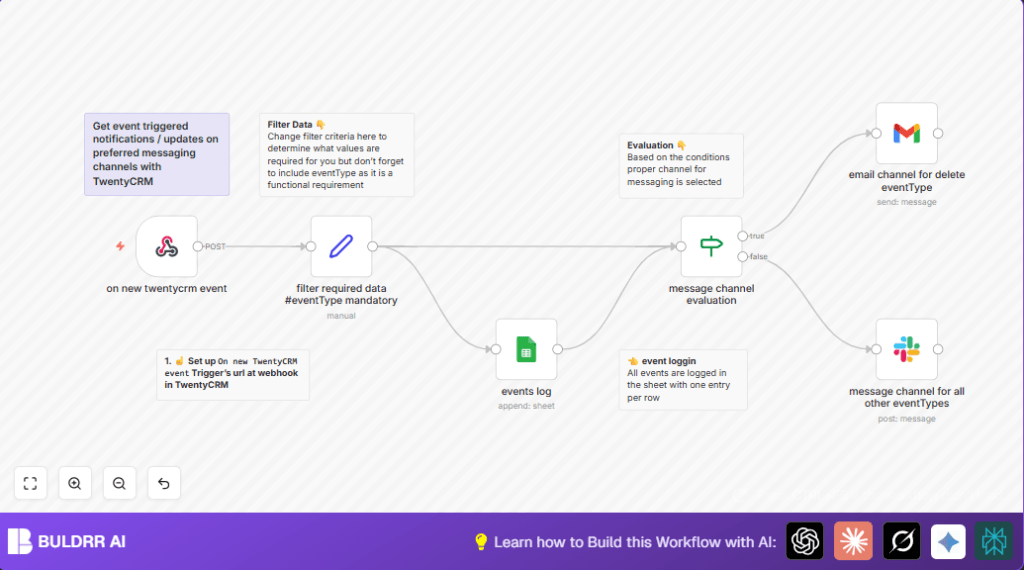
It sends notifications right away to Gmail for deleted records and to Slack for other events.
This saves time and helps users not miss important CRM changes.
The workflow listens to webhooks from TwentyCRM.
It picks important data like event name, record IDs, and type from each event.
All events get saved into a Google Sheet for easy tracking.
If the event is a deletion, the system sends an email via Gmail with details.
Other event types post a message in Slack to keep the team informed.
Who Should Use This Workflow
This workflow is for users who need to watch TwentyCRM updates closely.
People who want to stop manual checking and get alerts in their favorite apps will benefit most.
User roles like sales managers, customer support, and CRM administrators can use it.
Tools and Services Used
- TwentyCRM: Sends webhook events about CRM changes.
- n8n: The automation tool that processes and routes events.
- Google Sheets: Logs all events for history and audit.
- Gmail: Sends email alerts for deleted records.
- Slack: Posts messages for other event types.
- Webhook URL: Provided by n8n to receive TwentyCRM data.
Inputs, Processing Steps, and Outputs
Inputs
- Webhook POST requests from TwentyCRM including CRM event data.
Processing Steps
- Webhook node receives event payload.
- Set node extracts event name, object ID, record ID, and type.
- Google Sheets node appends event data to a logging sheet.
- If node checks if event type is “delete” by splitting eventName.
- Based on event type, route to either Gmail or Slack node.
- Gmail node sends formatted email for deletions.
- Slack node posts a message for other events.
Outputs
- Logging of all events in Google Sheets for history.
- Email notification with record details for deletions.
- Slack notification with summary for other changes.
Beginner Step-by-Step: How to Use this Workflow in n8n Production
1. Import the Workflow
- In the n8n editor, click “Import from File”.
- Download the workflow file using the Download button on this page.
- Upload this file into n8n.
2. Configure Credentials
- Add your Google Sheets and Gmail API credentials in n8n.
- Set the Slack bot token and choose the correct Slack channel.
3. Update IDs and Addresses
- Edit Google Sheet name and spreadsheet ID if needed.
- Make sure email recipient address is correct in the Gmail node.
- Double-check Slack channel names or IDs.
4. Test the Workflow
- Send a test webhook from TwentyCRM or Postman to the Webhook node URL.
- Check data flows through all nodes and notifications arrive.
5. Activate and Run
- Toggle the workflow “Active” switch in n8n.
- Monitor runs to confirm events log and notifications work.
- Consider using self-host n8n if production usage is expected.
Common Edge Cases and Troubleshooting
- If no data arrives at Webhook node, check TwentyCRM webhook URL and POST method.
- Google Sheets errors usually mean missing API permissions or unshared spreadsheet.
- Gmail notifications fail if credentials are wrong or email template is missing placeholders.
- Slack messages won’t send if channel ID or bot permissions are incorrect.
Customization Ideas
- Change the Set node fields to pick more event data.
- Add more If nodes to route create or update events differently.
- Add other messaging nodes for Microsoft Teams or SMS.
- Improve Gmail message with links to TwentyCRM records for quick access.
- Use a Code node to assign priority levels and notify accordingly.
Summary
✓ Stops manual checking by receiving TwentyCRM events automatically.
✓ Logs every event into Google Sheets for easy tracking.
✓ Sends Gmail emails about deleted records with key details.
✓ Posts Slack messages for creates or updates to keep teams informed.
→ Saves time and avoids missed CRM changes or errors.
→ Works with easy setup steps and clear routing of events.
