

What this workflow does
This workflow finds cluster centers (medoids) and sets threshold scores for anomaly detection in an agricultural crops dataset stored in Qdrant Cloud.
It solves the problem of manually picking cluster points and thresholds, which is slow and error-prone.
After running, it updates Qdrant with the best medoid points and matching threshold scores, helping accurate anomaly detection.
Who should use this workflow
Anyone working with large crop image datasets in Qdrant Cloud who needs to automate finding cluster centers and thresholds.
This is useful for agricultural AI that detects unusual or defective crops automatically.
Tools and services used
- Qdrant Cloud: Hosts the vector database of crops.
- n8n automation platform: Runs this workflow.
- Voyage AI API: Used for generating text embeddings.
- Python environment in n8n: Runs scipy code to process distance matrices.
- REST API credentials: For accessing Qdrant Cloud and Voyage AI.
Inputs → Processing → Output
Inputs
- Total points count from Qdrant collection.
- Unique crop types (cluster names) with their counts.
- Crop descriptions for text embeddings.
Processing Steps
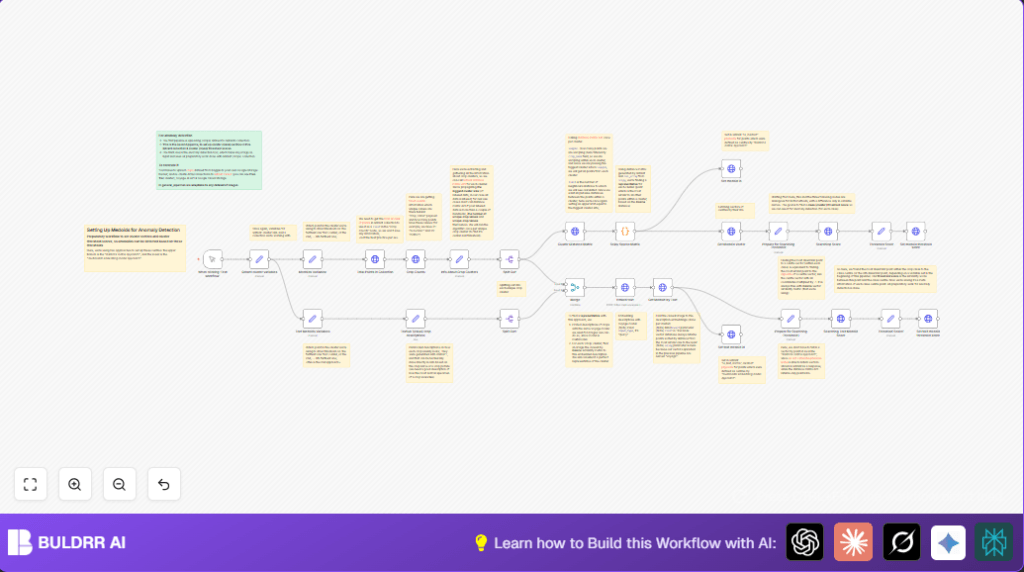
- Get total crop points count from Qdrant.
- Retrieve counts of each crop type facet.
- For each crop cluster, call Qdrant distance matrix API to get point distances.
- Use Python scipy coo_array to find the cluster medoid — the point most similar to others.
- Set the medoid’s payload in Qdrant to mark it as a cluster center.
- Embed crop descriptions using Voyage AI to find text-based medoids.
- Calculate threshold scores by searching for furthest points from medoids using cosine similarity.
- Store threshold scores in Qdrant payloads for anomaly detection.
Output
Cluster centers labeled as medoids with associated threshold scores in Qdrant collection payload.
These results enable reliable anomaly detection on crop image vectors.
Beginner step-by-step: How to build this in n8n
Import and setup
- Download this workflow file using the Download button.
- Open n8n editor already running.
- Use n8n’s “Import from File” option to load the downloaded workflow.
- Go to Qdrant cluster variables node and enter your Qdrant Cloud URL and collection name.
- Fill in your Voyage AI API Key in the Embed text HTTP Request node.
- Set any variables like
furthestFromCenterin the Medoids Variables nodes as needed. - Check that your REST API credentials for Qdrant and Voyage are active in n8n.
Test and activate
- Run the workflow with the manual trigger by clicking Webhook node or test button.
- Watch the workflow run without errors and verify medoid IDs and threshold scores are properly set in Qdrant.
- Activate the workflow in n8n for production use to run on schedule or manual triggers.
For users self hosting n8n, consult self-host n8n for reliable setup options.
Edge cases and failures
- If API requests return 401 errors, check the Qdrant API credentials and tokens.
- Python code errors about missing scipy mean the Python environment in n8n lacks scipy package.
- Distance matrix calls can fail if sample size is larger than actual cluster size.
- Threshold scores might be wrong if cosine similarity signs or calculations are mishandled.
Customization ideas
- Adjust
furthestFromCentervalues to change how strict or loose anomaly detection thresholds are. - Add more crop type descriptions or use ChatGPT API within n8n to generate crop descriptions dynamically.
- Change the embed model in the Voyage API HTTP node to try different vector representations.
- Increase
maxClusterSizeto handle bigger clusters, watching out for API limits.
Summary of results
✓ Cluster medoids marked accurately in Qdrant collection.
✓ Threshold scores calculated and saved for each cluster.
✓ Manual medoid setup replaced with automated processing.
✓ Enables better anomaly detection quality on crop image data.
