

What This Automation Does ⚙️
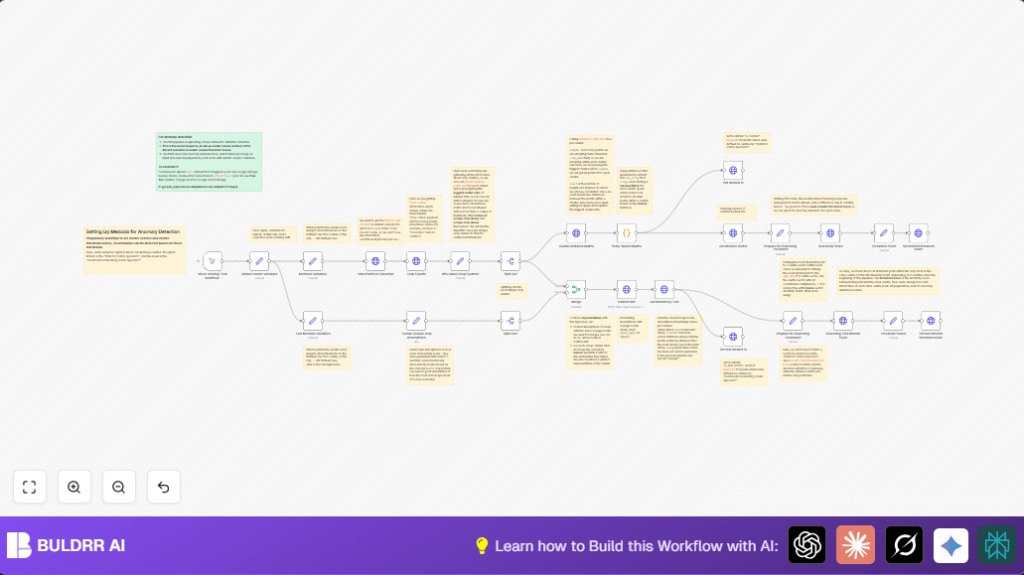
This workflow helps find central points called medoids for each crop cluster from images using Qdrant and Voyage AI.
It solves the problem of slow and hard manual work to find cluster centers and thresholds so anomaly detection works better.
The output is medoid points flagged in Qdrant and threshold scores set to detect unusual crop images accurately.
The workflow gets data from Qdrant, calculates similarities inside each crop cluster, finds the medoid using Python with SciPy, then gets medoids by comparing image vectors and crop text descriptions.
It marks these medoids in Qdrant and finds threshold scores to define anomaly boundaries.
This makes later detection faster and more precise.
Inputs, Processing Steps & Outputs
Inputs
- Qdrant Cloud URL and Collection Name: Needed to connect and query crop image vectors.
- Qdrant API Credentials: Required to access collection data securely.
- Voyage AI API Key: Used to embed crop textual descriptions for semantic medoid searches.
Processing Steps
- Fetch total points and number of unique crop clusters from Qdrant.
- Query counts of images per crop using Qdrant facet API.
- Split clusters to process each crop group separately.
- Get pairwise distance matrix of points within each cluster from Qdrant.
- Use Python code to find medoid (most central point) from sparse matrix of cosine similarities.
- Flag the medoid point in Qdrant payload.
- Retrieve medoid’s vector and payload from Qdrant.
- Calculate opposite vector to medoid center for searching threshold point.
- Find point furthest from medoid (by similarity) within cluster for threshold score.
- Assign the threshold score to medoid point payload in Qdrant.
- Embed textual descriptions of crops with Voyage AI.
- Find closest image point to each text embedding for text-based medoid.
- Flag text medoids and calculate thresholds similarly to vector medoids.
Outputs
- Qdrant collection updated with flags marking medoids as central points by vector and text methods.
- Threshold similarity scores saved per medoid to define cluster bounds.
- Ready medoids and threshold data for accurate anomaly detection.
Tools & Services Used
- Qdrant Cloud: Stores crop image vectors and supports distance matrix and point queries.
- Voyage AI API: Provides multimodal embeddings to get textual similarity medoids.
- n8n Workflow Automation: Orchestrates API calls, data processing, and status updates.
- Python SciPy Sparse Matrix: Calculates medoid from cosine similarity matrix programmatically.
Beginner Step-by-step: How to Use This Workflow in n8n
Step 1: Download and Import
- Download the workflow file by clicking the Download button on this page.
- Open n8n editor where the workflow should run.
- Select “Import from File” option and upload the downloaded workflow .json file.
Step 2: Set Credentials and Variables
- Open the Qdrant cluster variables node.
UpdateqdrantCloudURLandcollectionNamewith your correct Qdrant details. - Add your Qdrant API credentials in n8n credentials manager and link them in HTTP Request nodes.
- Add your Voyage AI API key in n8n’s HTTP credential settings and link it in the Embed text node.
- If needed, edit Textual (visual) crop descriptions node to match your crop names and descriptions.
- Adjust
furthestFromCentervariables in Medoids Variables and Text Medoids Variables nodes to tune sensitivity.
Step 3: Test the Workflow
- Click on the Manual Trigger node and press Execute to run the workflow once.
Check logs to verify medoids and thresholds set correctly.
Step 4: Activate the Workflow
- Once tested, activate the workflow to run automatically in production.
- You can schedule runs after batch uploads or periodic updates.
- Monitor results and adjust parameters as crop data grows.
Using this simple import and config way, you get production-ready medoid and threshold setup without building from scratch.
Customization Ideas ✏️
- Change
collectionNamein Qdrant cluster variables to work with different image sets. - Modify
furthestFromCenternumbers to make anomaly detection stricter or looser. - Add or improve crop descriptions for better text medoid accuracy.
- Switch Voyage AI embedding model URL or API key for different embedding approaches.
Troubleshooting ????
- 401 Unauthorized Error: Fix API Keys in n8n credentials and try again.
- SciPy Module Not Found: Make sure n8n runs where SciPy is installed or execute Python code externally.
- Medoid IDs or Payload Updates Fail: Double-check JSON paths and node outputs using n8n execution logs.
Deployment Notes
Turn on the workflow to update medoids and thresholds after new data arrives.
This keeps anomaly detection accurate with fresh clusters.
Check medoids flags and thresholds visually in Qdrant using the UI.
Change thresholds as the cluster shapes and sizes change over time.
For stable run times and less downtime, consider self-host n8n on a reliable server.
Summary
✓ Builds cluster medoids and thresholds for crop image anomaly detection.
✓ Automates manual work saving hours or days.
✓ Uses Qdrant distance matrices and Voyage AI text embeddings.
✓ Sets flags in Qdrant for vector-based and text-based cluster centers.
✓ Provides clear threshold scores to detect anomalies effectively.
✓ Easy to import and configure in n8n for production.
✓ Allows adjusting sensitivity and adding new crops.
