
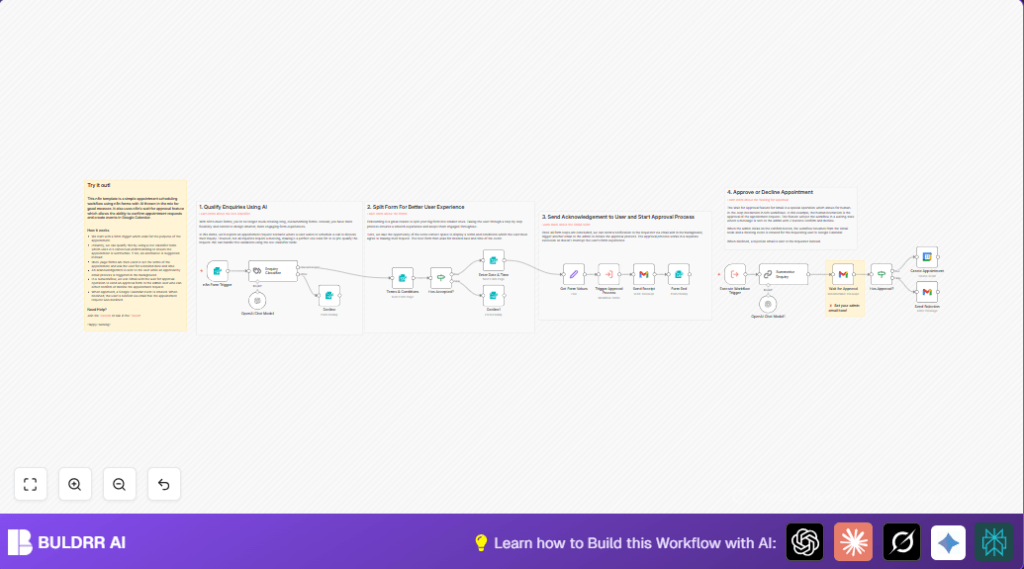

What This Automation Does
This workflow helps you manage appointment requests by sorting relevant from irrelevant messages using AI.
It breaks the scheduling into smaller forms, gets agreement on terms, picks dates and times, and sends emails to keep people informed.
After you approve a request, it adds the event to Google Calendar with an online meeting link.
If a request is declined, it politely tells the user.
This saves time and avoids confusion when booking appointments.
Tools and Services Used
- n8n Form Trigger: Captures appointment requests via forms.
- Text Classifier (LangChain): Uses AI to check if the enquiry is relevant.
- OpenAI Chat Model: Summarizes the enquiry for quick reading.
- Gmail with Wait for Approval: Sends approval requests with confirm/decline buttons.
- Google Calendar: Automatically creates appointments with meet links.
Inputs, Processing, and Outputs
Inputs:
- Appointment requests via a form with name, email, and enquiry.
- User acceptance of terms and selection of appointment date and time.
Processing Steps:
- Classify enquiry relevance with AI.
- If irrelevant, show a polite decline message.
- Check terms acceptance before proceeding.
- Collect structured date and time choices.
- Format data into JSON with timestamps.
- Start approval workflow asynchronously.
- Summarize the enquiry using OpenAI.
- Send approval email to admin via Gmail node waiting for response.
- Based on admin reply, create calendar event or send rejection email.
- Send confirmation email to requester after initial submission.
- Show form completion message with appointment summary.
Output:
- Google Calendar event with Google Meet if approved.
- Confirmation or rejection emails to requester.
- Clear user feedback via forms.
Who Should Use This Workflow
This workflow is useful for freelancers or small business owners who get many appointment requests.
If there are lots of unqualified requests, confusing emails, or double bookings, this helps by filtering relevant enquiries and managing appointment details automatically.
The workflow also supports manual approval, so you keep control over final scheduling.
Anyone who wants to spend less time answering emails and more time on actual meetings can use this system.
Beginner Step-by-Step: How to Use This Workflow in n8n
1. Download and Import
- Download the workflow file using the Download button on this page.
- Open the n8n editor where you have access to workflows.
- Use the “Import from File” option to upload the downloaded workflow.
2. Configure Required Settings
- Add API keys and credentials for OpenAI, Gmail, and Google Calendar.
- Update email addresses in the Gmail nodes if needed (e.g., admin’s email).
- Check if any IDs, channel names, or folders need to be changed for your account.
- Review and update any prompt text in OpenAI nodes as needed.
3. Test the Workflow
- Submit a test appointment request through the form webhook URL.
- Confirm acceptance and pick dates to check all steps.
- Verify you receive approval emails and can respond.
- Check calendar events are created after approval.
4. Activate for Production
- After successful tests, activate the workflow using the toggle switch.
- Share the form webhook URL to start receiving real requests.
- Monitor workflow activity and logs for errors.
If hosting n8n yourself, consider options like self-host n8n for reliable production use.
Common Errors and Fixes
Problem: Admin approval email not received
Cause: Wrong recipient email or OAuth problem.
Fix: Check “sendTo” email in Gmail wait for approval node and reconnect Gmail OAuth if needed.
Problem: Date/time parsing fails
Cause: Date and time formats differ from Set node pattern.
Fix: Match dropdown formats exactly with DateTime.fromFormat or test with sample values.
Problem: Form acceptance not recorded
Cause: Field name or condition is wrong in If node checking acceptance.
Fix: Verify field names and test the acceptance condition with debug mode.
Customization Ideas
- Change the query categories in the Text Classifier node to match your business topics.
- Add more date and time options or allow weekends in preferred appointment selection.
- Modify the Gmail email templates to reflect your branding and tone.
- Add multiple approvers in the wait for approval step for multi-person signoffs.
- Integrate SMS notifications via Twilio or similar services for faster updates.
Summary
✓ AI classifies and filters appointment enquiries.
✓ Multi-step forms collect terms agreement and scheduling data.
✓ Admin approves or declines via Gmail with one click.
✓ Approved appointments auto-create Google Calendar events with Google Meet.
✓ Users receive confirmation and polite decline emails.
✓ Saves time and avoids booking mistakes.
