
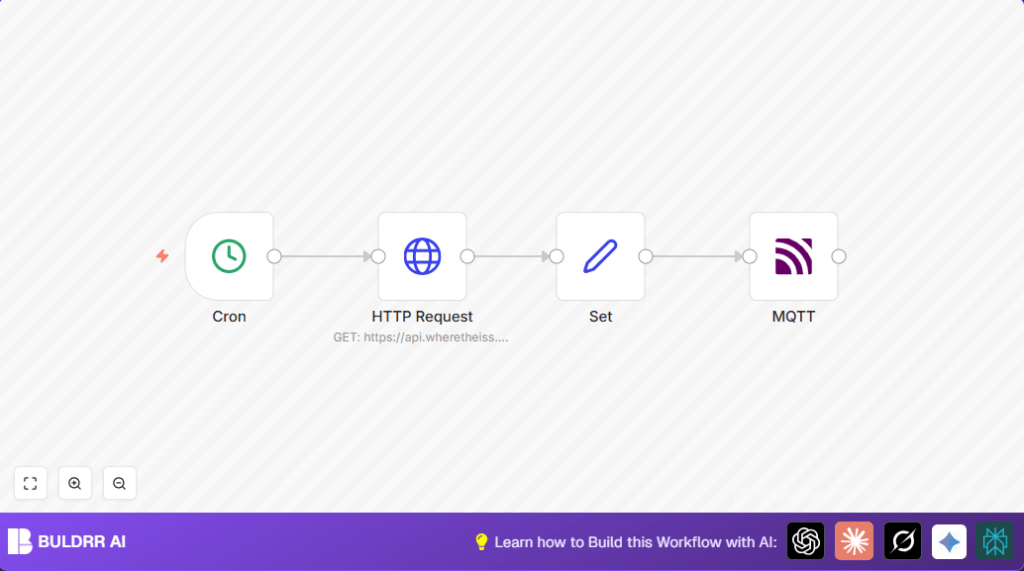

What this workflow does
This workflow gets the current location of the International Space Station every minute.
It fetches latitude, longitude, and timestamp from a public API.
Then it sends this data via MQTT so other apps can use live ISS information.
This saves time and avoids mistakes from manual data checking.
You get real-time ISS positions automatically updated every minute.
Who should use this workflow
This is useful for people who want fast, accurate ISS data without manual work.
Anyone running a satellite tracker dashboard, alert system, or educational tool can use it.
It fits hobbyists and scientists needing up-to-date ISS positions.
You need an MQTT broker to receive the live data.
Also, internet access for the n8n server to call the ISS API is required.
Tools and services used
- Cron node: Runs the workflow every minute.
- HTTP Request node: Gets ISS position from public ISS API.
- Set node: Extracts name, latitude, longitude, and timestamp from the API response.
- MQTT node: Publishes ISS data on topic “iss-position” for subscribers.
- MQTT broker: Receives messages from n8n and passes to clients.
How the workflow works: Input → Process → Output
Inputs
The workflow triggers every minute using the Cron node.
It uses the current timestamp (Date.now()) as a query parameter for the HTTP call.
No API key is needed for the public ISS API.
Processing steps
The HTTP Request node calls the ISS API, getting position data.
The response is an array with fields like “name”, “latitude”, “longitude”, and “timestamp”.
The Set node cleans this data, picking only these four fields.
“Keep Only Set” is turned on to filter output.
The MQTT node takes this clean data and publishes it on the “iss-position” topic.
Your MQTT broker delivers this live data to any subscribers.
Output
Subscribers receive real-time ISS position updates every minute.
Data includes satellite name, latitude, longitude, and timestamp.
This supports dashboards or alert systems needing fresh location info.
Beginner step-by-step: How to use this workflow in n8n production
Step 1: Import the workflow
- Download the workflow file using the “Download” button on this page.
- Open your n8n editor.
- Click “Import from File” and select the downloaded workflow.
Step 2: Configure the imported workflow
- Add your MQTT broker credentials in the MQTT node under “Credentials”.
- Verify the HTTP Request node uses the URL:
https://api.wheretheiss.at/v1/satellites/25544/positionswith query parametertimestamps={{Date.now()}}. - Check the Set node maps the response fields correctly:
– Name:{{$json["0"]["name"]}}
– Latitude:{{$json["0"]["latitude"]}}
– Longitude:{{$json["0"]["longitude"]}}
– Timestamp:{{$json["0"]["timestamp"]}} - Adjust any IDs, emails, channels, or topic names in the MQTT node if you want a different topic.
Step 3: Test and activate
- Run the workflow once manually to see if it gets data and publishes correctly.
- Check MQTT subscribers receive messages under topic “iss-position”.
- Activate the workflow to run every minute automatically.
- If self hosting n8n, confirm internet access and broker connection; refer to self-host n8n if needed.
Customization ideas
- Change the Cron node to run every 30 seconds or every 5 minutes for faster or slower updates.
- Add more data fields in the Set node, like altitude or velocity, using the API response paths.
- Use several MQTT nodes to publish on different topics for different user groups.
- Add a conditional node to check if the ISS is near certain coordinates and send alerts to other MQTT topics or systems.
Handling errors and edge cases
- HTTP Request node returns no data or error: Check the API URL and parameters. Test API in browser or with tools like Postman. Check n8n logs for errors.
- MQTT node fails to publish: Verify MQTT broker credentials and availability. Use an MQTT client tool to test connection.
- Ensure time on n8n server is accurate because timestamp is crucial for API queries.
Summary and results
✓ The workflow automatically updates ISS location every minute.
✓ It removes manual fetching and error risks.
✓ MQTT delivers live data to dashboards or apps instantly.
✓ User saves 30 minutes of manual work per hour.
✓ Real-time updates improve ISS tracking accuracy and timeliness.
