
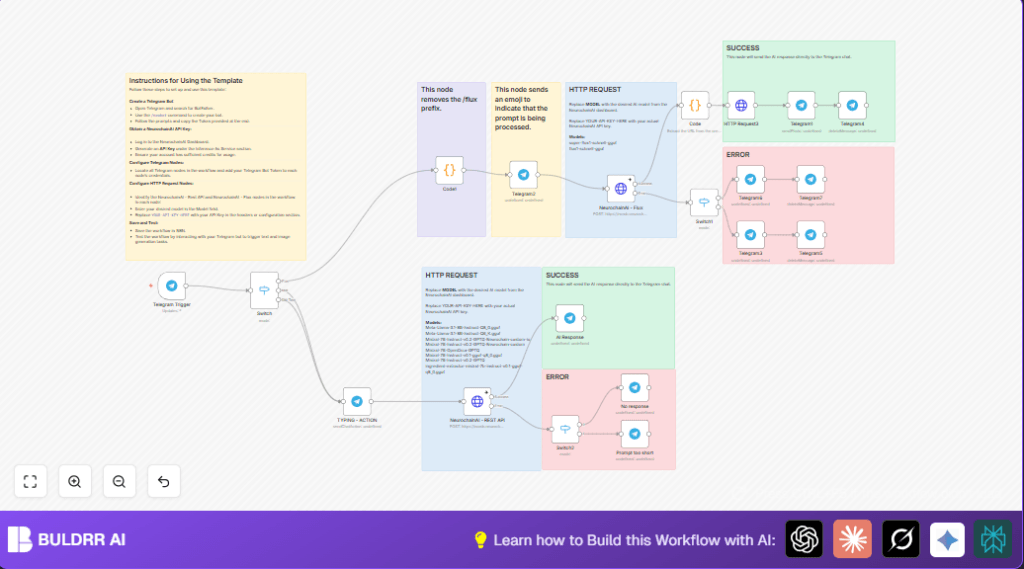

What This Workflow Does
This workflow connects a Telegram bot with NeurochainAI to handle text and image requests automatically.
It solves the problem of slow, manual prompt sending to AI models.
Users send commands in Telegram, and the bot replies with AI answers or images fast.
This saves time and stops errors when sharing AI content in chats.
Who Should Use This Workflow
This is good for digital content creators, community managers, or anyone who wants fast AI replies inside Telegram.
No coding needed, just basic setup in n8n.
Tools and Services Used
- Telegram Bot API: Receives user messages.
- NeurochainAI API: Provides text and image generation AI.
- n8n Automation Platform: Runs the workflow controlling message flow.
How the Workflow Works (Input → Process → Output)
Input
- User sends a message in Telegram to the bot.
- The message either starts with “/flux” for images or mentions the bot for text.
Processing Steps
- Telegram Trigger node detects any incoming messages.
- Switch node checks if message wants image or text.
- Code node cleans the prompt by removing “/flux” prefix.
- Telegram node sends typing or loading action so user knows the bot is working.
- HTTP Request nodes call NeurochainAI API with correct parameters for text or image.
- Response is parsed: text replies stay as message text; image URLs are extracted from JSON.
- Telegram nodes send reply messages or photos in chat.
- Error handling detects short prompts or failed API calls and sends error messages to users.
Output
- Users get quick AI-generated text replies directly in Telegram.
- Users get AI-generated images sent as photos with captions.
- Errors or status messages keep the chat clean and clear.
Beginner Step-by-Step: How to Use This Workflow in n8n
1. Import Workflow Into n8n
- Download the workflow file by clicking the “Download” button on this page.
- Open your n8n editor.
- Use “Import from File” to load the downloaded workflow.
2. Configure Credentials and API Keys
- Add your Telegram Bot API token in all Telegram nodes’ credentials.
- Add your NeurochainAI API Key in the HTTP Request nodes headers.
- Update any IDs such as chat IDs, emails, or other fields if the workflow uses them.
3. Check and Copy Code Snippets
- Check the Code nodes for prompt cleaning or image URL extraction.
- These scripts are ready, just ensure API keys and variables are set properly.
4. Test the Workflow
- Send test messages to your Telegram bot using “/flux” for images or bot mentions for text.
- Watch the n8n execution panel to see if the workflow runs without errors.
5. Activate for Production
- When satisfied, toggle the workflow to “Active” to run automatically.
- It will run on all new Telegram messages without manual steps.
If self hosting n8n, check self-host n8n options to run continuously.
Inputs and Outputs Detailed
Inputs
- User text messages with the command prefix or bot mention.
Processing
- Detect command type with Switch node.
- Clean prompt using JavaScript in Code node.
- Show typing status with Telegram message action.
- Send prompt to NeurochainAI via HTTP Request.
- Parse AI response, extract text or image URL.
Outputs
- Telegram text reply containing AI-generated message.
- Telegram photo message showing AI-generated image.
- Error messages if input invalid or request failed.
Error and Edge Case Handling
- If prompt after cleaning is too short – user gets a “prompt too short” error message.
- If NeurochainAI returns no answer – workflow sends “No response from worker” message.
- If API keys are invalid – error shows so user can check credentials.
- If Telegram messages fail – user is notified to verify Telegram Bot API token.
Customization Ideas
- Change AI model names in HTTP requests to try different NeurochainAI models.
- Adjust image size or quality in image generation JSON.
- Add new commands in Switch node to handle extra features.
- Edit Telegram reply texts to include emojis, markdown, or buttons.
Sample Code Used in Workflow
The Code node cleaning prompts removes the “/flux” prefix with this script:
// Acessa a mensagem original que está em $json.message.text
const userMessage = $json.message.text;

// Remover o prefixo '/flux' e qualquer espaço extra após o comando
const cleanMessage = userMessage.replace(/^\/flux\s*/, '');

// Retornar a mensagem limpa
return {
 json: {
 cleanMessage: cleanMessage
 }
};
This removes the command part and trims spaces, making a clean prompt for AI.
To extract image URLs returned in JSON form, this code is used:
// O valor vem como um array com uma string, então precisamos pegar o primeiro item do array
const rawUrl = $json.choices[0].text;

// Remover colchetes e aspas (se existirem) e pegar o primeiro elemento do array
const imageUrl = JSON.parse(rawUrl)[0];

return {
 json: {
 imageUrl: imageUrl
 }
};
Summary
✓ The workflow makes Telegram bots reply with AI text or images automatically.
✓ It handles user prompts, cleans commands, and gives fast answers.
✓ Works with minimal setup in n8n using Telegram and NeurochainAI APIs.
✓ Saves time and avoids manual errors during content creation.
✓ Customizable to change AI models, commands, or message style.
→ Automates AI content workflows inside Telegram chats without coding.
→ Provides easy ways to test and activate the bot in production.
